

Can an eSIM adapter add cellular data to a smartwatch?
An eSIM adapter cannot add cellular data to a smartwatch that lacks a cellular modem or a compatible physical SIM slot. A cellular watch with built-in eSIM needs its supported activation method, not a removable adapter card. Only a cellular watch with a compatible physical SIM slot is a candidate for an adapter, and the exact watch, carrier and profile must still support that setup.
- An eSIM adapter for smartwatch use cannot add a missing cellular modem or physical SIM slot.
- Built-in eSIM watches need supported carrier activation, not a removable adapter.
- Switchesim eSIM adapters belong in compatible physical SIM slots; smartwatch compatibility requires model-specific confirmation.
- A Bluetooth card reader loads profiles onto an adapter; it does not supply cellular connectivity to a watch.
Can an eSIM adapter add cellular data to a smartwatch?
Only when the watch already has cellular hardware and a compatible physical SIM slot—and the complete setup is supported. An adapter changes how you store and load a subscription. It does not supply the modem, antenna or operating-system support needed to connect to a mobile network.
Start with the exact watch variant, not the product family name. The eSIM-compatible smartwatch guide is the relevant starting point if you need a watch with native cellular capability.
| Watch configuration | Does a removable eSIM adapter help? | Best for | Benefit | Limitation |
|---|---|---|---|---|
| No cellular modem | No | Phone-connected or Wi-Fi use | Keeps the existing watch useful within its supported connections | Cannot connect independently to a cellular network |
| Cellular modem with built-in eSIM, no physical SIM slot | No | Supported native watch activation | Uses the watch's intended cellular setup | Carrier and watch activation requirements still apply |
| Cellular modem with a physical SIM slot | A candidate only after compatibility confirmation | Model-specific adapter evaluation | Provides a possible removable-profile route | Physical fit alone does not establish support |
For a purchase in 2026, require confirmation for the precise model and regional variant. A listing that says only Android, Bluetooth or eSIM does not establish removable-adapter support.
Why this matters
A smartwatch can receive notifications through a paired phone without having its own cellular connection. That distinction matters when you want to leave the phone behind. Phone-assisted connectivity and independent cellular data are different capabilities.
Buying an adapter before checking the watch hardware reverses the decision. First establish whether the watch can connect to the network independently. Then establish how it accepts a subscription.
Buy for the connection you need, not for the word eSIM on the accessory page. If the watch has no place for a removable card, neither profile capacity nor a separate reader resolves the mismatch.
A non-cellular smartwatch: no adapter upgrade
A smartwatch without a cellular modem cannot gain cellular service from an eSIM adapter. The adapter stores subscription credentials; the watch still needs hardware that communicates with a mobile network.
Bluetooth does not change that result. A Bluetooth link between a watch and a phone is not a cellular modem, and a Bluetooth card reader is not a mobile hotspot.
Keep a non-cellular watch if its phone-connected or Wi-Fi functions meet your needs. If independent cellular access is essential, choose a watch variant designed for cellular service and verify its carrier support before buying. An adapter is the wrong upgrade path.
A watch with built-in eSIM: use native activation
A watch with built-in eSIM and no physical SIM slot has nowhere to accept a removable adapter. Its subscription must be activated through the method supported by the watch manufacturer and carrier.
Do not treat a phone eSIM activation code as proof that it works on a watch. Subscription provisioning depends on the target device and service. Confirm whether the provider supports the exact watch and whether activation uses a companion phone, a watch app or another prescribed process.
For your 2026 purchase checklist, ask the carrier about standalone service, phone pairing and number sharing separately. Those are service arrangements, not features supplied by an adapter. A plan that delivers phone data does not automatically establish watch support.
Best for independent watch connectivity: a cellular watch with confirmed native activation. The benefit is using the intended setup path. The limitation is that the supported device and service must match.
A cellular watch with a SIM slot: verify the whole setup
A cellular watch with a physical SIM slot is the only category where a removable adapter is a plausible candidate. Even here, the slot is a prerequisite, not a compatibility guarantee.
Check the manufacturer's documentation for the accepted SIM format and cellular capabilities. Then ask the adapter supplier about the exact model, regional variant and operating system. Do not infer support from compatibility with a different Android device.
An Android-based watch is not automatically equivalent to an Android phone. The ability to install an app does not prove that the app can communicate with the card, load profiles or control the subscription on that watch.
Best for adapter evaluation: an existing cellular watch with a documented physical SIM slot. Its advantage is having a possible card-based route. Its disadvantage is the need to confirm both provisioning and network operation before purchase.
Why smartwatch adapter compatibility varies
These factors determine whether the card can serve the device. Check them together rather than treating a successful card insertion as the final test.
- Physical SIM slot: The watch needs a compatible slot and the correct card format. A charging connector or memory-card slot is not a substitute.
- Model and regional variant: Confirm the complete model identifier. A shared product name does not establish identical cellular hardware.
- Operating system: Establish how the card will be managed. Phone-oriented software support does not prove watch-oriented software support.
- Carrier-lock status: An adapter does not remove a carrier lock. Confirm that the device accepts the intended service.
- Network bands: The watch's cellular hardware must support the network you intend to use. A profile cannot add missing radio bands.
- Provider and activation method: Confirm that the provider permits the intended device and supplies an activation method your provisioning setup supports.
A supported profile-loading process answers only the provisioning question. You still need the watch to recognize the card and register on the intended network.
How do you check a smartwatch before buying an adapter?
Use this sequence before ordering hardware or a subscription. For a 2026 decision, check current documentation for the exact device rather than an older review of a related model.
- Identify the model. Record the full model identifier, regional variant and operating system. Confirm whether it is the cellular version.
- Check the slot. Find explicit documentation for a physical SIM slot and its accepted format. If there is no slot, stop the adapter evaluation.
- Confirm carrier support. Ask about the watch model, lock status, network compatibility and intended service. Separate data access from calls and number sharing.
- Choose provisioning. Establish whether you will load the adapter through Android-based management or a separate reader. Confirm the supported process before assuming either works.
- Verify the profile. Ask the provider whether its subscription and activation method support the intended setup. Record any device restrictions.
- Test cellular data. Follow the watch's documented setup, then verify connectivity without relying on the paired phone or Wi-Fi.
The sequence separates hardware eligibility from profile loading and actual network access. Passing an earlier check does not replace the later checks.
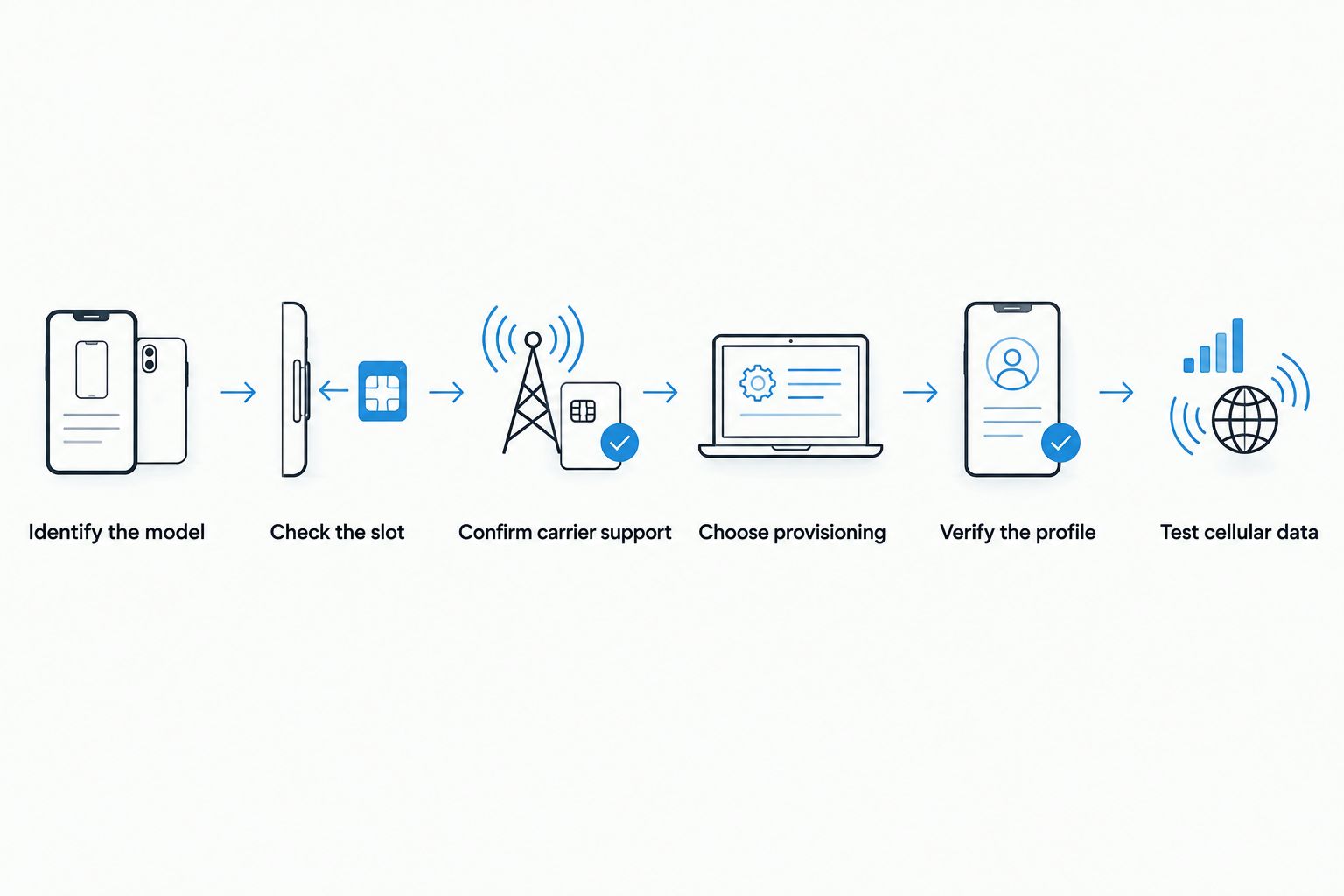
Keep the compatibility confirmation specific enough to act on. It should name your watch, your adapter, the loading method and the service you intend to use—not just say that eSIM is supported.
Where Switch hardware fits—and where it does not
Switchesim eSIM adapters are best for users with compatible physical-SIM devices, not for converting non-cellular smartwatches. Consider the hardware only after confirming the target device's slot and support. Phone compatibility is not evidence of smartwatch compatibility.
The product choice follows the management path. Switch's stated capabilities distinguish Android-based management, use of a configured card in a compatible iPhone and reader-based provisioning.
| Hardware | Best for | Stated capability | Limitation for this question |
|---|---|---|---|
| Switch Pro | Compatible devices with Android-based profile management | Uses Android-based profile management | Does not establish support for an Android watch |
| Switch Max | Users who need a configured card for a compatible iPhone | Extends card use to compatible iPhones | iPhone support does not establish smartwatch support |
| Bluetooth reader | Loading profiles without an Android phone | Provisions a removable adapter through the reader | Does not add a modem or SIM slot to the watch |
| Pre-loaded destination-data cards | Users seeking an already-loaded profile for a compatible device | Provide a pre-loaded card option | A loaded profile does not resolve device incompatibility |
The reader's role ends at provisioning the card. It does not turn the watch's Bluetooth connection into cellular data. Likewise, a configured Max card in an iPhone remains a phone setup; it is not native activation of a paired watch.
Switchesim describes its adapter-and-reader bundle as storing up to 15 eSIM profiles. That is a storage claim for the bundle, not a smartwatch compatibility claim or a promise of simultaneous connections. Do not transfer that figure to every card or device.
The open-source Bluetooth reader's product title states that no app or account is required. That statement concerns the reader workflow. It does not mean the mobile subscription requires no provider account, and open-source status alone does not establish a complete privacy guarantee.
For a 2026 comparison, assess privacy across the reader or management software, profile-loading process and network provider separately. Bulk and white-label supply are also offered, but neither changes the need for device-specific compatibility confirmation.
Can I use my phone's eSIM plan directly on my smartwatch?
You cannot assume a phone eSIM plan supports a smartwatch. The provider must support the watch and its activation method, whether you want independent data or a service linked to your phone number.
Tell the provider the exact watch model and intended use. A general statement that the plan supports eSIM is not enough to approve watch activation.
Does a Bluetooth reader give my watch mobile data?
A Bluetooth reader loads profiles onto a compatible removable adapter; it does not provide mobile data to the watch. The watch still needs its own cellular modem, compatible SIM interface and supported subscription.
Choose a reader to solve a provisioning requirement. Do not choose it to solve missing watch hardware.
Can I keep several profiles on a smartwatch adapter?
The Switch adapter-and-reader bundle is described as storing up to 15 eSIM profiles, but that does not establish watch support. Stored profiles and active network connections are separate questions.
Check the exact adapter's capacity and switching method only after confirming smartwatch compatibility. More storage does not make an incompatible card usable.
FAQ
What's the best eSIM adapter for a smartwatch in 2026?
There is no universal smartwatch adapter recommendation. First confirm that the watch has a cellular modem and a compatible physical SIM slot, then obtain support confirmation for the exact card and profile-loading method.
Can an eSIM adapter turn my Wi-Fi watch into a cellular watch?
No, an eSIM adapter cannot add a missing cellular modem. A watch without cellular hardware remains dependent on its supported phone or Wi-Fi connections.
Can I insert an adapter into a watch that already has built-in eSIM?
Only a watch with a compatible physical SIM slot can accept a removable adapter. A built-in-eSIM watch without that slot needs its supported native activation process.
Does Android on my watch mean Switch Pro will work?
No, an Android operating system does not establish Switch Pro compatibility. Confirm the exact watch model, physical SIM slot and supported management workflow before purchase.
Can Switch Max in my iPhone activate my paired watch?
A configured Switch Max card in a compatible iPhone does not establish cellular activation for its paired watch. The watch needs its own supported manufacturer and carrier activation process.
Does an eSIM adapter bypass a carrier lock?
No, an eSIM adapter does not remove a carrier lock. Confirm that the watch accepts the intended carrier before loading a profile.
Do 15 stored profiles mean 15 cellular connections on my watch?
No, 15 stored profiles is a capacity claim for the Switch adapter-and-reader bundle, not a claim of simultaneous cellular connections. Watch compatibility and active-profile behavior require separate confirmation.
One last thing
Test the connection with the paired phone disconnected and Wi-Fi disabled. Follow the watch's supported controls and try a function that actually requires network access. Notifications received through the phone do not demonstrate independent cellular service.
For a 2026 purchase, ask this before paying: does the exact watch support independent cellular data with this subscription and this activation method? If the answer depends on a physical adapter, require confirmation that names the watch and card together.



