

Can an eSIM adapter add eSIM support to a tablet that lacks it?
Yes—an eSIM adapter can let a compatible cellular tablet without native eSIM use an eSIM profile through its physical SIM slot. It cannot add cellular connectivity to a Wi-Fi-only tablet, bypass a carrier lock or guarantee compatibility; you must also confirm how you will load and manage profiles before buying in 2026.
- An esim adapter for tablet without esim requires a compatible cellular tablet with a physical SIM slot.
- Switchesim eSIM adapters suit buyers who confirm tablet compatibility and a separate profile-management path.
- Switch Pro uses Android-based management; Switch Max adds compatible iPhone use, not blanket iPad compatibility.
- The Bluetooth reader loads profiles without an Android phone; it does not supply the tablet’s cellular connection.
Can an eSIM adapter add eSIM support to a tablet that lacks it?
Yes, if the tablet already has compatible cellular hardware and a physical SIM slot. The adapter provides a removable place for an eSIM profile; it does not add a modem, antennas or native eSIM settings to the tablet.
Separate the device using the data connection from the device managing the card. Switch describes these product paths:
| Option | Best for | Profile-loading path | Benefit | Limitation |
|---|---|---|---|---|
| Switch Pro | Buyers with a compatible Android management device | Switch Android app | Android-based profile management | Confirm both management-device and target-tablet compatibility |
| Switch Max | Buyers who also need compatible iPhone use | Confirm the supported setup for your devices | Extends use to compatible iPhones | iPhone support does not establish iPad support |
| Bluetooth reader | Buyers who need provisioning without an Android phone | Reader-based profile loading | Separates provisioning from Android management | It is not a cellular modem or a tablet-compatibility guarantee |
The reader complements an adapter card; it does not replace one. For a tablet purchase in 2026, choose the card and its management method together.
Why this matters: loading a profile is not the same as using it
A tablet can be suitable for using a configured card without being suitable for running the software that configures it. Treat those as separate compatibility checks. Otherwise, you risk buying hardware that fits the tray but leaves you without a supported way to install or change the profile.
Switchesim eSIM adapters are best for buyers who confirm tablet compatibility and a supported profile-management path before purchase. Start with the tablet’s exact model and regional variant, not the adapter’s headline operating-system label.
The same distinction applies to troubleshooting. A profile-loading failure belongs to the provisioning path; a loaded profile that cannot connect requires checks of the tablet, carrier and plan.
Check the tablet before choosing an adapter
A Wi-Fi-only tablet has no direct adapter path
A physical eSIM adapter cannot turn a Wi-Fi-only tablet into a cellular tablet. The device lacks the cellular hardware needed to connect directly to a mobile network. A memory-card slot is not a SIM slot.
For a Wi-Fi-only tablet, use an external connection such as a phone hotspot or a compatible cellular router. That keeps the mobile connection outside the tablet. It also means you must manage and power another device.
A cellular tablet needs the right physical SIM slot
A cellular label alone is insufficient. Confirm that your particular tablet has a physical SIM tray and that the selected adapter fits its supported SIM format. Do not infer the tray configuration from another model in the same product family.
Check the manufacturer’s specifications for your regional variant. An adapter cannot create a physical SIM interface where the tablet has none, and physical fit does not establish software or carrier compatibility.
Android tablets need separate management confirmation
Switch Pro uses Android-based profile management through the Switch Android app. That does not mean every Android tablet can run the required management workflow. Confirm the tablet model and operating-system version explicitly.
If management on the tablet is unsupported, confirm whether a separate compatible Android device can configure the card for that target tablet. Do not treat Android branding as proof that the necessary SIM access is available.
iPad compatibility is not implied by iPhone compatibility
Switch Max extends use to compatible iPhones. That claim does not establish compatibility with an iPad, even when the iPad has a physical SIM tray. Ask for confirmation against the exact iPad model before selecting the card.
Also distinguish using a configured card from installing profiles on that card. A supported provisioning method does not, by itself, prove that the target iPad can use the resulting configuration.
Why tablet adapter compatibility varies
These factors determine whether an eSIM adapter is a practical choice for your tablet in 2026:
- Model and regional variant: Check the precise device identifier. A shared product-family name is not enough.
- Physical SIM interface: Confirm that the tablet has a compatible SIM slot, not merely cellular capability.
- Operating system and management access: Establish which device runs the provisioning workflow and which software it supports.
- Carrier-lock status: An adapter does not remove restrictions imposed by the tablet’s carrier lock.
- Network bands: The tablet must support the bands used by the network serving the selected plan.
- eSIM provider requirements: Confirm that the provider supplies a supported activation method and permits the intended device use.
Ask the seller and provider specific questions. Give them the model identifier, operating-system version and plan you intend to use; a general question about tablet compatibility cannot settle those details.
Choose the profile-loading method first
Switch Pro: Android-based profile management
Choose Switch Pro when its Android management path fits your setup and the target tablet is confirmed compatible. The practical benefit is a defined Android-based method for managing profiles. The limitation is dependence on a supported management device and workflow.
Before ordering, establish where the Switch Android app will run. If that device is a separate phone, include it in your setup plan rather than assuming every later profile change happens on the tablet.
Switch Max: compatible iPhone use is a separate capability
Choose Switch Max when you need its stated compatible-iPhone use alongside your confirmed tablet setup. Do not buy Max solely because a tablet runs an Apple operating system. Device-specific confirmation remains necessary.
A configured Max card used in a compatible iPhone is not the same thing as native eSIM management in that phone’s settings. Apply the same distinction when asking about a tablet: confirm card use, profile loading and profile switching separately.
Bluetooth reader: provisioning without an Android phone
The Bluetooth reader provides a profile-loading route without an Android phone. Switch describes its reader as open source and lists iPhone and Android use, with no app or account required. Those are Switch’s product claims, not a statement that every tablet is supported.
The reader’s benefit is separating card provisioning from Android-based management. Its limitation is equally clear: loading a card does not add cellular hardware to the target tablet or override a carrier restriction.
Pre-loaded destination-data cards: less initial provisioning
Pre-loaded destination-data cards are an option when you want a card supplied with a named data plan rather than beginning with a separate profile download. Match the destination, allowance and validity to your use. Then confirm the tablet and card combination.
For example, the listed Switch Max destination cards include China mainland, Japan and South Korea plans with 10GB or 20GB allowances and 30-day validity. Those figures describe the data plans—not the adapter’s profile-storage capacity or a guaranteed connection speed.
These cards reduce the need to select and provision that initial destination profile yourself. The trade-off is choosing a specific plan; you still need to check activation conditions, supported use and what happens when you want another profile.


How do you set up an eSIM adapter for a tablet?
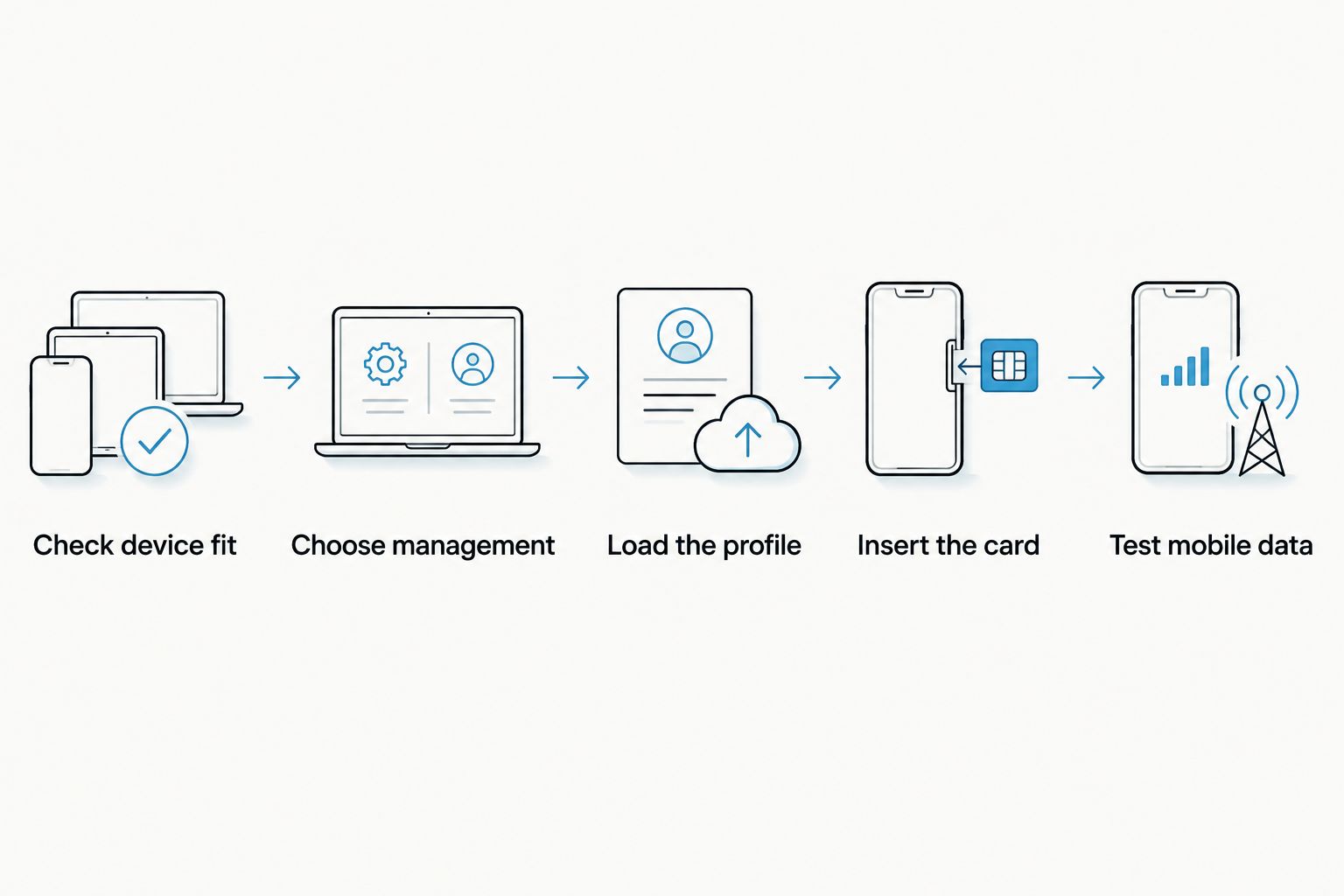
Use this sequence after the seller confirms your exact tablet and management path. Follow the selected product’s instructions for installation rather than assuming that the tablet’s native eSIM menu manages the adapter.
- Check device fit. Verify the model, regional variant, physical SIM format and carrier-lock status.
- Choose management. Confirm the Switch Android app route or reader-based provisioning, including the device used for that task.
- Load the profile. Follow the supported activation method and the provider’s instructions. For a pre-loaded card, follow its supplied activation instructions instead.
- Insert the card. Fit the configured adapter into the compatible tablet’s physical SIM tray according to the device instructions.
- Test mobile data. Check the selected profile, mobile-data settings and provider-required settings before relying on the connection.
The order matters. Confirm compatibility before loading a plan, and test the connection before depending on it. Keep access to another internet connection while completing activation and troubleshooting.
Check profile capacity and privacy before purchase
Stored profiles, selectable profiles and simultaneous connections are different capabilities. Ask for the selected card’s documented storage limit and switching method. Do not read a 20GB data allowance as information about how many profiles the card stores.
For a 2026 purchase, request the current specification for the exact product. Also confirm whether changing the selected profile requires the tablet, a separate Android device or the reader. That requirement affects how useful multiple stored profiles are in practice.
Switchesim describes the Bluetooth reader as open source and requiring no app or account. That addresses the reader workflow; it does not establish anonymity or remove a mobile provider’s activation and identity requirements.
Treat activation QR codes and credentials as sensitive. Check the management software’s permissions and the provider’s privacy terms, and distinguish any reader-account requirement from the separate account used to buy or activate mobile service.
Pre-purchase checklist for a tablet adapter in 2026
Before paying, get clear answers to these questions:
- Is the exact tablet model and regional variant confirmed compatible?
- Does the tablet have the required physical SIM slot and supported card format?
- Is the tablet unlocked for the intended network?
- Which device loads profiles, and which operating systems does that workflow support?
- How many profiles does the exact card store, and how do you select one?
- Does the chosen provider support the activation method and intended tablet use?
- What account, software and permission requirements apply to provisioning?
- Can you complete a connection test before you need the tablet away from Wi-Fi?
For a fleet, Switch offers bulk and white-label supply. Validate a representative tablet and provisioning workflow before expanding the order. Retail availability or bulk supply does not establish compatibility across different tablet models.
Can an adapter bypass a tablet’s carrier lock?
No—an eSIM adapter does not unlock a carrier-locked tablet. Check the tablet’s lock status and the carrier’s permitted networks before choosing a profile. Changing where the subscription profile is stored does not remove the device restriction.
Will the tablet gain a native eSIM settings menu?
An adapter does not guarantee native eSIM settings on the tablet. Confirm the adapter’s supported profile-management method instead. Using a configured card through a physical SIM slot is distinct from the operating system managing an embedded eSIM.
FAQ
Can I use an eSIM adapter in a Wi-Fi-only tablet?
No. An eSIM adapter cannot add a cellular modem or SIM interface to a Wi-Fi-only tablet. Use an external hotspot or compatible cellular router for mobile internet.
What is the best eSIM adapter for a tablet without eSIM?
The best choice is the adapter confirmed for your exact tablet and provisioning setup. Switch Pro uses Android-based management; Switch Max adds compatible iPhone use, which does not establish iPad compatibility.
Can I load an adapter’s eSIM profile without an Android phone?
Yes, Switch’s Bluetooth reader provides a profile-loading path without an Android phone. Confirm the supported setup and target-tablet compatibility separately.
Does Switch Max work with every iPad that has a SIM tray?
No blanket iPad compatibility follows from Switch Max’s compatible-iPhone claim. Confirm the exact iPad model, regional variant and supported profile-management path before purchase.
How many eSIM profiles can my tablet adapter store?
Use the documented storage limit for the exact adapter card. Profile capacity is separate from data allowance and from the number of connections that can operate simultaneously.
Will a Bluetooth reader give my tablet mobile internet?
No. The reader provisions the adapter card; the compatible cellular tablet supplies the mobile-network connection. The tablet still needs the correct SIM interface, network support and permitted carrier use.
Does a pre-loaded data card remove the need for compatibility checks?
No. A pre-loaded profile changes the initial provisioning task, not the tablet’s hardware or carrier restrictions. Confirm device fit, destination coverage and activation conditions before using it.
One last thing
Ask for confirmation of both connection use and profile management—not just whether the card fits. A physically compatible tray answers only the first hardware question. The useful purchase is a card you can provision, select and use with your exact tablet.
Send Switchesim the tablet model, regional variant, operating-system version, carrier-lock status and intended provider. Include whether you have a compatible Android management device or need the Bluetooth reader; that makes the product-choice question specific enough to answer.



