

Can an eSIM adapter add eSIM to an iPhone bought outside the US?
Yes—an eSIM adapter can let a compatible iPhone bought outside the US use an eSIM profile through its physical SIM slot, even without native eSIM support. It does not add Apple's built-in eSIM hardware or bypass a carrier lock. In 2026, the deciding checks are your exact regional iPhone model, physical SIM tray, carrier restrictions and profile-loading method—not simply where you bought it.
- An eSIM adapter for an iPhone bought outside the US requires a compatible physical SIM slot.
- Switch Max is the iPhone-focused choice; confirm the exact regional model before buying.
- The Switch Android app manages profiles; a Bluetooth reader offers provisioning without an Android phone.
- An adapter does not bypass carrier locks, add network bands or guarantee provider compatibility.
Can an eSIM adapter add eSIM to an iPhone bought outside the US?
Yes, but only through a compatible physical SIM slot. An adapter carries the eSIM profile on removable hardware. Your iPhone then uses that hardware through its SIM interface; this is different from downloading a profile into the iPhone's built-in eSIM hardware.
For a 2026 purchase, use the following comparison to separate the routes. The broader guide to adding eSIM to a phone without native support explains the same distinction beyond iPhones.
| Route | Best for | Main benefit | Limitation to check first |
|---|---|---|---|
| Native iPhone eSIM | Owners whose exact iPhone and provider already support it | No removable adapter needed | Regional model and provider support still matter |
| Switch Max | Compatible iPhone owners who need a removable eSIM adapter | Extends adapter use to compatible iPhones | Requires a compatible physical SIM slot and a confirmed setup path |
| Switch Pro | Buyers managing profiles through Android | Android-based profile management | Do not assume Android management means equivalent iPhone management |
| Bluetooth reader with a compatible adapter | Buyers who need provisioning without an Android phone | Loads profiles without an Android phone | It is a provisioning accessory, not a replacement for the iPhone's SIM slot |
These routes are not interchangeable. A reader addresses profile loading; an adapter addresses where the profile resides; native eSIM uses hardware already inside the phone.
Why this matters
“Bought outside the US” describes a purchase location, not a complete compatibility specification. An imported iPhone sold by a local reseller can differ from the regional variant you expected to receive.
The practical risk is buying the right type of adapter for the wrong phone or setup method. Check the device first. Then choose how you will load and manage profiles, rather than treating an iOS-compatible product description as proof that every operation happens inside iOS.
Switchesim's Switch Max eSIM adapter is best for compatible iPhone owners who need a removable profile solution. That recommendation depends on a usable physical SIM slot and confirmation of the exact model and provisioning workflow.
Check device fit before choosing hardware
Physical SIM slot
An adapter needs somewhere to go. If your iPhone has no physical SIM tray, a removable SIM-slot adapter is not the route for that device.
If a tray is present, confirm that the adapter supports your exact phone and tray arrangement. Do not force a card into a tray or assume that matching its outline establishes electrical and software compatibility.
Regional model and operating system
Open Settings, then General, then About, and record the model details and iOS version. Use the model number, not just the commercial iPhone name, when asking for compatibility confirmation.
For a 2026 check, provide the regional variant as well as the operating system. A statement about an iPhone family is less useful than confirmation for the device actually in your hand.
Carrier lock and destination network
Check the Carrier Lock entry in the iPhone's About screen. Apple's “No SIM restrictions” wording indicates that the iPhone is unlocked; resolve a lock with the carrier before relying on another provider's service.
An eSIM adapter does not unlock an iPhone. It also does not add network bands, so confirm that the phone itself supports the destination network independently of whether the adapter fits.
Choose profile management separately from iPhone use
The important distinction is using a configured card versus managing the profiles stored on it. A card working in a compatible iPhone does not establish that iOS can perform every loading, deletion or switching operation.
Switchesim describes Switch Pro as using Android-based profile management and Switch Max as extending use to compatible iPhones. The Bluetooth reader provides a separate way to load profiles without an Android phone. Confirm which operations your proposed combination supports before ordering.
| Setup path | Best for | What it addresses | What you must confirm |
|---|---|---|---|
| Switch Android app | Buyers with access to a compatible Android phone | Android-based profile management | Supported Android device, app requirements and card compatibility |
| Configured Max card in an iPhone | Buyers who want to use the adapter in a compatible iPhone | iPhone use after configuration | Exact iPhone fit and the available profile-switching workflow |
| Reader-based provisioning | Buyers without an Android phone | Loading profiles through a Bluetooth reader | Reader software, host operating system and supported adapter |
| Pre-loaded destination-data card | Buyers choosing a named destination bundle | A product supplied with destination data pre-loaded | Phone compatibility, activation conditions and later profile management |
The open-source Bluetooth reader is an option for buyers who want that provisioning approach. “Open-source” does not, by itself, establish support for every operating system, an independent security audit or a particular privacy policy.
Why iPhone adapter compatibility varies
Use these factors to evaluate a 2026 compatibility claim. Each addresses a separate failure point; passing one does not replace the others.
- Physical SIM interface: The iPhone needs a compatible physical SIM slot. A trayless device cannot accept a removable adapter.
- Model and regional variant: Confirm the exact device rather than relying on the country of purchase or an iPhone family name.
- Operating system and management software: Separate iPhone use from Android management and reader-based provisioning.
- Carrier-lock status: The adapter does not remove restrictions imposed by the locking carrier.
- Network bands: The iPhone's radio hardware must support the network you intend to use.
- eSIM provider requirements: Confirm that the provider permits and supports the proposed activation method on the adapter.
A seller's broad compatibility statement is not enough to settle these checks. Ask for confirmation that names your device, adapter and loading method together.
Set up the adapter in the right order
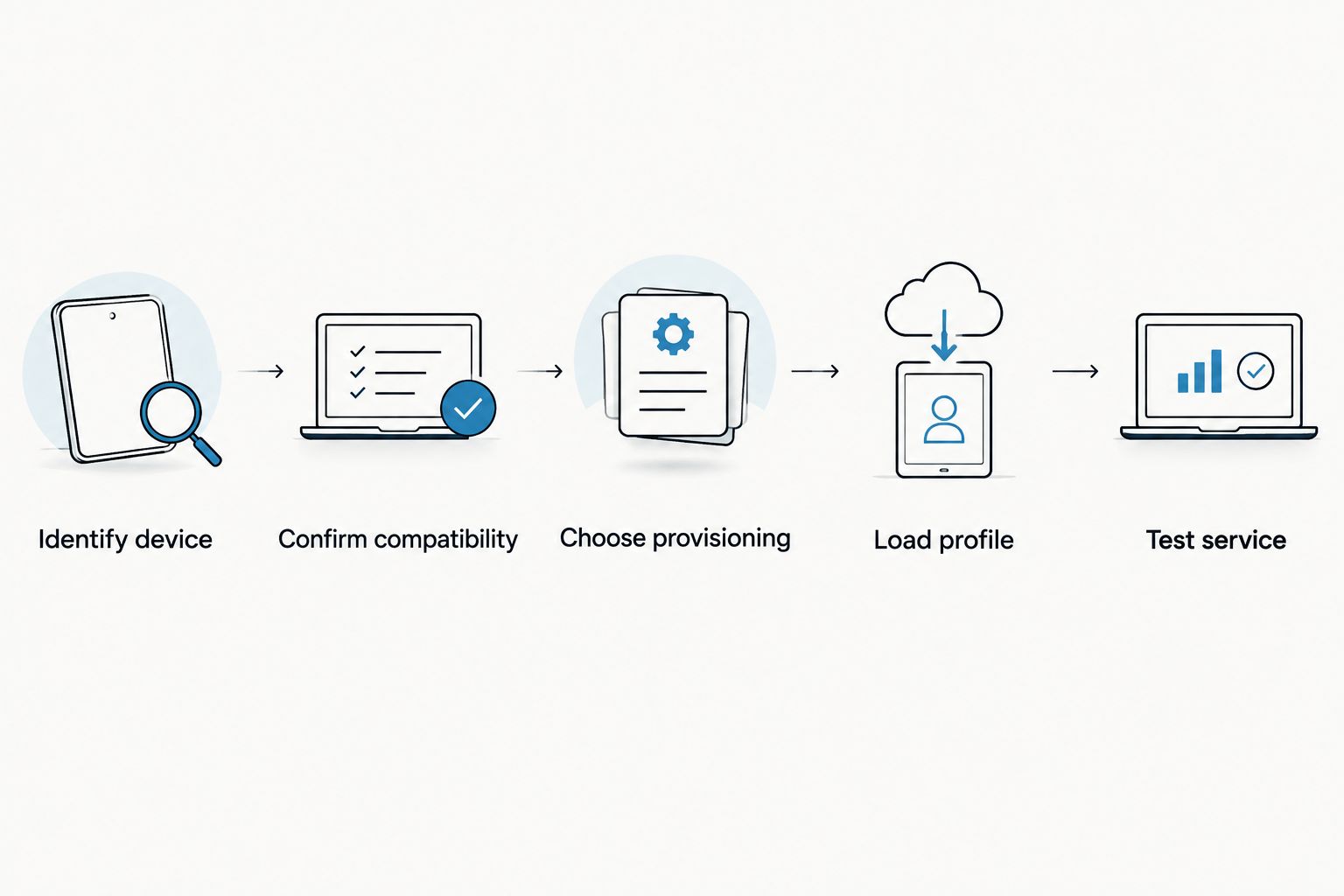
Confirm the entire route before redeeming an activation code. Profile installation and carrier service are separate checks, and the provider's activation conditions still apply.
- Identify device. Record the iPhone model, regional variant, iOS version and physical SIM-tray arrangement. Check carrier-lock status.
- Confirm compatibility. Ask for confirmation covering the adapter, iPhone and intended provider. Include your proposed management device or reader.
- Choose provisioning. Decide between the supported Android-app workflow, Bluetooth reader or an appropriate pre-loaded card. Confirm the required software.
- Load profile. Follow the instructions for that specific hardware combination and the provider's activation rules. Keep activation credentials private.
- Test service. Insert the configured adapter as instructed, select the intended mobile-data line and verify service before depending on it.
If the profile loads but the iPhone does not connect, do not immediately delete it. Check carrier-lock status, provider activation, the selected data line and the provider's connection settings first. Follow the provider's reinstallation rules before removing a working installation.
Check profile capacity and privacy before buying
Stored profiles are not simultaneous connections
Ask for the current profile capacity of the exact adapter you intend to buy. Do not infer capacity from another model, a destination-data allowance or the number of profiles shown in a demonstration.
Also ask how many profiles can be active and how you select between them. Storage capacity and simultaneous service are different capabilities. Neither a larger profile store nor a Bluetooth reader establishes that multiple adapter profiles can connect at once.
Separate hardware privacy from provider privacy
For a 2026 privacy check, examine the management app, reader software and mobile provider separately. Ask what permissions the software requires, whether an account is needed, what information leaves the device and how stored credentials are protected.
Do not equate removable hardware with anonymous service. The network provider still has its own account, identity and usage-data practices. Keep QR codes and manual activation credentials out of public screenshots and support posts.
When is a pre-loaded destination-data card relevant?
A pre-loaded card is relevant when its named destinations and data allowance match your trip. It does not remove the need to confirm iPhone compatibility, and its data-plan description does not establish how future profiles will be managed.
Switchesim lists Max bundles including 10 GB for 30 days in China mainland, Japan and South Korea, and 20 GB for 30 days in Australia and New Zealand. These are plan allowances and durations—not adapter profile capacities or universal coverage claims.
| Pre-loaded Max bundle | Best for | Included allowance | Limitation |
|---|---|---|---|
| China mainland, Japan and South Korea | Buyers needing data in those named destinations | 10 GB / 30 days | Confirm activation conditions and exact iPhone compatibility |
| Australia and New Zealand | Buyers needing data in those named destinations | 20 GB / 30 days | Confirm activation conditions and exact iPhone compatibility |
Choose these bundles by destination, not by where the iPhone was purchased. Bulk and white-label options address supply requirements; they do not replace device-level compatibility checks.
Do I need an adapter if my imported iPhone already supports eSIM?
No—if your exact iPhone and intended provider support native eSIM, use that route unless you specifically need removable adapter hardware. Native support avoids adding a separate card and provisioning workflow.
An adapter is a different hardware approach, not a necessary upgrade for every imported iPhone. Establish what the phone already supports before adding accessories.
Can I set this up without an Android phone?
Yes—the Bluetooth reader offers profile loading without an Android phone. Confirm the supported host operating system, software and adapter combination before choosing that route.
Using a configured Max card in a compatible iPhone is a separate capability. It does not mean that Apple's Add eSIM menu manages the removable card.
What should I send before requesting compatibility confirmation?
Send the exact iPhone model, regional variant, iOS version, carrier-lock status and intended eSIM provider. Add whether you have a compatible Android phone or need reader-based provisioning.
For a useful 2026 purchasing decision, request an answer covering both initial installation and later profile changes. A one-time successful installation does not describe the complete ownership workflow.
FAQ
Can an eSIM adapter work in an iPhone bought outside the US?
Yes, an eSIM adapter can work in a compatible iPhone bought outside the US if it has a compatible physical SIM slot. Confirm the regional model, carrier-lock status, operating system and provider before buying.
Will an eSIM adapter work in an iPhone without a SIM tray?
No, a removable SIM-slot eSIM adapter requires a physical SIM slot. A Bluetooth reader does not add a SIM slot to the iPhone.
Does an eSIM adapter unlock a carrier-locked iPhone?
No, an eSIM adapter does not unlock a carrier-locked iPhone. Resolve the restriction with the locking carrier before relying on another provider.
Is Switch Max the right eSIM adapter for an imported iPhone?
Switch Max is the iPhone-focused option for compatible devices. Confirm your exact regional model and the profile-loading and switching workflow before purchasing.
Can I load profiles without borrowing an Android phone?
Yes, the Bluetooth reader provides a loading route without an Android phone. Check the required host operating system, software and adapter compatibility.
How many eSIM profiles can I use at the same time?
Do not infer simultaneous connections from stored-profile capacity. Confirm the adapter's active-profile limit and the iPhone's supported line configuration separately.
Does a pre-loaded data card remove the setup checks?
No, a pre-loaded data card still requires a compatible iPhone and an appropriate activation workflow. Check destination coverage, allowance, validity and provider conditions separately.
One last thing
Ask how you will change profiles after the first successful connection. That question exposes the difference between a card you can use and a system you can manage.
Before buying a Switchesim eSIM adapter, get confirmation for the complete sequence: load a profile, use it in your exact iPhone and change it later. A compatible first connection is useful; a confirmed ongoing workflow is the better buying criterion.



