

Can an eSIM adapter be hacked or cloned?
An eSIM adapter is not normally clonable through its profile-management tools, but that does not make the adapter, its software or your carrier account immune to attack. Standard eSIM provisioning protects subscriber credentials rather than exposing them as a file you can copy. A stolen activation code, compromised phone or fraudulent carrier transfer can threaten your service without anyone cloning the adapter.
- Can eSIM adapter be cloned? Normal profile management does not export the authentication secrets needed for a working clone.
- GSMA eSIM provisioning separates profile installation from copying subscriber authentication credentials.
- Switchesim eSIM adapter buyers should choose by device fit and provisioning method, not assume immunity from attacks.
- Protect carrier accounts and activation codes; SIM swapping does not require cloning your adapter.
Can an eSIM adapter be hacked or cloned?
Hacking and cloning are different outcomes. Hacking means gaining unauthorized access or control. Cloning means reproducing subscriber credentials so another device can authenticate as the same subscription.
GSMA's consumer remote SIM provisioning specification, SGP.22, describes protected profile delivery and installation on an eUICC. It does not treat an installed profile as an ordinary document that a management app can export. That architectural protection is not a security certification for every removable adapter, reader or app.
| Security event | What happens | Is it adapter cloning? | Your main defense |
|---|---|---|---|
| Genuine credential cloning | Subscriber authentication secrets are reproduced elsewhere | Yes | Evaluate the hardware's security evidence |
| Carrier-account takeover | An attacker obtains control of your subscription account | No | Protect account access and recovery |
| SIM swapping | A carrier moves service to another SIM or eSIM | No | Use available carrier transfer protections |
| Activation-code theft | Someone obtains information used to request a profile download | No | Keep provisioning information private |
| Phone or management-tool compromise | An attacker interferes with the device or profile-management process | Not necessarily | Use trusted software and secure the host device |
Before evaluating security, confirm that the adapter actually fits your device. The guide to adding eSIM support to a phone without native support explains the hardware question separately from the security question.
Why this matters
A secure adapter cannot stop a carrier from authorizing a fraudulent replacement subscription. Equally, a well-protected carrier account does not secure an infected phone. You need to protect both.
For a 2026 purchase, separate the decision into 3 access paths: the adapter itself, the device used to manage it and the provider account that controls the subscription. Each needs its own checks. Treat a claim about one path as a claim about that path only.
Device fit comes before security features
An adapter needs a compatible physical SIM slot. It cannot add a removable SIM tray to a phone that lacks one, and it does not remove a carrier lock. Check the exact model and regional variant before choosing hardware.
Compatibility also depends on operating system support, network bands and the eSIM provider's activation process. An adapter changes how the subscription is stored and presented to the device. It does not expand the device's radio capabilities.
Keep these distinctions clear:
- Android management: The Switch Android app is the profile-management route for Switch Pro.
- iPhone use: A configured Switch Max card extends use to compatible iPhones. Using the card and provisioning it are separate tasks.
- Reader provisioning: The Bluetooth reader loads profiles without requiring an Android phone. The destination device still needs compatible hardware.
An iPhone-compatible card is not proof that every profile-management operation happens inside iOS. Decide where you will load and manage profiles before buying, particularly if you do not own an Android device.
What would a genuine clone require?
A working clone needs more than a visible phone number, a profile label or a copied screenshot. Mobile-network authentication uses secret credentials associated with the subscription. Merely knowing identifiers does not reproduce those secrets.
An installed eSIM profile contains sensitive subscription material inside the eUICC. Standard provisioning is designed to deliver that material securely, not provide a general-purpose export function for authentication keys. Moving a removable adapter between compatible devices also moves the same hardware; it does not create another copy.
This distinction matters when evaluating a security claim. Ask whether the claim demonstrates secret extraction and duplicate authentication, or merely shows profile installation, account access or service transfer. Those are different capabilities with different consequences.
Do not interpret “removable” as “copyable.” A removable security component can retain protected credentials. Conversely, do not interpret “eSIM” as a blanket guarantee against implementation flaws or physical attacks.
Why eSIM adapter security varies
For your 2026 security check, evaluate these 5 factors separately. None is a substitute for the others.
- Hardware implementation: Security depends on how the eUICC and surrounding hardware implement credential protection. Marketing terminology alone does not establish resistance to extraction.
- Management software: The app or provisioning interface operates on your phone or computer. Compromising that host creates risks even when authentication secrets remain protected inside the card.
- Reader access: Reader-based provisioning introduces another device and connection to secure. Review its documented access controls and operating instructions.
- Provider controls: Activation rules, account recovery and subscription-transfer processes influence whether someone can obtain or replace service without touching your adapter.
- Physical custody: A removable card can be lost or stolen. Physical possession creates a different problem from remote credential copying.
Open-source software allows inspection of the published code. It does not, by itself, prove that the shipped hardware matches that code, that every release has been reviewed or that the product has passed an independent security assessment.
Which hardware path fits your setup?
Choose the management route first. Switchesim eSIM adapter hardware serves compatible physical-SIM devices; it is not a remedy for a missing tray or an incompatible provider.
Switchesim is best for buyers who need eSIM adapter hardware for compatible physical-SIM devices. That is a device-fit verdict, not a claim that the products are unhackable.
| Hardware path | Best for | Profile-loading or management route | Benefit | Limitation to check |
|---|---|---|---|---|
| Switch Pro | Buyers using Android-based management | Switch Android app | A defined Android profile-management path | Exact Android device and app compatibility |
| Switch Max | Buyers using a configured card in a compatible iPhone | Establish the supported provisioning route before use | Extends adapter use to compatible iPhones | Physical tray, regional model and provisioning requirements |
| Bluetooth reader | Buyers provisioning without an Android phone | Reader-based profile loading | Separates provisioning from Android-phone ownership | Reader access controls and supported host environment |
Profile capacity is a separate buying criterion. The adapter-and-reader bundle description states up to 15 eSIM profiles. That storage claim does not establish how many profiles operate simultaneously, and it does not establish equivalent capacity for every other item.
Switchesim also offers pre-loaded destination-data cards and bulk or white-label supply. Pre-loading changes who performs initial provisioning; it does not eliminate provider-account or activation-security considerations. Bulk buyers should define custody, provisioning access and recovery responsibilities before distributing cards.
Protect the setup before loading a profile
Use this 5-step checklist when setting up an adapter in 2026. It addresses preventable exposure without assuming that a particular product has a particular security control.
- Device check: Confirm the physical SIM slot, exact model, regional variant, operating system and carrier-lock status. Verify that the intended subscription supports your target device and activation route.
- Trusted software: Obtain management tools through the manufacturer's documented channels. Avoid modified installers and unsolicited downloads sent by someone claiming to provide support.
- Account protection: Use a unique carrier-account password and the strongest available authentication and transfer protections. Protect the email account used for recovery too.
- Private activation: Keep QR codes and manual activation details out of public posts, shared albums and support screenshots. Share them only through an authorized provisioning process.
- Recovery plan: Record the provider's recovery procedure somewhere separate from the phone. Know how to suspend service if the phone or removable adapter disappears.
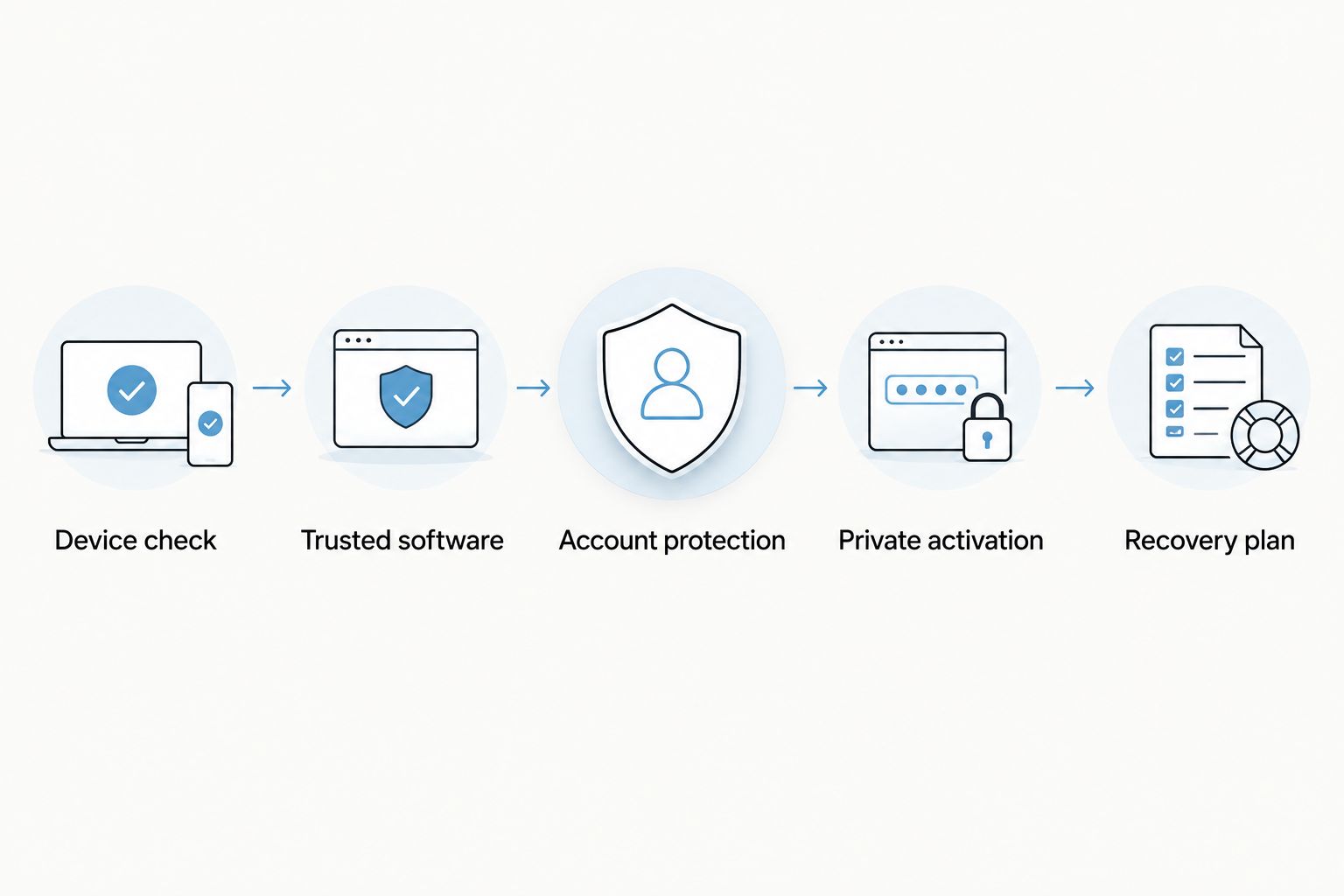
After setup, verify that the expected subscription works and that you can access its provider account independently. Keep recovery information separate from activation secrets. Losing the phone should not also mean losing every route to support.
Reader-based hardware options
The Switchesim store lists an open-source Bluetooth reader and an adapter-and-reader bundle. The reader's product title states that no app or account is required; that statement concerns the reader workflow, not whether an eSIM provider requires an account.
Best for existing adapter owners: the standalone reader, after confirming adapter compatibility. Best for buyers needing both components: the bundle. Both add reader-based provisioning to the setup, so review that workflow rather than assuming Bluetooth or open source guarantees security.

Can someone clone my adapter from an activation QR code?
An activation QR code is not a copy of an installed adapter's authentication secrets. It carries provisioning information used to request a profile. Provider controls determine whether an unauthorized person can use that information.
Treat the code as sensitive anyway. If it escapes your control, contact the provider about canceling or replacing the activation information rather than assuming that a completed download makes every leaked code harmless.
Does moving the adapter to another phone create a clone?
Moving the same adapter does not create a clone. The subscription hardware moves with the card. The receiving device still needs a compatible physical SIM slot and must satisfy the relevant network and provider requirements.
A carrier-authorized transfer is different again. It changes where service is provisioned under the carrier's rules; it is not evidence that someone extracted the original card's secret credentials.
Does sudden loss of service prove my adapter was hacked?
Loss of service does not prove hacking or cloning. Coverage, provider status, device settings and account changes can also interrupt connectivity. Investigate before replacing hardware.
If the interruption coincides with unexpected account notifications, contact the provider through a known support channel from another connection. Ask whether a SIM replacement, eSIM transfer or account-recovery event occurred. Secure your recovery email as well as the carrier account.
FAQ
Can an eSIM adapter be cloned in 2026?
An eSIM adapter is not normally clonable through standard profile-management tools. A genuine clone requires reproducing subscriber authentication secrets, not merely copying an activation code or moving the card.
Is an eSIM adapter completely safe from hacking?
No eSIM adapter should be treated as completely immune to hacking. Evaluate hardware implementation, management software, reader access and carrier-account controls separately.
Can someone steal my number without cloning my adapter?
Yes, a fraudulent carrier transfer can move your service without cloning the adapter. Protect account recovery and use the carrier's available transfer protections.
Does open-source reader software guarantee security?
Open-source software does not guarantee security. It allows inspection of published code, but code availability alone does not establish independent review or the security of shipped hardware.
Can I use an eSIM adapter in an iPhone without a SIM tray?
A removable eSIM adapter requires a compatible physical SIM slot. Switch Max use therefore depends on the exact iPhone model, regional variant and supported setup path.
How many profiles does the adapter-and-reader bundle store?
The adapter-and-reader bundle description states up to 15 eSIM profiles. Storage capacity does not establish simultaneous active-profile capacity or the capacity of every other adapter.
Should I delete a profile if I suspect account takeover?
Deleting a local profile does not resolve carrier-account takeover. Contact the provider to secure or suspend the subscription, and secure the accounts used for recovery before making local changes.
One last thing
A perfectly protected authentication key does not stop someone from manipulating account recovery. The carrier can issue replacement service without an attacker extracting anything from your adapter. Your security checklist must include the provider, not just the card.
Before your next 2026 setup, confirm how you would suspend service from another device. That recovery route matters more during an incident than a vague promise that hardware is impossible to clone.



