

Can an eSIM adapter be used on a phone still under carrier contract?
Yes, you can use an eSIM adapter on a phone still under carrier contract if the handset accepts the intended carrier’s profile and has a compatible physical SIM slot; the contract itself does not establish whether the phone is locked. An eSIM adapter does not bypass a carrier lock, and using another service does not cancel your existing payment or service obligations.
- eSIM adapter phone under contract: check carrier-lock status before buying hardware or activating another plan.
- An unlocked phone still needs a compatible physical SIM slot, supported software and a suitable eSIM provider.
- Switchesim eSIM adapters suit compatible-device owners adding profile flexibility, not buyers seeking a carrier-lock bypass.
- Profile loading and cellular network access are separate checks; successful provisioning does not prove network compatibility.
Can an eSIM adapter be used on a phone still under carrier contract?
Yes, provided the phone’s restrictions and hardware permit the intended connection. A carrier contract governs your agreement with the operator. A carrier lock restricts which network credentials the handset accepts. These are separate conditions.
Before choosing hardware, read the distinction in does an eSIM adapter work if your phone is carrier locked?. A removable adapter adds a way to use eSIM profiles through a compatible SIM slot. It is not an unlocking tool.
| Phone situation | What it means for an adapter | Your next move |
|---|---|---|
| Under contract and unlocked | The contract alone does not prevent compatible adapter use | Check the handset, adapter and provider together |
| Under contract and carrier-locked | Other-provider access remains restricted | Ask the carrier about unlocking and permitted services |
| Paid off but still carrier-locked | Completing payments does not itself confirm an unlock | Verify the actual lock status |
| Unlocked but without a physical SIM slot | A removable SIM-slot adapter cannot be inserted | Use a supported native eSIM route instead |
| Unlocked with a compatible physical SIM slot | Hardware fit is possible, but software and provider checks remain | Confirm the profile-loading method before purchase |
Why this matters
Buying the adapter before checking the lock can leave you with functioning hardware and no usable cellular connection. Loading an eSIM profile onto a card and registering that profile on a mobile network are different operations.
For a 2026 purchase, answer three separate questions: does the phone accept the intended provider, does the adapter fit the exact handset, and can you load and manage the profile? A positive answer to only one is insufficient.
Your existing agreement also remains relevant. Removing the carrier’s SIM does not end billing, repay device financing or change cancellation terms. Read your agreement before replacing your main line or moving your number.
Check device fit before choosing an adapter
A removable eSIM adapter needs a compatible physical SIM slot. Native eSIM support is not the deciding requirement for this hardware route, but the presence of a tray is not a complete compatibility guarantee either.
Record the exact model and regional variant. Phones sold under the same family name can differ in SIM hardware, and operating-system support affects how you manage the card. Check the device you own, not a similar model shown in a guide.
Use this pre-purchase checklist:
- Physical SIM slot: Confirm the handset actually has a compatible slot.
- Carrier-lock status: Verify that the phone accepts the intended provider.
- Regional variant: Match the adapter’s compatibility information to your exact handset.
- Operating system: Confirm support for both everyday use and profile management.
- Network bands: Check that the phone supports the destination network.
- Provider requirements: Confirm that the eSIM can be provisioned onto the selected adapter.
A dual-SIM label does not settle these questions. Check which SIM interfaces the handset provides and which combinations it supports before planning to keep your contract line active alongside an adapter.
How do you check whether your contract phone is unlocked?
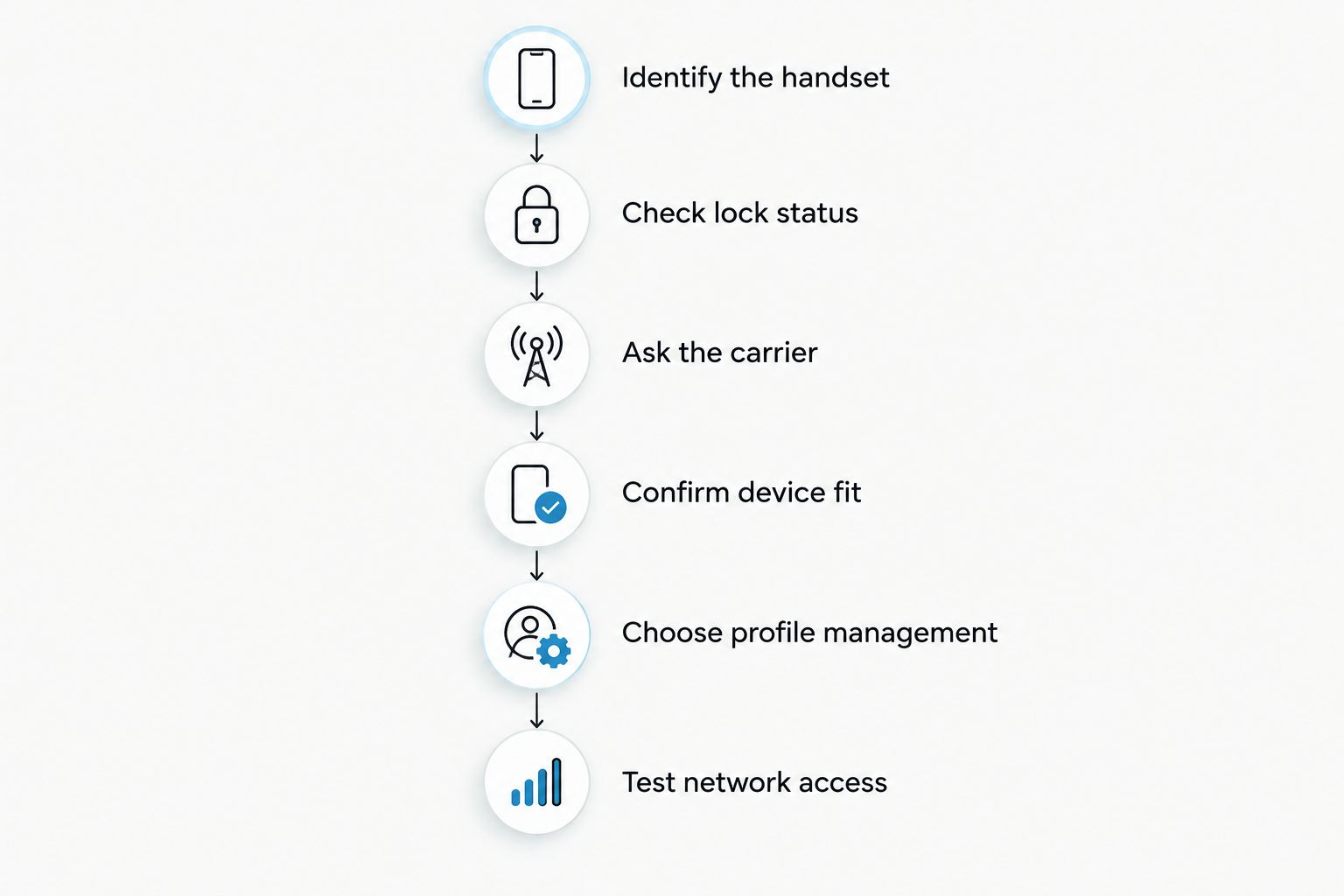
Check the handset’s lock status, then resolve uncertainty with the original carrier. Do not infer the answer from the remaining contract term, the presence of a SIM tray or successful use of the original SIM.
- Identify the handset. Record its exact model, regional variant and current operating system.
- Check lock status. On an iPhone, look under Settings, General, About, then Carrier Lock; an unlocked handset displays No SIM restrictions. Android menus vary, so use the manufacturer’s instructions or contact the carrier.
- Ask the carrier. Confirm whether the handset is unlocked and whether any unlocking requirements remain.
- Confirm device fit. Check physical-slot compatibility and the intended network’s bands.
- Choose profile management. Establish whether you will use an Android app, a configured card or a Bluetooth reader.
- Test network access. After setup, confirm that the intended profile actually registers and passes data.
A successful profile download is not the final test. Check cellular service on the handset that will use the adapter, rather than treating a provisioning confirmation as proof of network access.
Which adapter setup fits your phone?
Choose hardware after confirming the handset’s lock status. Switchesim describes separate routes for Android profile management, compatible iPhone use and reader-based provisioning. None removes the receiving phone’s carrier restrictions.
| Setup | Best for | Supported role | Limitation to check first |
|---|---|---|---|
| Switch Pro | Buyers using Android-based profile management | Managing adapter profiles through the Switch Android app | Confirm the exact Android handset and software support |
| Switch Max | Buyers using a configured card in a compatible iPhone | Extending adapter use to compatible iPhones | Requires a compatible physical SIM slot and a supported setup path |
| Bluetooth reader | Buyers who need profile loading without an Android phone | Provisioning profiles onto compatible adapter hardware | Loading a profile does not unlock the destination handset |
| Pre-loaded destination-data cards | Buyers who want destination data supplied on a card | Reducing the initial profile-loading task | Phone compatibility, carrier restrictions and plan conditions still apply |
Android management: choose Switch Pro for the supported app route
Switch Pro uses Android-based profile management. Choose this route when your exact Android device supports the card and the Switch Android app’s required functions.
The benefit is a defined management path on a compatible Android phone. The limitation is dependence on that supported environment; a physical tray alone does not establish app compatibility. Verify the operating-system requirements before ordering.
Compatible iPhone use: choose Switch Max after checking the tray
Switch Max extends use to compatible iPhones. A configured Max card and profile management are separate parts of the setup: do not assume that using the card in an iPhone means every management task takes place through native iPhone settings.
The benefit is adapter use in a supported iPhone with a physical SIM slot. The limitation is device fit and provisioning support. An iPhone without a physical SIM tray cannot take this removable card.
Reader provisioning: choose the Bluetooth reader without Android management
The Bluetooth reader loads profiles without an Android phone. Switchesim’s reader listing also states that no app or account is required; treat that as a claim about the reader workflow, not a promise about the mobile operator’s activation process.
The benefit is a separate provisioning route. The limitation is equally clear: the reader handles profile loading, not handset unlocking, network-band support or changes to your carrier agreement.
Why compatibility varies between contract phones
Two phones with ongoing contracts can produce different results because the relevant restrictions sit in different places. For your 2026 compatibility check, separate these factors instead of asking only whether the phone is financed.
- Carrier restrictions: A locked handset limits which provider credentials it accepts. Ask the carrier about the actual restriction rather than assuming all profiles are permitted.
- Hardware and regional variant: The receiving phone needs the right physical SIM interface. Model-family names are not enough.
- Software and management method: Android app management, configured-card use and reader provisioning are different workflows.
- Provider provisioning rules: Confirm that the provider supports the activation method and adapter you intend to use. Do not assume every eSIM can be moved freely.
- Radio compatibility: An adapter does not add missing cellular bands to the handset.
- Account and plan conditions: Activation, identity verification, service coverage and contractual obligations remain separate from adapter hardware.
An unlocked phone clears the carrier-lock question, not every compatibility question. Buy against the complete device-and-provider combination.
What should you check about capacity and privacy?
Profile storage is not the same as simultaneous service. Check the selected card’s documented storage capacity, the method for selecting a profile and the handset’s supported active-line configuration. Do not translate a stored-profile count into a promise of concurrent connections.
For privacy, distinguish the adapter-management workflow from the mobile service. The reader’s stated no-app, no-account workflow does not remove any account or identity requirements imposed by an eSIM provider. It also does not make cellular use anonymous.
Keep activation credentials private and follow the provider’s transfer instructions before deleting a working profile. A QR code or activation code is not something to publish in screenshots or share with an untrusted support contact.
For a 2026 purchase, check current documentation for the exact card and reader combination. Avoid relying on a capacity claim attached to a different model or a different management method.
Does a pre-loaded data card change the contract-phone answer?
No. Pre-loaded data changes the preparation, not the handset’s carrier restrictions. A card with a profile already supplied still needs a compatible receiving phone and permission to use the intended provider.
The supplied Switchesim catalog includes destination-data cards described as 10GB over 30 days, 20GB over 30 days and 50GB over 180 days. Those figures describe data allowances and plan periods, not stored-profile capacity, handset compatibility or an unlocking capability.
Check when the plan period starts, what destinations it covers and how activation works before choosing a card. Do not assume that delivery, profile loading and the start of usable service are the same event.
Bulk or white-label supply changes procurement, not this technical boundary. For a fleet, validate each handset variant and provisioning path before repeating the setup across devices.
Can I keep paying my contract while using another eSIM provider?
Yes, an ongoing contract can coexist with another provider’s service on a compatible, unlocked handset. Your existing agreement continues according to its terms; installing an adapter does not cancel it.
If you need calls or verification messages on the original number, confirm how that line will remain accessible. An adapter occupying the only physical SIM slot changes where the original SIM can be used.
Will a Bluetooth reader unlock my carrier-locked phone?
No, a Bluetooth reader provisions profiles; it does not unlock the phone. The receiving handset still applies its carrier restrictions when you try to connect.
Use the reader to solve a profile-loading requirement. Use the carrier’s unlocking process to address a carrier lock.
Should I wait until my contract ends before buying an adapter?
Wait for compatibility confirmation, not an assumed contract-end milestone. An unlocked phone under contract can qualify now, while a phone whose payments have ended still needs its lock status checked.
For a 2026 buying decision, confirm the lock, physical slot, operating system and provider first. Then select the management route that fits your actual device.
FAQ
Can I use an eSIM adapter while I still owe money on my phone?
Yes, if the handset accepts the intended provider and meets the adapter’s compatibility requirements. Device financing does not by itself establish carrier-lock status, and your payment obligations remain in place.
Does an eSIM adapter bypass a carrier lock?
No, an eSIM adapter does not bypass a carrier lock. Confirm unlocking eligibility with the original carrier before buying hardware for another provider.
Can a carrier-locked phone use a profile from its existing carrier?
Compatibility requires confirmation from the carrier and adapter supplier. Acceptance of the original physical SIM does not establish support for that carrier’s profile on a removable eSIM adapter.
Can I use an adapter on an iPhone without a SIM tray?
No, a removable SIM-slot adapter needs a compatible physical SIM slot. A Bluetooth reader does not add that slot to the iPhone.
Does loading an eSIM profile prove it will work in my phone?
No, successful profile loading does not prove cellular network access. The receiving phone must also accept the provider and support the required network bands.
Will removing my original SIM cancel my contract?
No, removing the original SIM does not cancel your carrier agreement. Check the agreement before changing service or moving your number.
What should I check before buying an adapter in 2026?
Check carrier-lock status, the exact handset variant, physical-slot compatibility, software support and provider requirements. Confirm the profile-loading method before purchase.
One last thing
Ask two separate questions: can I load the profile, and can this phone use it? A reader or management app answers the first. Carrier restrictions, handset compatibility and provider support determine the second.
Do not buy an adapter to fix the wrong problem. Resolve the lock question first, then choose the card and setup route.



