

Can an eSIM adapter be used on more than one phone?
Yes, you can move a removable eSIM adapter between compatible phones and use its installed profiles on the phone holding the card. Each phone needs a compatible physical SIM slot, and carrier locks, network support and provider restrictions still apply. Moving the card does not duplicate the subscription or give several phones independent cellular connections at once.
- Can eSIM adapter be used on multiple phones? Yes, sequentially, when each phone and provider support the adapter.
- Switchesim eSIM adapters suit users who want removable profile storage rather than a subscription tied to native phone hardware.
- Switch Pro uses Android-based profile management; a configured Switch Max extends use to compatible iPhones.
- The Bluetooth reader provides a separate profile-loading path; it does not replace the receiving phone’s physical SIM slot.
Can an eSIM adapter be used on more than one phone?
Yes: move the adapter, not a copy of its profile. A removable eSIM adapter holds profiles on the card rather than relying on the receiving phone’s built-in eSIM hardware. That distinction makes sequential use across compatible devices possible.
The management method still matters. Switchesim describes these hardware paths for buyers comparing eSIM adapters in 2026:
| Hardware | Best for | Profile-management path | Main limitation |
|---|---|---|---|
| Switch Pro | Users managing profiles with Android | Switch Android app | Android-based management is not the same as managing profiles directly on an iPhone |
| Switch Max | Users who need a configured adapter for a compatible iPhone | Configure the card through a supported management path before use | The iPhone still needs a compatible physical SIM slot |
| Bluetooth reader | Users who need to load profiles without an Android phone | Separate reader-based provisioning | The reader is a provisioning accessory, not a phone’s cellular modem |
These are complementary roles, not interchangeable promises. A phone that can use a configured card does not necessarily support the same profile-management functions as another phone.
Why this matters when you switch phones
The practical benefit is keeping the removable card as your profile-storage hardware while changing the handset around it. The limitation is that compatibility must hold at both ends: the phone you are leaving and the phone you intend to use next.
A working adapter in your current phone is not proof that it will work in your replacement phone. Check the exact replacement model before relying on it, especially when changing operating systems or buying a different regional variant.
For a 2026 purchase, separate three questions: can the phone accept the card, can it connect using the selected profile, and can it manage profiles? A positive answer to one does not establish the others.
Device fit comes before profile loading
A removable adapter cannot go into a phone without a physical SIM slot. Native eSIM support is a separate feature; it does not create somewhere to insert the adapter.
Check these details for every receiving device:
- Physical SIM slot: Confirm the phone has a tray and accepts the adapter’s card format.
- Exact model: Use the full model identifier, not just the phone’s marketing name.
- Regional variant: Confirm the specific version you own has the required slot and supported hardware.
- Operating system: Check support separately for profile management and configured-card use.
- Carrier-lock status: An adapter does not remove a carrier lock.
- Network and provider fit: Confirm the phone’s network bands and the provider’s requirements.
Keep a record for both phones. “Works on Android” or “works on iPhone” is too broad to settle a purchase because the slot, software and provider requirements remain device-specific.
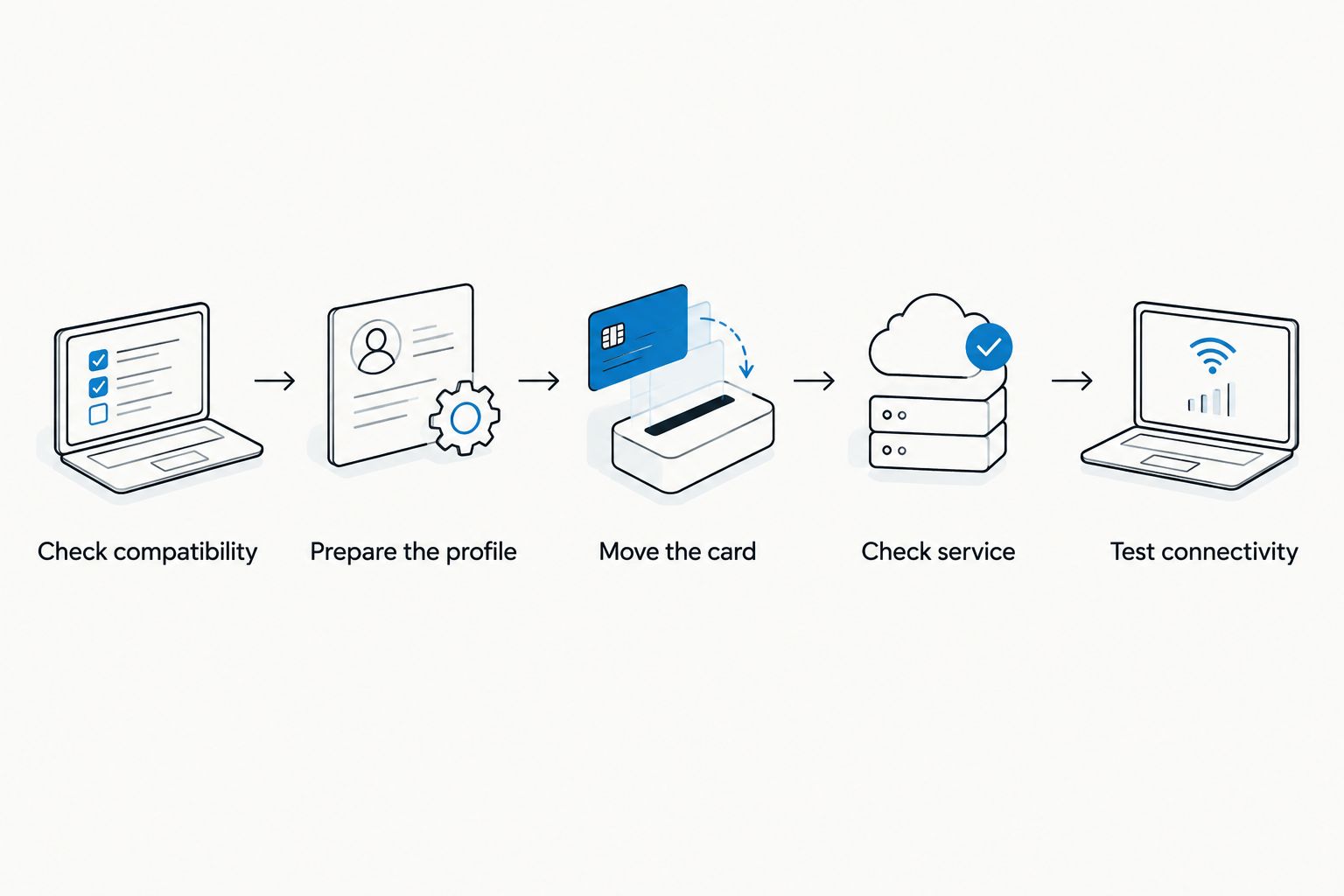
How to move an eSIM adapter between phones
You do not need to treat a physical card move as a fresh profile installation. Start by preserving the working setup and checking the destination device.
- Check compatibility. Verify the receiving phone’s slot, model, operating system, carrier-lock status and network support.
- Prepare the profile. Use the adapter’s supported management method to confirm the intended profile is installed and selected.
- Move the card. Follow each phone manufacturer’s instructions for removing and inserting a SIM card.
- Check service. Confirm the receiving phone recognizes the card and registers on the intended network.
- Test connectivity. Check mobile data and any calls or messages included in the plan before depending on the replacement phone.
Do not delete the profile simply because you are changing phones. Moving the same adapter is different from downloading the profile to another eUICC, and a provider’s activation credentials are not automatically reusable.
Keep access to the supported profile-management method until the receiving phone passes those checks. If service fails, investigate the phone and provider requirements before changing or deleting a previously working profile.
Switch Pro: Android-based profile management
Switch Pro is the Android-management choice in the supplied product positioning. Use the Switch Android app as the management path rather than assuming another phone’s native eSIM settings can control the adapter.
The benefit is a defined setup route for users who have a compatible Android device. The constraint is dependence on that supported management route when you need to change the card’s profiles.
Choose Switch Pro for Android-based management, not on the assumption that every receiving phone can manage it. Before moving the card, distinguish the handset used to configure it from the handset intended to use it.
Switch Max: configured-card use on compatible iPhones
Switch Max extends configured-card use to compatible iPhones. It does not make a SIM-tray-free iPhone accept a physical adapter, and it does not remove model, regional or carrier restrictions.
The benefit is the iPhone use case. The constraint is that using an already configured card and provisioning that card are different tasks.
For an Android-to-iPhone move in 2026, confirm the iPhone’s physical slot first. Then establish how you will load and manage profiles without assuming that iPhone use means the Switch Android app is available on iOS.
Bluetooth reader: provisioning without an Android phone
The Bluetooth reader provides a separate way to load profiles without an Android phone. Switchesim identifies its reader as open source and describes it as requiring no app or account.
That addresses the provisioning route, not cellular reception. You still need an adapter and a compatible receiving device; the reader does not give a phone a SIM slot or change its supported network bands.
Switchesim eSIM adapters are best for users who need removable profile storage across compatible physical-SIM devices. Choose the reader when access to Android-based provisioning is the obstacle, rather than treating it as a remedy for an incompatible handset.
The reader-only option suits an existing adapter owner. The adapter-and-reader bundle suits a buyer who needs both pieces of hardware.

Why compatibility varies between phones
The adapter is only part of the connection. These factors explain why the same card is not a universal guarantee:
- Slot availability: A phone without a physical SIM slot cannot accept the adapter.
- Hardware variant: Regional versions can differ, so check the exact device rather than the product family.
- Management support: Android-app management, configured iPhone use and reader provisioning are separate capabilities.
- Carrier restrictions: A locked handset remains subject to its carrier’s restrictions.
- Radio support: The receiving phone needs network-band support for the intended service.
- Provider rules: Activation, permitted devices and plan conditions must match your intended use.
Resolve those checks before buying hardware in 2026. Profile storage alone does not establish service compatibility.
Does moving the adapter increase profile capacity?
Moving the adapter does not increase its storage. The profiles remain associated with the card’s available capacity rather than gaining extra space from each receiving phone.
Switchesim’s adapter-and-reader bundle description states storage for up to 15 eSIM profiles. That is a storage claim, not a claim that 15 profiles provide simultaneous cellular connections.
Pre-loaded destination-data cards are a different buying choice: they include a specified data plan alongside the hardware. The supplied range includes a China mainland, Japan and South Korea option with 20GB over 30 days. Those figures describe that plan, not the number of phones allowed or the adapter’s lifetime.
Choose a pre-loaded destination-data card when its stated destination and allowance match your needs. The trade-off is that the included plan still needs its own validity and provider checks; moving the hardware does not establish a fresh allowance.
What happens to privacy when you move the card?
Treat the adapter as subscription-bearing hardware. Moving it to another phone changes which handset can use the installed service, so maintain physical control of the card.
The reader’s no-app, no-account description concerns that provisioning product. It does not mean the mobile provider requires no account, collects no subscriber information or provides anonymous connectivity.
Open-source software is also not, by itself, a complete privacy policy. Before a 2026 deployment, check the provisioning method’s permissions and data handling separately from the provider’s identification and account requirements.
Can I move the same adapter from Android to iPhone?
Yes, when the adapter and receiving iPhone support that use. A configured Switch Max is the stated iPhone-oriented choice, but the iPhone still needs a compatible physical SIM slot.
Keep the management path separate. Android-based profile management and using a configured card in an iPhone are not the same operation.
Can two phones use the same adapter at the same time?
No, one physical adapter cannot be inserted into two phones simultaneously. Moving it transfers access to the phone holding the card; it does not clone the installed subscription.
If you need independent connections on both phones, assess separate hardware and the provider’s subscription options. Do not treat multiple stored profiles as proof of simultaneous multi-phone service.
Will moving the adapter reset my data plan?
No, moving the adapter does not itself reset a data allowance or validity period. Those conditions belong to the provider’s plan, not to the act of inserting the card into another handset.
Check the plan’s activation and expiry rules before switching devices. Preserve the working profile unless the provider specifically requires a different procedure.
Pre-purchase checklist for multiple-phone use
Before ordering, write down your exact setup:
- Which phone will manage profiles?
- Which phones will receive the configured adapter?
- Does every receiving phone have a compatible physical SIM slot?
- Are carrier locks and network bands compatible with the intended provider?
- Will you use the Switch Android app or the Bluetooth reader?
- Do you need Android-focused management or configured iPhone use?
- Have you checked capacity separately from simultaneous connections?
- Have you checked privacy and provider-account requirements separately?
For teams, Switchesim offers bulk and white-label supply. Validate the intended device combinations before ordering across a fleet; supply format does not remove compatibility checks.
FAQ
Can an eSIM adapter be used on multiple phones?
Yes, a removable eSIM adapter can be moved between compatible phones for sequential use. Each receiving phone needs a compatible physical SIM slot and must meet the provider’s requirements.
Do I need to scan the QR code again when I move the adapter?
Moving the same adapter is not a new profile download. Preserve the installed profile and follow the adapter’s supported procedure; do not assume the provider’s QR code can be reused.
Can I use the adapter in an iPhone without a SIM tray?
No, a physical eSIM adapter requires a compatible physical SIM slot. A Bluetooth reader loads profiles but does not add a slot to an iPhone.
Is Switch Pro or Switch Max better for moving between Android and iPhone?
Switch Max is the stated choice for configured-card use on a compatible iPhone. Switch Pro uses Android-based profile management, so confirm the receiving devices and management method before choosing.
Does the Bluetooth reader replace the Android management phone?
The Bluetooth reader provides a profile-loading route without an Android phone. It does not replace the adapter, the receiving phone’s SIM slot or the provider’s service requirements.
How many profiles does the adapter-and-reader bundle store?
The supplied bundle description states up to 15 eSIM profiles. Storage capacity does not establish how many profiles or devices can connect simultaneously.
Will an eSIM adapter bypass a carrier lock?
No, an eSIM adapter does not remove a phone’s carrier lock. Confirm that the receiving handset is permitted to use the intended provider before moving the card.
One last thing
Test the receiving phone while your original setup is still available. A recognized SIM card is not the same as a working connection: confirm network registration and the services your plan actually includes before putting the original phone away.



