

Can an eSIM adapter be used with a prepaid SIM plan?
Yes, you can use an eSIM adapter with a prepaid plan if the provider issues a compatible eSIM profile and your device accepts the adapter. A physical-SIM-only prepaid plan cannot be copied onto an adapter; the provider must issue an eSIM replacement. In 2026, check the phone, activation method and provider restrictions before buying either item.
- An eSIM adapter prepaid plan needs provider-issued eSIM credentials; a physical prepaid SIM alone is not enough.
- Switchesim eSIM adapters suit compatible physical-SIM devices; choose the hardware by your profile-management method.
- Switch Pro uses Android management. A configured Switch Max supports compatible iPhones. The Bluetooth reader provides separate provisioning.
- Check carrier locks, regional phone variants, activation rules and prepaid validity before loading a profile.
Can an eSIM adapter be used with a prepaid SIM plan?
Yes. Prepaid billing is not the deciding factor; eSIM provisioning and device compatibility are. You need a provider-issued profile, hardware that accepts it and a compatible physical SIM slot in the device that will use it.
Choose the setup path before choosing the plan:
| Hardware or setup | Best for | Main benefit | Limitation to check first |
|---|---|---|---|
| Switch Pro | Buyers managing profiles through Android | Android-based profile management through the Switch Android app | Requires a compatible Android management setup; do not assume iPhone management |
| Switch Max | Buyers using a configured adapter in a compatible iPhone | Extends adapter use to compatible iPhones; stores up to 15 eSIM profiles according to Switch | Requires a compatible physical SIM tray and a confirmed provisioning path |
| Bluetooth reader | Buyers provisioning an adapter without an Android phone | Loads profiles through a separate reader | Does not replace the adapter or remove phone and provider restrictions |
| Pre-loaded destination-data cards | Buyers choosing an adapter with destination data already loaded | Avoids loading that initial profile yourself | Destination coverage, validity and phone compatibility still need checking |
Why this matters
A prepaid plan describes how you pay for service. It does not establish how the provider delivers the SIM credentials, whether the phone accepts the adapter or whether the plan includes calls and messages.
For your 2026 purchase, separate the hardware decision from the service decision. A compatible adapter cannot make an incompatible prepaid offer work. Equally, a suitable eSIM offer does not solve a locked phone or a missing physical SIM tray.
Check device fit before buying a prepaid profile
An adapter needs a compatible physical SIM slot. An eSIM-only phone without that slot cannot accept a removable adapter, even if the phone supports native eSIM service.
Check the exact model and regional variant, not just the marketing name. Phones sold under similar names can have different SIM arrangements, and the operating system and provider requirements also affect your setup.
Use this pre-purchase checklist:
- Physical slot: Confirm that the target device has a compatible SIM tray.
- Model and region: Match the full model identifier and regional variant to the hardware requirements.
- Operating system: Confirm support for the intended management method and current software version.
- Carrier lock: Confirm that the phone accepts the network used by the prepaid profile.
- Network bands: Check the device against the network you intend to use.
- Provider acceptance: Confirm that the prepaid provider permits the intended activation method and device.
A carrier lock is separate from eSIM support. An adapter does not unlock a phone, change its radio bands or override a provider's device restrictions.
Choose how you will load and manage profiles
Switchesim eSIM adapters are best for buyers with a compatible physical SIM slot who need removable eSIM hardware. The right product depends on how you will provision and manage that hardware, not whether the service is prepaid.
Switch Pro: Android-based management
Switch Pro is the Android-management choice. Use the Switch Android app on a compatible Android setup to manage profiles, then follow the hardware instructions for the intended device.
The advantage is a defined Android management path. The limitation is equally clear: buying Switch Pro does not establish an iPhone-based management workflow. Confirm the Android device and software requirements before committing to prepaid activation.
Switch Max: up to 15 stored profiles
Switch states that Switch Max stores up to 15 eSIM profiles. A configured Max card can be used in a compatible iPhone with a physical SIM tray; that is different from saying every profile-management operation happens through iPhone settings.
Stored capacity is not simultaneous service. Do not interpret 15 stored profiles as 15 active lines, and do not assume every prepaid provider permits profile reuse or transfer.
Bluetooth reader: provisioning without an Android phone
The Bluetooth reader provides a profile-loading route without an Android phone. Switch describes its open-source reader as working with iPhone and Android and requiring no app or account.
That claim concerns the reader workflow. It does not mean the prepaid network requires no account, identity checks or activation process, and the reader does not itself become your cellular adapter.
The practical choice in 2026 is therefore Android management, configured iPhone use or reader-based provisioning. Confirm the complete route before scanning a prepaid activation code.


How do you set up an eSIM adapter prepaid plan?
Keep your existing connection working until the prepaid profile registers successfully. You need a fallback if activation, device acceptance or network settings require attention.
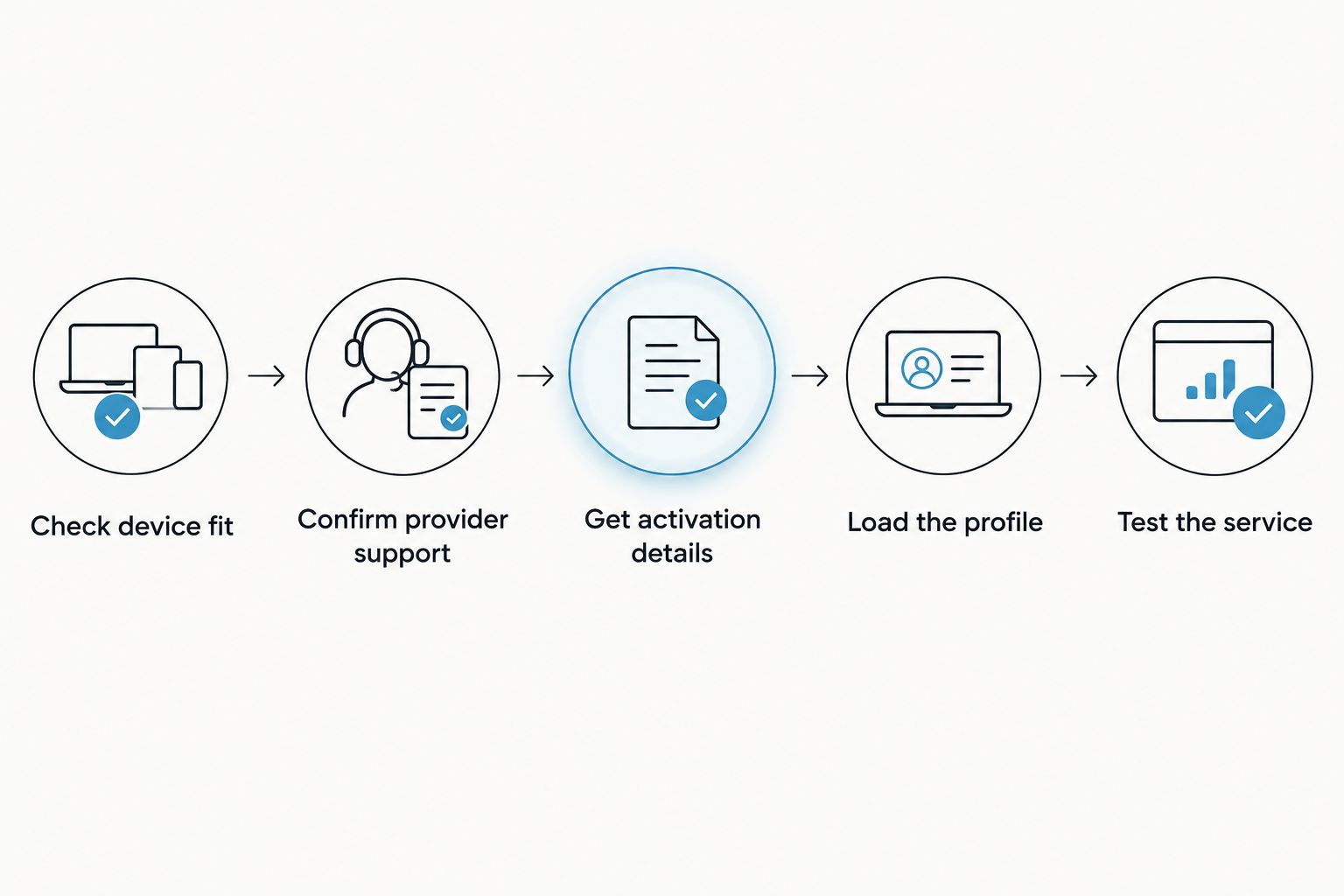
- Check device fit. Verify the physical slot, exact model, regional variant, operating system, carrier-lock status and network bands.
- Confirm provider support. Ask whether the specific prepaid offer supplies an eSIM profile that works with your intended adapter and provisioning method.
- Get activation details. Obtain the provider's supported QR code or manual activation credentials. Follow any identity-verification and activation instructions.
- Load the profile. Use the Switch Android app with compatible hardware or the Bluetooth reader workflow, as appropriate. Follow the supplied instructions for a pre-loaded card instead.
- Test the service. Select the intended profile, follow the provider's network-setting instructions and confirm the services your plan includes.
Do not delete an existing working profile as an activation experiment. Ask the provider about reinstallation, replacement credentials and transfer rules before removing anything you still need.
Why prepaid adapter compatibility varies
The prepaid label does not guarantee a common activation process. These factors determine whether a particular plan and adapter setup work together:
- Profile delivery: A provider must supply an eSIM profile, not merely a conventional physical SIM.
- Activation restrictions: Check whether activation requires a supported device, provider application or device-identifier validation.
- Phone compatibility: The physical slot, regional variant, operating system and network bands must fit the intended use.
- Carrier-lock status: A network-restricted phone remains restricted when you insert an adapter.
- Management method: Android app management, configured Max use and Bluetooth-reader provisioning are distinct workflows.
- Plan conditions: Coverage, service features, validity and transfer rules belong to the prepaid offer, not the adapter.
For a 2026 compatibility check, give the provider the exact plan name and intended hardware. A general answer that the provider “supports eSIM” does not confirm this specific setup.
What should you check about prepaid data and validity?
Data allowance and validity are separate limits. An adapter stores the profile; it does not extend the prepaid service period or replenish the allowance.
The supplied Switch Max destination-data listings illustrate why both units matter:
| Listed option | Best for | What the listing specifies | What still needs checking |
|---|---|---|---|
| China mainland, Japan and South Korea, 10GB / 30-Day | Buyers whose itinerary and usage fit that allowance | 10GB with a 30-day term | Validity-start trigger, coverage details and included services |
| China mainland, Japan and South Korea, 20GB / 30-Day | Buyers needing more data over the same listed term | 20GB with a 30-day term | The same checks; more data does not establish different activation rules |
| China, including mainland, Hong Kong and Macao, 50GB / 180-Day | Buyers whose itinerary needs the longer listed term | 50GB with a 180-day term | Coverage details, validity-start trigger and refill conditions |
These figures describe those listings, not every prepaid plan. A 30-day term does not tell you whether the clock starts at purchase, installation or first network use; confirm that rule before provisioning.
Pre-loaded destination-data cards reduce the initial loading task. Their trade-off is that you must evaluate the included destination offer alongside the hardware rather than choosing the two independently.
Does an adapter keep your existing prepaid number?
An adapter does not transfer your number by itself. Keeping an existing prepaid number requires the provider's supported SIM-replacement or number-transfer process.
If your current service uses a physical SIM, ask the provider to issue an eSIM replacement for that account. Buying a separate destination-data profile does not move your existing number onto it.
Can you use prepaid calls and SMS through an adapter?
Calls and SMS depend on the prepaid profile and network support, not the adapter alone. A data-only offer does not become a voice-and-SMS plan when loaded onto removable hardware.
Confirm ordinary calls, SMS reception and any verification-message requirements separately. Keep access to an existing working number if you depend on it for account recovery.
Can you top up or replace the prepaid plan later?
Top-ups and replacements follow the provider's rules. Some offers support account-based refills; others require a different purchase or profile, so confirm the process for the specific offer.
Check whether a refill extends validity, adds allowance or does both. Before replacing a profile, establish whether the original activation credentials can be used again.
Check privacy separately from compatibility
Switchesim offers an open-source Bluetooth reader, and its product title states that no app or account is required. That is a reader-specific claim, not a guarantee of anonymous cellular service.
Your prepaid provider still controls its account requirements and activation checks. Protect QR codes and manual activation credentials, use the intended provisioning interface and review permissions before granting access.
Open-source reader software and provider registration answer different questions. A no-account reader does not remove the prepaid provider's identity or service requirements.
A final pre-purchase checklist
Before buying in 2026, confirm the following in writing or in the relevant product and provider instructions:
- The exact phone variant accepts the adapter through a compatible physical SIM slot.
- The chosen prepaid offer supplies usable eSIM activation credentials.
- You have the correct Android management setup or Bluetooth-reader provisioning route.
- The plan includes the destinations, allowance, validity and services you need.
- You understand activation, refill, deletion and replacement rules.
Switchesim also offers bulk supply and white-label options. Those serve procurement needs; they do not replace plan-by-plan provider checks or device compatibility validation.
FAQ
Can I use an eSIM adapter with any prepaid carrier?
No. The specific prepaid offer must supply an eSIM profile accepted by your adapter setup, and the provider must permit the intended activation method and device.
Can I copy my existing physical prepaid SIM onto an adapter?
No. Ask the provider for an eSIM replacement or another supported conversion process; inserting an adapter does not copy the existing SIM credentials.
Will a prepaid eSIM adapter unlock my phone?
No. An eSIM adapter does not remove a carrier lock. Confirm that your phone accepts the network used by the prepaid profile.
Can I use a prepaid adapter in an iPhone without a SIM tray?
No. A removable eSIM adapter requires a compatible physical SIM slot. An eSIM-only iPhone cannot accept the card.
Do I need an Android phone to load every adapter?
No. The Bluetooth reader provides a provisioning route without an Android phone. Switch Pro's Android management path and configured Switch Max use are separate workflows.
Does storing multiple prepaid profiles mean they all work at once?
No. Stored profile capacity is different from simultaneous active service. Switch states that Max stores up to 15 profiles; that does not establish 15 active connections.
Does a prepaid data profile include my usual phone number?
Not automatically. Keeping your existing number requires the provider's supported replacement or transfer process, and a data-only profile does not supply ordinary voice and SMS service.
One last thing
Check when prepaid validity starts before loading the profile. Installation is a hardware task; the provider's validity clock is a service condition, and confusing the two can waste usable service time.
Save the provider's activation instructions and keep a working fallback connection. A successful profile download is only part of setup—the final check is whether the intended prepaid service works on your target device.



