

Can an eSIM adapter host eSIM profiles from any carrier worldwide?
No. In 2026, an eSIM adapter cannot guarantee support for profiles from every carrier worldwide: the provider must permit the profile to be downloaded to that adapter, and your device must support the adapter’s physical SIM format and operating requirements. Loading a profile also does not guarantee service; carrier locks, network bands, plan coverage and activation restrictions still apply.
- The answer to ‘esim adapter any carrier worldwide’ is no: provider approval and device compatibility still matter.
- Switchesim eSIM adapters serve compatible physical-SIM devices, not phones without a suitable SIM slot.
- Android management, configured iPhone use and Bluetooth reader provisioning are different workflows.
- Stored profiles, active connections and destination coverage are separate limits; verify each before buying.
Can an eSIM adapter host eSIM profiles from any carrier worldwide?
An adapter adds a way to store and use supported eSIM profiles. It does not give you unrestricted access to every carrier. A carrier offering eSIM service is not, by itself, confirmation that its activation process supports removable adapter hardware.
Switchesim describes physical eSIM adapters for compatible devices with a physical SIM slot. Its stated setup paths distinguish Android-based profile management, compatible iPhone use with a configured Max card, and provisioning through a Bluetooth reader.
Check these separate requirements before treating a carrier as compatible:
| Requirement | What you need to establish | What it does not prove |
|---|---|---|
| Profile provisioning | The provider permits installation on the adapter | That your phone accepts the card |
| Device compatibility | Your exact device supports the adapter and setup method | That a carrier lock permits another provider |
| Network compatibility | Your device supports the relevant network bands | That the plan includes your destination |
| Plan coverage | The plan includes the country and required service | That every local network is included |
A successful download answers only the provisioning question. Test network registration and the services you need separately.
Why this matters
For a 2026 purchase, check the carrier and device before choosing hardware. Buying an adapter first and checking activation later leaves the central compatibility question unresolved.
The distinction matters when you want to keep an existing number, use local subscriptions abroad or replace a travel-data provider. Those are different requirements. A destination-data plan is not automatically a replacement for a subscription that supplies your regular calls and messages.
Keep the purchase decision narrow: your device, your intended provider and your profile-loading method. Country coverage alone is not enough.
Device fit comes before carrier choice
A suitable physical SIM slot is mandatory for the adapter card. A phone without that slot cannot accept the card, even if its operating system supports native eSIM.
Check the exact model and regional variant rather than the model family alone. Also check operating-system requirements, carrier-lock status and network bands. A matching tray is necessary, but it is not the complete compatibility test.
For Android, distinguish using the card for service from managing profiles through an Android app. For iPhone, distinguish using a configured compatible card from loading profiles onto it. Neither distinction disappears because the phone has Bluetooth.
Routers, hotspots and IoT devices need the same discipline. A physical SIM slot does not establish that the device can manage the adapter’s profiles or connect to your chosen network.
Switchesim eSIM adapters are best for multi-profile users whose devices have a compatible physical SIM slot and a verified setup path. They are not a workaround for missing radio bands or an unsupported carrier activation process.
Choose the profile-loading method, not just the card
The product choice follows your management device. Start with the limitation in the final column, then decide whether the corresponding workflow fits.
| Option | Best for | Supported workflow described by the brand | Main limitation to check |
|---|---|---|---|
| Switch Pro | Android-based profile management | Manage profiles through the Switch Android app | Requires a compatible Android management path; do not assume iPhone-side provisioning |
| Switch Max | Compatible iPhone users | Use a configured Max card in a compatible iPhone; Android management is a separate path | Requires a compatible physical SIM slot and a confirmed loading method |
| Bluetooth eSIM card reader | Provisioning without an Android phone | Load profiles through the reader-based workflow | It provisions an adapter; it does not replace the adapter or remove carrier restrictions |
| Pre-loaded destination-data cards | Buyers with a defined destination and data requirement | Start with a card supplied with a destination-data plan | The included plan has its own destination, allowance and validity limits |
Choose Switch Pro for a verified Android management setup. Choose Switch Max for a compatible iPhone setup. Add the Bluetooth reader when you need its provisioning path rather than assuming an Android phone is available.
The reader and adapter-reader bundle below address that loading decision. The standalone reader is a provisioning accessory, while the bundle includes an adapter. Neither establishes universal carrier support.

Why carrier compatibility varies
Carrier compatibility depends on more than the country printed on a plan. Check these factors for the exact combination you intend to use:
- Provider activation rules: Confirm that the provider permits installation on removable eSIM adapter hardware.
- Profile-loading method: Confirm whether the provider supplies activation details your management workflow accepts, such as a QR code or manual activation information.
- Device and regional variant: Check the physical SIM slot, operating system and adapter support for your exact device.
- Carrier-lock status: Confirm that the phone accepts the intended provider rather than assuming an adapter bypasses its lock.
- Network bands: Verify that the device supports the destination network’s relevant bands.
- Plan scope: Check destination coverage, validity and whether the subscription includes data, calls or messages.
A provider’s coverage list answers where its plan is intended to work. It does not answer whether you can provision that plan onto your chosen hardware.
Check a carrier before buying its eSIM
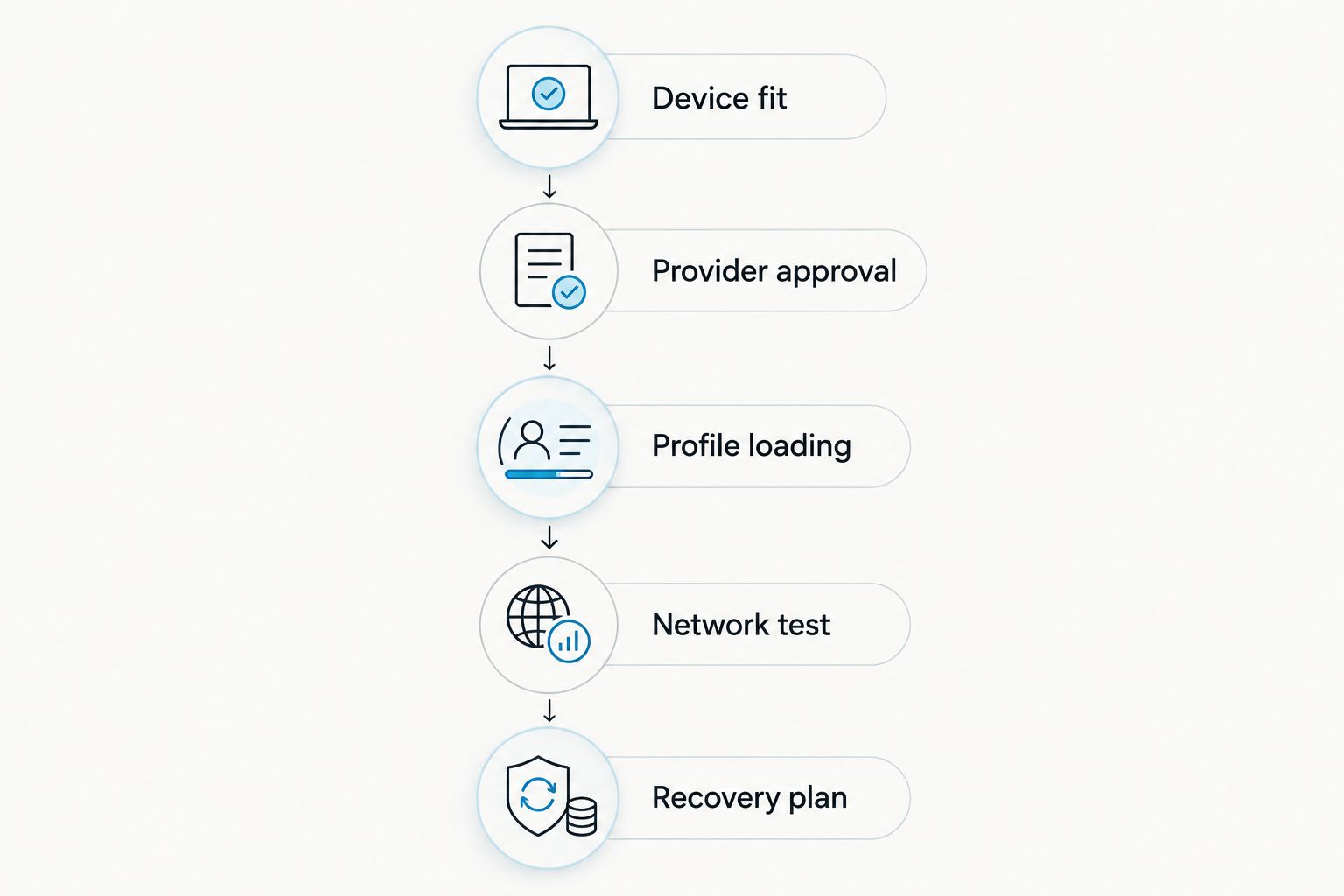
Use this sequence for a 2026 compatibility check. Keep the provider’s answer tied to the exact adapter and device, not simply the word eSIM.
- Device fit: Record your device’s exact model, regional variant, operating system and carrier-lock status. Confirm that it has the required physical SIM slot.
- Provider approval: Ask whether the particular plan supports a removable eSIM adapter. Name the hardware and explain whether you will use Android management or reader-based provisioning.
- Profile loading: Establish how you will receive the activation information. Ask whether activation requires a provider app, an approved device or another process that changes your setup.
- Network test: After loading the profile, confirm that the device registers on a network. Check the provider’s required settings and test the service the plan actually includes.
- Recovery plan: Before deleting a working profile, confirm the provider’s reinstallation or replacement procedure. Keep access to another connection while setting up the new one.
Ask a precise question: does this particular plan support installation on this adapter, using this loading method, for this device? A general statement that the provider supports eSIM does not resolve those details.
For bulk or white-label deployments, apply the same checks to the intended device range. Confirm the provisioning procedure before expanding beyond your tested hardware and provider combination.
Profile capacity is not worldwide carrier support
Switchesim describes its adapter-and-reader bundle as storing up to 15 eSIM profiles. That is a storage claim for the listed bundle, not a promise that every carrier’s profile will install.
Do not turn that figure into a simultaneous-connection claim. Stored profiles, enabled profiles and active mobile connections are different questions, each requiring confirmation for your hardware and device.
Check capacity for the exact card you order rather than copying a specification from another product or bundle. If retaining several subscriptions is essential, also establish how you will select profiles and recover access after changing devices.
Privacy depends on more than the provisioning accessory
Switchesim lists the Bluetooth reader as open source and requiring no app or account. That claim describes the reader workflow; it does not mean your carrier requires no account or that mobile service becomes anonymous.
For a 2026 privacy check, separate hardware management from the mobile subscription. Review the software used to provision the card, the provider’s activation requirements and the handling of your activation credentials.
Keep QR codes and manual activation details private. Do not publish them in support screenshots or share them with an unverified support contact.
Open-source reader software is a relevant selection criterion. It is not a substitute for checking the provider’s policies or the security of the device used during setup.
Pre-loaded cards solve a different problem
Pre-loaded destination-data cards reduce the need to arrange the initial profile separately. They do not prove that unrelated carriers will work on the same hardware.
The supplied catalogue includes a United Arab Emirates card described as 10GB / 30-Day and an Australia & New Zealand card described as 20GB / 30-Day. Those allowances and validity periods describe particular destination-data offerings, not adapter-wide capabilities.
Check when validity begins, which destinations the selected plan covers and which services it includes. Do not assume a destination-data plan supplies a local telephone number or replaces your existing voice subscription.
Choose pre-loaded destination-data cards when the included plan matches your requirement. Choose a separately provisioned setup when selecting and managing your own supported subscriptions is the priority.
What to check before ordering
Use this pre-purchase checklist to keep the hardware decision separate from the subscription decision:
- Your exact device has a compatible physical SIM slot.
- Your regional variant and operating system match the intended setup path.
- Your phone’s lock status permits the intended provider.
- Your device supports the relevant network bands.
- Your provider confirms the plan’s adapter provisioning requirements.
- You have a suitable Android management device or the required reader-based workflow.
- The exact card’s profile capacity meets your needs.
- You understand how to reload or replace a profile if setup fails.
- Your selected plan covers the destination and services you require.
Keep the provider confirmation with your order details. It gives you a specific starting point if installation or network registration fails.
Why did my profile load but fail to connect?
Profile installation and network access are separate stages. A completed download does not confirm that your device is unlocked, supports the network bands or has the correct settings for the plan.
Start with the symptom. If the profile does not appear on the card, investigate provisioning and the management workflow. If the profile appears but the device cannot register, check the device, provider and plan requirements before deleting anything.
If the device registers but data does not work, check the provider’s data settings and plan status. Test calls and messages only when the subscription includes them.
Do not use repeated deletion and downloading as your first troubleshooting step. Confirm the provider’s reuse or replacement process before removing a profile that has already been issued.
Does an adapter bypass a carrier-locked phone?
No. An eSIM adapter is not a carrier-unlocking method. Confirm that your phone accepts the intended provider before buying a different subscription or adapter.
An unlocked phone still needs compatible hardware, network bands and a supported provisioning process. Unlock status resolves only the lock requirement.
Can I use a travel eSIM from a different country?
Yes, when the provider supports your adapter setup and the plan covers where you will use it. The country where the provider operates is not sufficient evidence of either requirement.
Check the exact plan, not just the provider’s name. Destination coverage and profile installation remain separate checks.
FAQ
Can an eSIM adapter accept every carrier worldwide?
No. An eSIM adapter requires a supported provider activation process, compatible hardware and a suitable plan. Worldwide coverage claims do not establish universal profile compatibility.
Will an eSIM adapter work in an iPhone without a SIM tray?
No. A physical eSIM adapter card needs a compatible physical SIM slot. Reader-based provisioning does not add a SIM tray to the phone.
Do I need an Android phone to load profiles?
Not for every setup. Switch Pro uses Android-based management, while the Bluetooth reader provides a loading path without an Android phone; compatible iPhone use with a configured Max card is a separate workflow.
How many profiles can the adapter and reader bundle store?
Up to 15 eSIM profiles is the stated capacity of the listed adapter-and-reader bundle. Storage capacity does not establish simultaneous connections or compatibility with every provider.
Does a carrier QR code guarantee adapter compatibility?
No. A QR code supplies activation information but does not establish that the provider permits the profile on your adapter. Confirm the specific plan and loading method.
Does the Bluetooth reader make mobile service anonymous?
No. The reader’s no-account claim concerns its provisioning workflow, not the carrier subscription. Provider account requirements and privacy policies remain separate.
Can I move an installed profile to another adapter?
Do not assume an installed profile can be moved or downloaded again. Confirm the provider’s transfer, replacement and reinstallation rules before deleting it.
One last thing
The decisive test is not whether the adapter holds a profile; it is whether your complete setup delivers the required service. For a 2026 purchase, verify loading, network registration and the plan’s included functions before relying on the connection.
Keep a working connection available until those checks pass. A profile visible in a management screen is progress, not the end of setup.



