

Can an eSIM adapter replace a physical SIM completely?
An eSIM adapter can replace your conventional SIM card for a supported mobile plan, but it cannot remove the need for physical SIM hardware: the adapter still occupies a compatible SIM slot. It also does not automatically transfer your number, bypass a carrier lock, or give a data-only plan the calls and SMS services of your existing subscription.
- Can eSIM adapter replace physical SIM? For supported service, yes; eliminating the physical card and SIM slot, no.
- Switchesim eSIM adapters suit multi-profile users with compatible physical SIM slots, not phones without SIM trays.
- Android profile management, compatible iPhone use, and Bluetooth reader provisioning are separate setup paths.
- Replacing your main SIM requires provider approval, suitable plan features, and successful calls, SMS, and data checks.
Can an eSIM adapter replace a physical SIM completely?
It replaces the conventional card, not the physical SIM interface or your carrier subscription. In a compatible device, the adapter holds an eSIM profile that supplies the subscription credentials needed for network access. The phone still connects through its physical SIM slot.
There are three separate decisions: whether the hardware fits, whether the provider supports the profile-loading route, and whether the resulting plan covers your existing services. Treating those decisions as one compatibility claim is the mistake to avoid in 2026.
If you want to retain your existing number, start with the provider's process for switching from a physical SIM to eSIM. Buying an adapter is not itself a number transfer.
| Option | Best for | Main benefit | Main limitation |
|---|---|---|---|
| Conventional physical SIM | Keeping an existing subscription without changing its provisioning method | Uses the familiar removable-card setup | Does not provide the adapter's multi-profile storage approach |
| Native eSIM | Users whose exact device and provider support built-in eSIM | Does not need an adapter in the SIM tray | Depends on native device support and provider activation rules |
| Switch Pro | Compatible-device users with an Android management path | Android-based profile management | Requires a compatible physical SIM slot and a suitable management device |
| Switch Max | Compatible iPhone users who need a removable adapter | Extends adapter use to compatible iPhones | A configured card in an iPhone is not the same as Android profile management |
| Bluetooth reader | Users who need profile loading without an Android phone | Provides a separate provisioning route | Does not replace the adapter or the target device's SIM slot |
Why this matters
Your main SIM often provides more than internet access. It can also carry your phone number, ordinary calls, SMS verification messages, and account-recovery access. A destination-data profile is not a substitute for those services unless its provider explicitly includes them.
For a 2026 purchase, define what complete replacement means before selecting hardware. Replacing mobile data is a narrower task than replacing the subscription you use for banking messages, work calls, and contactability.
Switchesim eSIM adapters are best for multi-profile users with compatible physical SIM slots. The advantage is access to an adapter-based profile workflow without native eSIM support. The trade-off is that physical-slot compatibility and profile provisioning remain part of your setup.
Device fit comes before profile capacity
A phone without a physical SIM tray cannot accept this type of adapter. A tray alone is not proof of compatibility either. Check the exact model, regional variant, operating system, carrier-lock status, network bands, and intended eSIM provider.
Use the device's model identifier rather than its retail family name. Two phones sold under similar names can have different regional hardware or SIM arrangements. Match the identifier to the adapter's compatibility information before buying.
Separate these checks:
- Physical slot: Confirm that the target device has the required compatible SIM slot.
- Device model: Check the exact model and regional variant, not just the brand.
- Operating system: Confirm the supported software environment for both use and management.
- Carrier lock: Confirm that the device permits the intended provider's service.
- Network bands: Check the device's radio support against the destination network.
- Provider activation: Confirm that the provider supports the required profile-loading method.
The same discipline applies to routers, hotspots, and IoT devices. A physical SIM slot is necessary for the adapter, but it does not establish that every profile, management action, or network configuration will work.
Switch Pro: Android-based profile management
Choose Switch Pro when your confirmed setup uses Android-based profile management. The supplied product information identifies Android as the management path. That is a capability to check separately from the device that will ultimately use the configured card.
The benefit is a defined Android management route. The limitation is dependence on a suitable Android environment for that route. Do not assume that installing the Switch Android app on an arbitrary Android phone proves compatibility.
Before purchasing, confirm the management phone's support, the target device's support, and the provider's activation requirements. If those are different devices, check both. A successful profile download does not by itself prove that the target device can register on the intended network.
Switch Max: use in a compatible iPhone
Choose Switch Max for a confirmed compatible iPhone setup with a physical SIM tray. A configured Max card can be used in a compatible iPhone. This is distinct from managing profiles through the Switch Android app.
The benefit is adapter use in supported iPhone configurations. The limitation remains physical hardware: an iPhone without a SIM tray cannot accept the card. Regional model differences matter here.
For a 2026 iPhone purchase, establish the loading and switching workflow before ordering. Ask how the profile reaches the card, how you select the intended profile, and what equipment you need for later changes. Do not treat iPhone use as proof that every management operation occurs inside iOS.
Bluetooth reader: provisioning without an Android phone
Choose the Bluetooth reader when your loading workflow must not depend on an Android phone. The reader provisions profiles onto the adapter through a separate hardware path. It is a setup tool, not a replacement for the adapter in the target device.
Switchesim describes the Bluetooth reader as open source, usable with iPhone and Android, and requiring no app or account. Those are the supplier's product claims. They do not establish that every provider's activation flow or every phone configuration is supported.
The advantage is separation between provisioning and everyday phone use. The drawback is another piece of hardware to keep available for the tasks that require it. Confirm the complete workflow, including provider authentication, rather than relying only on the reader's headline description.
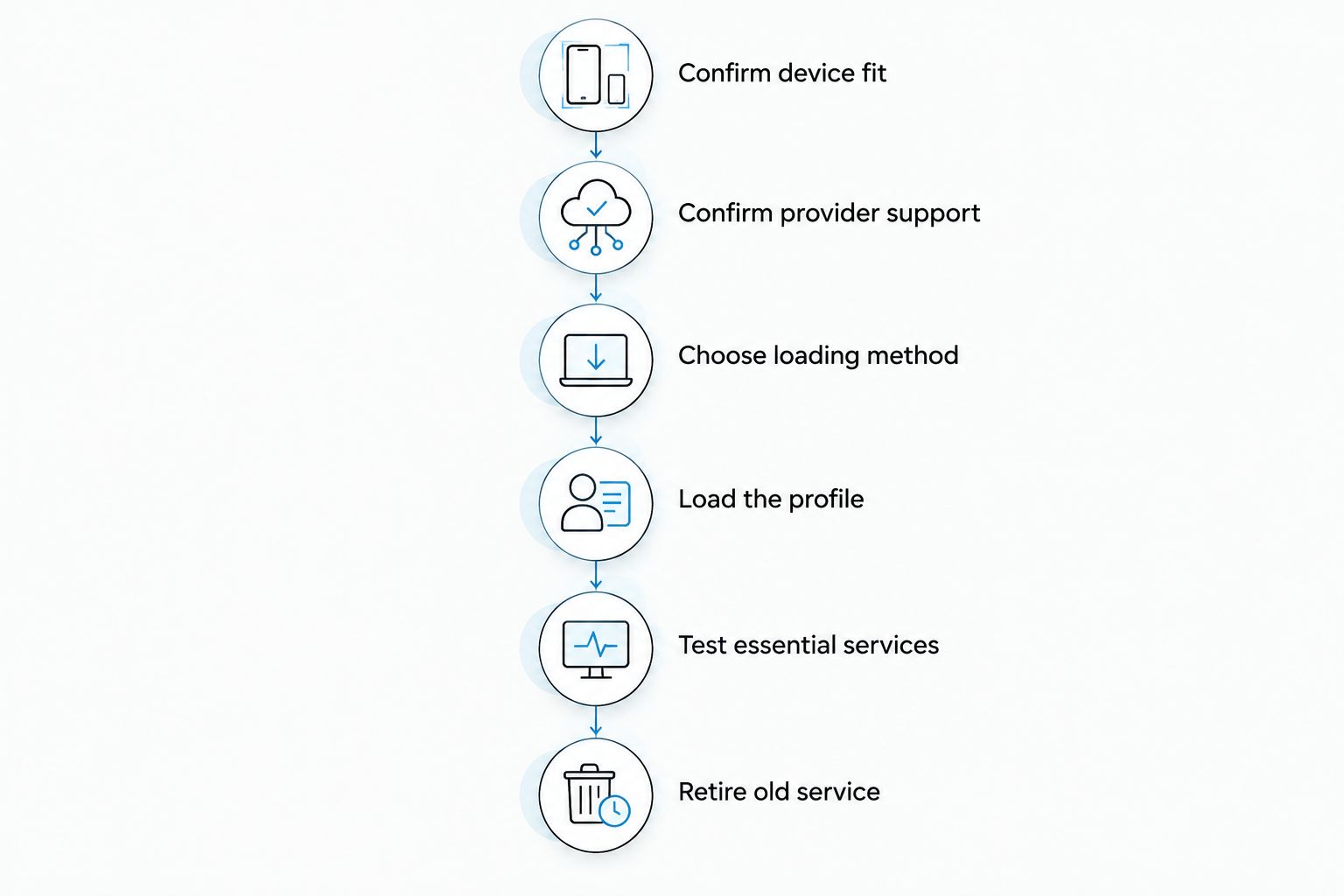
How do you replace your current SIM without losing essential service?
Keep your current service usable while you establish the replacement route. Provider rules determine whether an existing subscription can be reissued as an eSIM and whether that profile works with the adapter's provisioning method.
- Confirm device fit. Identify the target model, regional variant, physical slot, software, and lock status.
- Confirm provider support. Ask about the intended subscription, activation method, number retention, and adapter use.
- Choose loading method. Select Android management, reader provisioning, or a suitable pre-loaded card.
- Load the profile. Follow the provider's activation instructions and the hardware's documented procedure.
- Test essential services. Check mobile data, required calls, SMS, and any other service you depend on.
- Retire old service. Stop relying on the previous SIM only after understanding the provider's migration and recovery rules.
A provider-controlled migration can deactivate the old SIM as part of activation. Ask about that sequence before starting. Keeping the old card physically does not guarantee that its subscription remains active after conversion.
Stored profiles are not simultaneous phone lines
Profile capacity describes storage, not necessarily the number of services available at the same time. Do not read a storage figure as a promise of simultaneous calls, data sessions, or incoming messages across every saved subscription.
The Switchesim adapter-and-reader bundle description states storage for up to 15 eSIM profiles. That claim belongs to the described bundle; it is not evidence that every adapter configuration has identical capacity or that 15 subscriptions operate concurrently.
Before buying, distinguish:
- The number of profiles the selected card can store.
- The process for selecting a profile.
- The device's supported active-line arrangement.
- Whether the inactive subscription can receive the services you need.
For separating work and personal service, active-line behavior matters more than a large storage count. For keeping destination profiles available, storage matters too. Verify both against your actual usage.
Pre-loaded destination-data cards do not automatically replace your number
Pre-loaded destination-data cards reduce the profile-loading work you need to arrange for the included plan. They do not automatically move your existing phone number or reproduce the services of your home subscription.
The supplied catalog includes a Switch Max card with 10GB of China mainland, Japan, and South Korea data for a 30-Day plan. It also includes destination bundles with other allowances and validity periods. Those figures describe the included plan, not the adapter's storage capacity or the phone's compatibility.
Check destination coverage, validity rules, and included services separately. A data allowance tells you nothing by itself about ordinary voice calls or SMS reception.
The following hardware choices address the provisioning decision rather than promising complete replacement of your main subscription:

Why complete replacement varies
The adapter changes the subscription hardware and provisioning workflow. It does not change the target device's radio hardware or rewrite the mobile provider's service rules.
- Device configuration: Model, regional variant, physical slot, and software determine the supported setup.
- Carrier restrictions: A carrier lock can prevent use of the intended subscription.
- Activation method: Provider requirements must match the supported loading route.
- Plan features: Destination data is not equivalent to a plan that includes your required calls and SMS.
- Management access: Android management and Bluetooth provisioning impose different equipment requirements.
- Profile behavior: Storage capacity and active-line capability answer different questions.
For 2026 buying decisions, resolve these factors before comparing convenience. An adapter is useful only when the complete combination of hardware, software, provider, and service meets your needs.
What should you check about privacy before replacing your SIM?
Treat account requirements, software transparency, and mobile-provider identity checks as separate privacy questions. A reader described as requiring no account does not remove the provider's own registration or subscription requirements.
The supplied reader listing makes an open-source claim. That does not, by itself, establish an independent security audit, a particular data-retention policy, or the absence of data collection elsewhere in the activation chain.
Before entering activation credentials, confirm the software source, required permissions, handling of profile information, and recovery procedure. Protect provider activation details as you would other subscription credentials. Ask for the documented privacy model of the exact management route you choose.
Can I keep my existing phone number with an adapter?
Your provider determines whether you can retain your existing number through an eSIM migration. The adapter does not perform number porting or convert the old physical SIM's subscription by itself.
Ask whether the provider can issue the required profile for your existing line. If you are changing providers, confirm the number-transfer process separately from the adapter setup.
Does an adapter bypass a carrier-locked phone?
An adapter does not bypass a carrier lock. The target phone must permit the intended provider's service.
Check unlock eligibility with the carrier before purchasing another plan. Profile loading and permission to use that profile on the phone are separate issues.
Is native eSIM a better replacement if my phone supports it?
Native eSIM is the direct option when your exact phone and provider support the required subscription without an adapter. It avoids occupying the physical SIM tray with adapter hardware.
An adapter remains relevant when you need the removable-card workflow or lack native eSIM support. Compare the supported setup and recovery process, not just whether both options use eSIM profiles.
Pre-purchase checklist for 2026
Use this checklist before treating an adapter as your primary SIM replacement:
- Confirm the exact target device and compatible physical SIM slot.
- Verify carrier-lock status and destination network bands.
- Confirm the provider's activation method and required plan features.
- Identify the equipment needed for loading and later profile changes.
- Verify capacity for the selected card, not a different bundle.
- Confirm number retention, recovery, and replacement procedures.
- Test the services you rely on before retiring the previous setup.
For bulk or white-label purchases, specify the same requirements in the deployment brief. Retail compatibility checks still matter across a fleet. A provisioning method that fits one device does not establish compatibility across mixed hardware.
FAQ
Can an eSIM adapter replace my physical SIM completely?
An eSIM adapter can replace the conventional card for a supported subscription, but it remains physical hardware in a compatible SIM slot. It does not eliminate the slot or automatically transfer your existing number.
Will an eSIM adapter work in a phone without a SIM tray?
A physical eSIM adapter cannot be installed in a phone without a compatible physical SIM tray. Native eSIM support is a separate device capability.
Can I use Switch Max in an iPhone without an Android phone?
Switch Max use in a compatible iPhone is separate from Android profile management. The Bluetooth reader provides a provisioning route without an Android phone; confirm the complete workflow for your device and provider.
Does a Bluetooth eSIM reader replace the adapter card?
The Bluetooth reader does not replace the adapter card. It loads profiles through a separate provisioning path, while the configured adapter goes into the target device's compatible SIM slot.
Does storing 15 eSIM profiles mean I can use 15 numbers at once?
Storage for up to 15 eSIM profiles does not establish simultaneous use of 15 numbers. Check the selected card's profile-selection process and the target device's active-line capabilities separately.
Will a pre-loaded travel data card receive my banking SMS?
A pre-loaded destination-data card does not automatically receive SMS addressed to your existing number. Confirm number retention and SMS support with the provider of the subscription carrying that number.
Does an open-source reader mean I do not need a carrier account?
An open-source reader does not remove the mobile provider's account or identity requirements. The reader's software model and the provider's subscription process are separate.
One last thing
Decide which service you cannot afford to lose before deciding which card to remove. If that service is SMS to your existing number, successful mobile data on a destination profile is not a sufficient replacement test.
Write down the required number, calls, messages, and data behavior. Then verify each against the configured setup. That service checklist is a stronger buying criterion than profile capacity alone.



