

Can resellers white-label eSIM adapter hardware?
Yes. Resellers can white-label eSIM adapter hardware: Switchesim states that bulk and white-label supply are available for its physical eSIM adapters and Bluetooth reader. The target device still needs a compatible physical SIM slot, and the supply agreement must define which branding, provisioning and support responsibilities belong to each party. White-label supply does not mean universal device compatibility or a fully rebranded management app.
- Switchesim offers white label esim adapter hardware for resellers; agree branding scope before ordering.
- Switch Pro uses Android-based profile management; Switch Max extends use to compatible iPhones.
- The Bluetooth reader loads profiles without an Android phone; it does not replace the adapter.
- Bulk supply, white-label hardware and pre-loaded destination-data cards are distinct purchasing options.
Why this matters
Your customer buys a working connection, not just a card carrying your name. A branded adapter needs instructions that match the customer's phone, the profile-loading method and the eSIM provider.
For a 2026 reseller launch, separate the commercial offer from the technical acceptance criteria. Approve the device and setup path before approving the branding. Otherwise, the packaging can promise a workflow the customer's hardware cannot perform.
Can resellers white-label eSIM adapter hardware?
Yes. Switchesim identifies both bulk and white-label supply as available options. That establishes a sourcing route, but it does not establish the scope of customization for a particular order.
Use this hardware comparison to define the product you want to resell. These are the stated product roles, not guarantees that every model within an operating-system family works.
| Hardware option | Best for | Stated capability | Limitation to explain |
|---|---|---|---|
| Switch Pro | Buyers with a compatible Android management device | Android-based profile management through the Switch Android app | Do not present Android management as an iPhone-native workflow |
| Switch Max | Buyers using a configured card in a compatible iPhone | Extends adapter use to compatible iPhones | The iPhone needs a compatible physical SIM slot; loading and use are separate questions |
| Bluetooth reader | Buyers who need provisioning without an Android phone | Loads profiles without an Android phone; described as open source | It is a provisioning accessory, not a replacement for the adapter or a connectivity plan |
| Pre-loaded destination-data cards | Buyers who want an adapter supplied with a destination profile | Combine adapter hardware with pre-loaded destination data | The included plan's destination, allowance and validity must match the sale |
Switchesim is best for resellers seeking physical eSIM adapter hardware with bulk or white-label supply options. Choose the hardware around the customer's setup method, then agree the reseller-specific terms.
Define what “white-label” includes
Write the customization scope into the purchasing brief. Ask separately about card branding, packaging, printed instructions, customer-facing documentation and software branding. Do not treat one approval as approval for everything else.
Bulk supply and white-label supply are not interchangeable. Buying hardware in quantity does not, by itself, establish permission to change its name, packaging or software presentation. Your agreement should identify the exact changes authorized for your order.
Also separate hardware supply from mobile service. A removable adapter, a profile-loading accessory and a destination-data plan serve different roles. A reseller offer can combine them, but the customer needs to know which components are included and who supports each one.
Switch Pro: Android-based profile management
Choose Switch Pro when your customer has a verified Android management path. Its stated role is Android-based profile management through the Switch Android app.
The advantage is a clearly defined management route. The limitation is equally important: do not advertise that route as iPhone-native management or promise it for every Android model.
For your 2026 product specification, record the exact Android model, regional variant and operating-system version used for validation. Include carrier-lock status and the intended eSIM provider. An operating-system name alone is not a compatibility checklist.
Ask the supplier to confirm profile capacity for the exact adapter being supplied. Do not copy a capacity claim from a different card or bundle. Likewise, distinguish storing profiles from operating multiple connections simultaneously; those are different customer requirements.
Switch Max: configured-card use in compatible iPhones
Choose Switch Max when the sale requires use in a compatible iPhone with a physical SIM slot. A phone without that slot is outside the physical-adapter setup described here.
The benefit is the stated extension to compatible iPhone use. The limitation is that using a configured card does not establish how the customer initially loads profiles, adds another profile or changes the configuration.
Your instructions must name the provisioning method supplied with the offer. If the customer needs a Bluetooth reader, say so before purchase. If your service includes configuration before dispatch, define that responsibility in the order rather than assuming it follows from the hardware name.
Keep the iPhone compatibility statement model-specific. Regional variants, carrier restrictions, supported network bands and the chosen eSIM provider remain part of device fit. Branding cannot remove those dependencies.
Bluetooth reader: provisioning without an Android phone
Choose the Bluetooth reader when the customer needs a profile-loading route that does not require an Android phone. The reader is an accessory used with adapter hardware, not the hardware that occupies the target device's SIM slot.
The listed reader product states that it works with iPhone and Android, requires no app or account, and is open source. Treat those as supplier claims for that reader. Do not extend them to every adapter workflow or to the eSIM provider's own account requirements.
The adapter-and-reader bundle description states storage of up to 15 eSIM profiles. Use that capacity only for the specified bundle; confirm the capacity of each standalone card or white-label configuration separately.
The reader's benefit is provisioning without an Android phone. Its trade-off is an additional physical accessory that your instructions and support process must cover. Show customers when they need the reader and when they need the configured adapter.
Pre-loaded destination-data cards: hardware plus a specified plan
Pre-loaded destination-data cards suit an offer where you want the buyer to receive hardware with a destination profile already supplied. They do not remove the need to verify the target device or explain plan conditions.
For example, the listed Switch Max destination products include a 10GB / 30-day China mainland, Japan and South Korea plan, and a 20GB / 30-day Australia and New Zealand plan. These are separate named offers, not generic allowances that apply to all cards.
The benefit is that the supplied profile becomes part of the product specification. The limitation is that hardware suitability and plan suitability must both be checked. Keep the destination, allowance, validity and activation conditions separate from adapter capacity in your documentation.
A pre-loaded retail product also does not establish the terms of a white-label destination-data arrangement. Agree those terms independently before describing your reseller package.
Why white-label scope varies
Your specification determines what the supplier needs to confirm. These factors change the required scope without establishing any particular customization entitlement:
- Target device: A compatible phone, router, hotspot or IoT device needs its own validation record.
- Management path: Android-app management and reader-based provisioning require different instructions.
- Customer operating system: Configured-card use on iPhone is distinct from Android-based profile management.
- Hardware package: An adapter alone and an adapter with a reader are different customer offers.
- Profile content: Empty hardware and pre-loaded destination-data cards need different onboarding information.
- Branding responsibility: Hardware, packaging, documentation and software changes need separate agreement.
For a 2026 launch, keep these decisions in a single specification shared by purchasing, customer support and whoever writes the product page. The same compatibility boundary should appear in every customer-facing document.
How should a reseller qualify the hardware before launch?
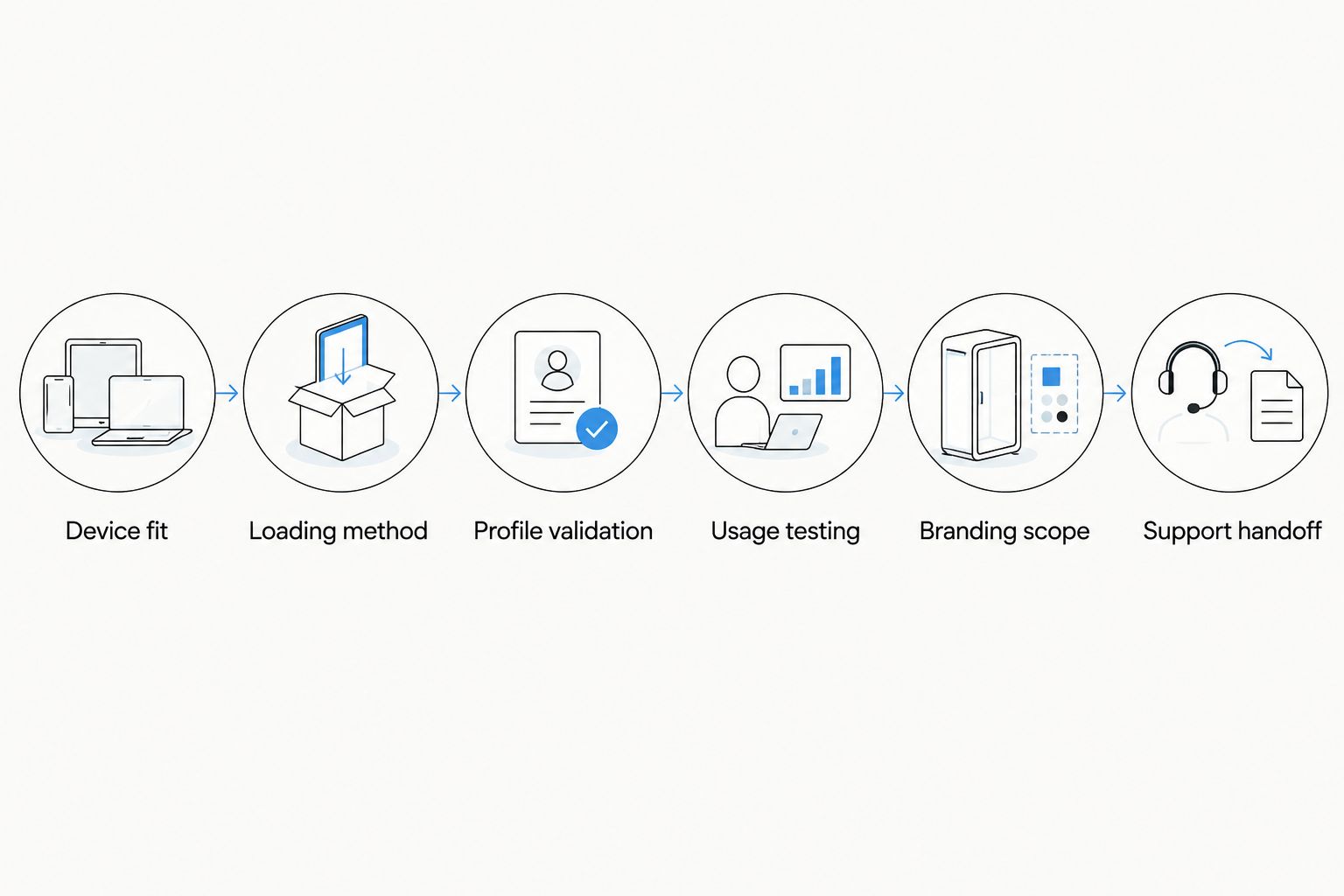
Use a documented sequence. It keeps a branding discussion from substituting for evidence that the customer's complete setup works.
- Device fit: Record the exact target model, regional variant, operating system, SIM-slot requirement, carrier-lock status and network-band requirements.
- Loading method: Choose Android-app management or reader-based provisioning. Identify who performs the initial loading and what equipment the customer needs afterward.
- Profile validation: Test the intended provider's activation method on the selected hardware. Record the provider and profile used, rather than reporting a blanket compatibility result.
- Usage testing: Test the configured adapter in the target device. Include the customer actions you intend to advertise, such as selecting a different stored profile.
- Branding scope: Agree the authorized changes and approve the corresponding customer instructions. Keep unapproved software or app customization out of the offer.
- Support handoff: Document who handles hardware faults, profile-loading problems and connectivity questions. Give customers a clear route for each issue.
This sequence separates supplier capabilities from the outcomes your own reseller offer promises. Record successful results and exclusions together so your sales copy does not exceed your testing.
What privacy information should the reseller request?
An open-source reader is not a complete privacy policy. Source availability and data handling answer different questions. Your privacy explanation must cover the actual provisioning route and the parties involved.
The reader's listed no-app, no-account claim applies to the reader product. It does not establish that a mobile service provider needs no account, that no activation information is processed, or that every management route has identical privacy behavior.
Before publishing a 2026 privacy statement, request written answers about:
- Where activation credentials are entered and processed.
- What the Android management app or reader workflow stores.
- Whether diagnostic information is collected and by whom.
- Which permissions each setup method requires.
- How customer support should handle sensitive activation information.
- Which data-handling responsibilities belong to the reseller and provider.
Publish only the answers that apply to your offer. Keep customer activation credentials out of routine screenshots and shared troubleshooting documents unless the handling process explicitly requires and protects them.
What should be in the pre-purchase checklist?
Use the checklist to approve a particular configuration, not the entire category. A test on one phone does not establish compatibility for every phone carrying the same operating-system name.
- Hardware identity: Exact adapter, reader and any included destination-data product.
- Device boundary: Validated models and regional variants, plus explicit exclusions.
- Software boundary: Supported operating systems and the required management method.
- Carrier boundary: Lock status, network bands and provider requirements checked.
- Capacity statement: Confirmed stored-profile capacity for the supplied card or bundle.
- Provisioning ownership: Supplier, reseller or customer responsible for loading profiles.
- Privacy explanation: Verified statements for the app, reader and provider workflow.
- Branding approval: Written scope covering the changes you intend to publish.
- Support ownership: Clear responsibility for hardware, activation and service issues.
Do not approve a customer-facing claim until the relevant configuration supports it. Apply that rule to compatibility, privacy and profile capacity as strictly as you apply it to branding.
Does white-label hardware include a white-label app?
No. White-label hardware availability does not establish a white-label app entitlement. Treat app naming, app distribution and software customization as separate questions requiring explicit agreement.
For Android management, explain the stated Switch Android app path unless your agreement specifies a different supported arrangement. Do not promise a proprietary management app merely because the card carries your reseller name.
Can resellers load profiles before giving cards to customers?
Pre-loaded destination-data cards are part of the stated product offering. That supports a pre-loaded purchasing option, not an assumption that every reseller order includes custom provisioning.
Specify the destination profile, who loads it and how the customer completes any remaining activation steps. Keep provider-dependent requirements in the instructions rather than treating loading and service activation as identical events.
Is bulk supply enough to launch a branded offer?
No. Bulk supply addresses sourcing, while a branded offer also needs an agreed customization scope and a validated customer workflow. Confirm both before using your brand on the product presentation.
For your 2026 launch decision, approve the hardware specification and commercial scope separately. Neither replaces the other.
FAQ
Can I resell eSIM adapters under my own brand?
Switchesim states that white-label supply is available. Agree the exact branding scope and customer-support responsibilities before presenting a particular order as your own branded offer.
What's the best adapter choice for Android-focused resellers?
Switch Pro is the relevant choice when the offer uses Android-based profile management. Validate the exact device, operating system and provider before advertising compatibility.
Can a white-label adapter work in an iPhone without a SIM tray?
No. The physical-adapter setup requires a compatible physical SIM slot; Switch Max's stated iPhone use does not remove that requirement.
Do my customers need an Android phone to load profiles?
The Bluetooth reader provides a profile-loading route without an Android phone. An offer using the Switch Android app has a different management requirement, so name the route included with the purchase.
How many eSIM profiles can the adapter-and-reader bundle store?
The listed adapter-and-reader bundle states storage of up to 15 eSIM profiles. Confirm capacity separately for each standalone adapter or white-label configuration, and do not equate storage with simultaneous connections.
Does white-label supply include a rebranded management app?
White-label hardware availability does not establish a rebranded management app entitlement. Obtain explicit approval for software customization separately from card or packaging branding.
Does an open-source reader mean the whole service is private?
No. The reader's open-source description does not establish the data-handling practices of the management workflow, reseller or eSIM provider; document those separately.
One last thing
Put the profile-loading method next to the compatibility statement, not deep in the instructions. A customer can own a suitable target phone and still lack the equipment required to provision the card.
Your product page should answer both questions together: where the configured adapter works, and how the customer loads or manages its profiles. That distinction is more useful than a broad “iPhone and Android” label.



