

Can you transfer an eSIM profile from one adapter to another?
You generally cannot copy an installed eSIM profile directly from one adapter to another; you need the eSIM provider’s supported transfer or replacement process. Moving the same physical adapter to another compatible device is different: the profile stays on the adapter. In 2026, the safe approach is to confirm the provider’s reactivation rules before deleting anything, because the original activation code is not necessarily reusable.
- To transfer esim profile between adapters, request provider-authorized reactivation; do not assume an installed profile can be copied.
- Moving the same adapter keeps its stored profiles on that card; device compatibility still matters.
- Switchesim eSIM adapters suit compatible physical-SIM devices; profile replacement remains subject to the eSIM provider’s rules.
- A Bluetooth reader loads profiles onto an adapter; it does not bypass provider activation restrictions.
Can you transfer an eSIM profile from one adapter to another?
You can move a subscription to another adapter only through a process the eSIM provider supports. That usually means obtaining replacement activation credentials or following an authorized migration procedure, rather than exporting the installed profile yourself.
An eSIM profile contains protected subscription credentials. In standard consumer eSIM provisioning, the downloaded profile is protected for the receiving eUICC—the secure component that stores it. An activation QR code supplies download instructions; it is not an exportable copy of the installed profile.
| What you want to do | What actually changes | Required action | Main limitation |
|---|---|---|---|
| Move the same adapter to another device | The host device changes; the adapter stays the same | Check the destination device and move the card | Physical-slot and network compatibility still apply |
| Replace an adapter with another adapter | The receiving eUICC changes | Obtain provider-approved replacement activation | The original activation code is not necessarily reusable |
| Copy the installed profile to another adapter | You attempt to duplicate protected credentials | Use the provider’s supported migration route instead | Standard provisioning is not a file-copy process |
| Load a different subscription onto another adapter | You install a separately issued profile | Follow that subscription’s activation instructions | This does not transfer the original subscription |
If your real objective is changing handsets, start with how to switch phones without losing your eSIM. Replacing the phone and replacing the adapter are separate operations, with different failure points.
Why this matters
Deleting a working profile does not make its activation credentials reusable. It also does not instruct the provider to issue a replacement. Treat deletion as a separate action, not as the first step of a transfer.
The practical risk is losing access before you have a working replacement. Keep another internet connection available for account access, activation and support, and ask when the provider will deactivate the original subscription credentials.
For a 2026 adapter replacement, separate three questions: will the provider issue a replacement, can your management method load it, and will the destination device use it? Success on one question does not answer the others.
Check device fit before requesting a replacement
A new adapter cannot fix an incompatible device or a carrier restriction. Your destination device needs a compatible physical SIM slot. An eSIM-only handset has nowhere to accept a physical adapter.
Check the exact model and regional variant rather than relying on the phone’s marketing name. Physical SIM trays, operating-system support and management capabilities differ between variants. A device accepting the card mechanically does not establish that the full setup is supported.
Carrier locking remains a separate restriction. An adapter does not unlock a phone, and a successfully installed profile does not override the device’s lock policy. Confirm that the intended subscription is permitted on the destination handset.
Network bands and the eSIM provider also matter. Profile installation and network registration are different stages: the card can contain a profile without the host device being able to connect to its intended network.
Use this pre-purchase checklist:
- Confirm that the destination device has a compatible physical SIM slot.
- Record the exact model, regional variant and operating-system version.
- Check carrier-lock status against the intended subscription.
- Confirm the supported profile-loading method for the replacement adapter.
- Check the device’s network bands and the provider’s service requirements.
- Obtain the provider’s replacement instructions before retiring the original card.
Choose the management path, not just the adapter
Switchesim distinguishes Android-based profile management, use of a configured Max card in a compatible iPhone, and provisioning through a Bluetooth reader. These are different setup paths. None establishes permission to copy an existing subscription.
| Hardware or setup path | Best for | Stated capability | Limitation to resolve first |
|---|---|---|---|
| Switch Pro | Users with a compatible Android management setup | Android-based profile management through the Switch Android app | Confirm exact Android device and software compatibility |
| Switch Max | Users who need a configured adapter in a compatible iPhone | Extends adapter use to compatible iPhones | The iPhone needs a compatible physical SIM tray; use and provisioning are distinct |
| Open-source Bluetooth eSIM card reader | Users provisioning without an Android phone | Loads profiles onto compatible adapter hardware | Confirm the supported reader workflow and provider-issued activation credentials |
Switchesim eSIM adapters are best for users whose compatible devices have physical SIM slots but lack native eSIM support. Choose Switch Pro for the stated Android management path, Switch Max for compatible iPhone use, or the Bluetooth reader when your provisioning workflow must work without an Android phone.
The advantage is access to those distinct hardware workflows. The constraint is that device compatibility and provider authorization still govern the result. Do not buy a replacement adapter on the assumption that matching hardware makes the original QR code reusable.
Profile capacity is not transfer permission
Switchesim describes its adapter-and-reader bundle as storing up to 15 eSIM profiles. That is a storage claim for the stated bundle, not permission to duplicate a subscription or a promise of simultaneous network connections.
Check the capacity of your exact adapter before planning a migration. Keep storage, activation and transfer authorization separate: a card with room for another profile still needs valid credentials that the provider permits it to download.
How do you move a subscription to a replacement adapter?
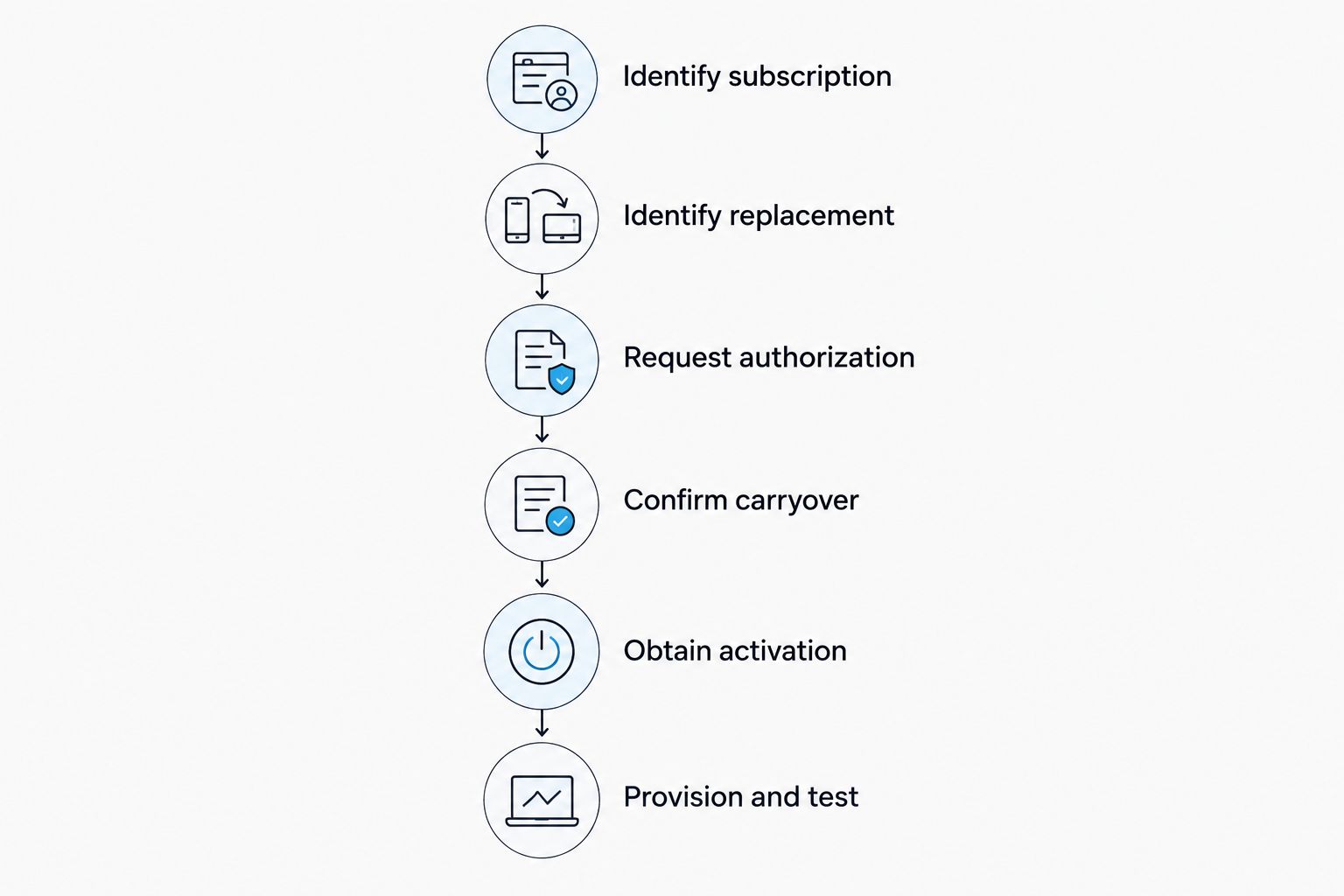
Use this sequence for a 2026 replacement. Follow the provider’s instructions wherever they specify a different order, especially when the old profile must be disabled before the replacement activates.
- Identify the subscription. Record the provider, account reference and installed profile details available through the supported management interface. Keep activation credentials private.
- Identify the replacement adapter. Confirm the exact hardware and supported loading method. Provide its eUICC identifier, or EID, if the provider requests it.
- Request authorization. Ask whether the provider supports migration to another eUICC, replacement activation or another documented recovery route. State that you are changing adapters, not merely moving the same card.
- Confirm what carries over. Ask specifically about the telephone number, remaining data, validity period and service features. Do not infer those terms from successful activation alone.
- Obtain the approved activation method. Use the replacement QR code, manual activation details or other procedure the provider supplies. Reuse the original code only when the provider explicitly permits it.
- Provision and test the replacement. Load the profile through the supported Android or reader workflow. Test the service features included in your subscription before removing the old profile, unless the provider requires earlier deactivation.
The important handover is between provider authorization and hardware provisioning. The management app or reader performs the supported loading operation; the provider decides whether the subscription can be issued to the replacement adapter.
What should you ask the provider before switching?
Ask: Does this subscription support replacement onto another eUICC? Is the activation code reusable? When will the original profile stop working? Which account benefits survive replacement?
Get answers for your specific plan. A provider’s support for replacing one subscription type does not establish the same policy for every travel-data or telephone-number product it sells.
Why eSIM transfer outcomes vary
The hardware is only part of the process. These factors determine whether an adapter replacement produces a working subscription:
- Provider replacement rules. The provider controls whether it will issue activation credentials for another adapter.
- Activation-code status. A code already used for installation is not proof that another download is permitted.
- Destination hardware. The replacement adapter and host device must support the intended setup.
- Provisioning method. Android management and Bluetooth-reader loading have different requirements.
- Subscription terms. Number retention, remaining allowance and validity depend on the provider’s replacement process.
- Device restrictions. Carrier locking, regional variants and network bands remain relevant after installation.
For 2026 purchases, request confirmation for the exact combination of subscription, adapter and device. A general statement that a provider supports eSIM does not answer whether it supports your replacement workflow.
Can you reuse the original eSIM QR code on another adapter?
Only reuse the original QR code when the provider confirms that another installation is permitted. Possessing the image does not establish that the activation credentials remain valid or that another eUICC can use them.
Do not repeatedly scan the same code as a substitute for checking its status. If installation fails, record the error and contact the provider with the replacement adapter details. Deleting the old profile is not a reliable remedy for a rejected download.
Can you move the same adapter instead of transferring its profile?
Moving the same physical adapter leaves its stored profile on the same eUICC. You are changing the host device rather than downloading the subscription onto another secure component.
This distinction often removes the need for adapter-to-adapter replacement. You still need to check the destination device’s physical slot, operating system, lock status and network compatibility, along with any provider restrictions on device use.
Does a Bluetooth reader let you clone an eSIM profile?
A Bluetooth reader provides a provisioning path, not authorization to clone a subscription. Switchesim describes its reader as a way to load profiles without an Android phone; that capability is separate from exporting protected credentials from an existing adapter.
Use provider-issued activation details with the supported reader workflow. An open-source reader does not make the provider’s profile-replacement policy irrelevant.
Privacy and pre-loaded cards need separate checks
Treat QR codes, manual activation details and account-recovery credentials as sensitive. Share them only through the provider’s or hardware vendor’s legitimate support process, and avoid publishing screenshots that expose them.
An open-source reader is not, by itself, proof of a complete privacy model. Before provisioning, review the software permissions, where activation information is processed, and what support information you are asked to submit. Do not equate open-source hardware with a guarantee that every part of the workflow is local.
Pre-loaded destination-data cards also need their own replacement instructions. Switchesim lists configurations such as 10GB over 30 days and 50GB over 180 days. Those allowances and validity periods describe the named plans; they do not establish that unused service transfers to another adapter.
For bulk or white-label deployments, document the replacement procedure before distributing hardware. Keep account ownership and activation records clear so a failed card does not leave the next operator guessing who can authorize reissue.
FAQ
Can I transfer an eSIM profile between adapters without contacting the provider?
Do not assume you can transfer an eSIM profile between adapters without provider authorization. Follow the provider’s documented replacement or migration process rather than attempting to copy the installed profile.
Will deleting my eSIM make the QR code work again?
Deleting an installed eSIM does not itself make the QR code reusable. Confirm the activation code’s status and replacement instructions with the provider before deleting a working profile.
Can I keep my phone number when I replace an eSIM adapter?
Phone-number retention depends on the provider’s replacement process. Ask for confirmation that the replacement preserves your number and included services before authorizing the change.
Can I move an eSIM adapter from Android to an iPhone?
Moving an adapter to an iPhone requires a compatible card and an iPhone with a compatible physical SIM tray. Using a configured card is separate from managing or loading its profiles.
Does a Bluetooth reader bypass a single-use activation code?
A Bluetooth reader does not bypass provider activation restrictions. It supplies a supported way to load a profile onto compatible hardware using valid activation credentials.
Will my remaining travel data move to the new adapter?
Remaining travel data transfers only if the provider’s replacement terms preserve it. Confirm the allowance and validity period separately from whether a replacement profile can be installed.
Is moving the same adapter safer than deleting and reinstalling the profile?
Moving the same adapter avoids a new profile download because the profile remains on the card. The destination device must still meet the adapter’s compatibility requirements and the provider’s device-use rules.
One last thing
Your first replacement question should concern the subscription, not the adapter. In 2026, the decisive confirmation is whether the provider will authorize installation onto another eUICC while preserving the service you need.
Keep the working card intact until the provider tells you how to complete the handover. A compatible replacement and a valid activation process must meet at the same point.



