

Can you use two eSIM profiles at the same time with an adapter?
An eSIM adapter alone does not let you use two eSIM profiles at once: storing multiple profiles and running two mobile lines are different capabilities. Two concurrent lines require a phone-supported dual-SIM configuration, not just extra profile storage on an adapter. Check the phone’s supported SIM combinations before choosing hardware; this 2026 guide separates profile storage, profile switching and simultaneous line use.
- Switchesim eSIM adapters suit profile switching; simultaneous lines depend on the phone’s supported dual-SIM configuration.
- To use two esim profiles at once, verify active-line support rather than stored-profile capacity.
- Switch Pro uses Android-based management; Switch Max extends use to compatible iPhones with physical SIM slots.
- The Bluetooth reader loads profiles without an Android phone; it does not add another cellular line.
Can you use two eSIM profiles at the same time with an adapter?
Do not buy a multi-profile adapter on the assumption that it provides two simultaneous lines. A profile-storage specification describes what the card holds, not how many mobile subscriptions your phone can use concurrently. A dual-SIM specification describes supported line combinations, but you still need to check which combinations apply to your exact device.
Start with the distinction in the dual-eSIM phone guide. Native dual-eSIM support and removable adapter support are separate buying questions.
| Configuration | What it provides | Best for | Main limitation |
|---|---|---|---|
| Multiple profiles stored on an adapter | A collection of profiles to select between | Changing subscriptions without replacing the adapter | Storage capacity does not establish concurrent-line support |
| Adapter plus a separate physical SIM | Separate subscription identities in compatible dual-SIM hardware | Keeping a home line alongside another subscription | Requires a supported physical-slot arrangement |
| Adapter plus native eSIM | A removable adapter alongside the phone’s built-in eSIM capability | Phones that support this specific dual-SIM combination | Support depends on the exact model and regional variant |
| Native dual-eSIM configuration | Concurrent use where the phone explicitly supports it | Buyers whose priority is two enabled eSIM lines | Does not establish adapter compatibility |
A phone that supports two enabled lines also needs its call, messaging and data behavior checked. Keeping two subscriptions enabled is not the same as combining their data connections or guaranteeing uninterrupted calls on both.
Why this matters
An adapter solves a different problem from a second cellular line. It lets compatible devices with a physical SIM slot use profiles through removable hardware, including devices without native eSIM support. It does not replace the phone’s modem, change its supported SIM combinations or remove a carrier lock.
For a 2026 purchase, write down the outcome you need before comparing cards. “Switch between destination profiles” calls for profile management. “Keep my home number reachable while using another data plan” calls for a verified dual-SIM configuration and appropriate service on each subscription.
Switchesim eSIM adapters are best for users who need removable profile storage and switching on compatible physical-SIM devices. Buyers who need two concurrent lines should establish phone support first, then choose the adapter and loading method.
Stored profiles are not active lines
A stored profile is an installed subscription profile. An enabled profile is selected for use. A working line also requires successful network registration and an appropriate service plan; storing a profile does not establish either condition.
Switchesim’s adapter-and-reader bundle listing states storage for up to 15 eSIM profiles. That is a storage claim for the bundle’s adapter, not a claim that 15 mobile lines run simultaneously. Do not apply that capacity to every card or infer a separate capacity for Switch Pro or Switch Max from the bundle description.
Keep these checks separate:
- Profile storage: how many profiles the selected card can hold.
- Profile selection: how you choose the subscription to use.
- Active lines: which subscriptions the phone supports concurrently.
- Network service: whether each subscription provides the calls, messages or data you need.
A larger profile library helps when you alternate between subscriptions. It does not answer whether your home number stays reachable while another profile supplies data. Ask for the exact supported configuration, not just a profile-capacity figure.
Device fit comes before profile capacity
An adapter needs a compatible physical SIM slot. A phone without a physical SIM tray is not a candidate for this adapter format, regardless of whether it supports native eSIM. Check the handset itself and its regional model documentation before ordering.
Having 1 physical SIM slot establishes an installation location, not support for 2 concurrent lines. The phone might support a separate native eSIM alongside that slot, or it might not support the combination you need. A second physical slot also needs checking for cellular use and the supported dual-SIM behavior.
Your compatibility check should cover the exact model, regional variant, operating-system version, carrier-lock status, network bands and eSIM provider. A model family name is not enough. Different regional versions can have different SIM arrangements, so use the device’s full model identifier.
Carrier locks remain relevant with an adapter. An eSIM adapter is not a carrier-unlocking device. Confirm that the handset accepts the intended subscription before buying hardware or loading a plan, particularly when the phone came from a network operator.
Choose the hardware by its management path
Neither the card name nor the loading accessory should substitute for a dual-SIM check. Choose the hardware after establishing device fit, then confirm how you will load and select profiles. The 2026 product decision is primarily about the target device and the management route.
| Hardware | Stated role | Best for | Limitation to resolve before purchase |
|---|---|---|---|
| Switch Pro | Android-based profile management | Buyers with a compatible Android management setup | Confirm Android app support and the intended target-device configuration |
| Switch Max | Extends use to compatible iPhones | Buyers using a configured card in a compatible iPhone | A compatible physical SIM slot is still required; use is not the same as management |
| Open-source Bluetooth eSIM card reader | Loads profiles without an Android phone | Buyers who need reader-based provisioning | Confirm supported provisioning software and operating systems; it adds no cellular line |
Choose Switch Pro for a confirmed Android-based management path. Choose Switch Max for confirmed compatible iPhone use. Choose the Bluetooth reader when you need to load profiles without an Android phone. None of those choices establishes simultaneous-line support by itself.
Android management is a separate compatibility check
Switch Pro uses Android-based profile management through the Switch Android app. Confirm that your intended Android device supports that management workflow rather than assuming every Android handset does.
Also distinguish the management device from the device that will use the configured card. A compatible phone, router or hotspot still needs its own hardware and network checks. Successful loading on one device does not establish compatibility with another.
Compatible iPhone use does not mean identical management
Switch Max extends use to compatible iPhones with a physical SIM slot. Using a configured Max card in an iPhone and managing profiles through the Switch Android app are different workflows.
Before purchase, establish how you will load the card and how profile selection works on your exact iPhone. Do not assume the Android management experience is reproduced in iOS. If your iPhone has no physical SIM tray, this removable-card route does not fit it.
Reader-based provisioning does not add a radio
The Bluetooth reader provides a profile-loading route without an Android phone. Bluetooth is the connection used for the reader workflow, not a second mobile-network connection for the handset.
Confirm the supported software and operating systems for the intended reader setup. The reader’s open-source description does not, by itself, establish universal software compatibility, a security audit or a particular privacy guarantee.
How to check your setup before buying
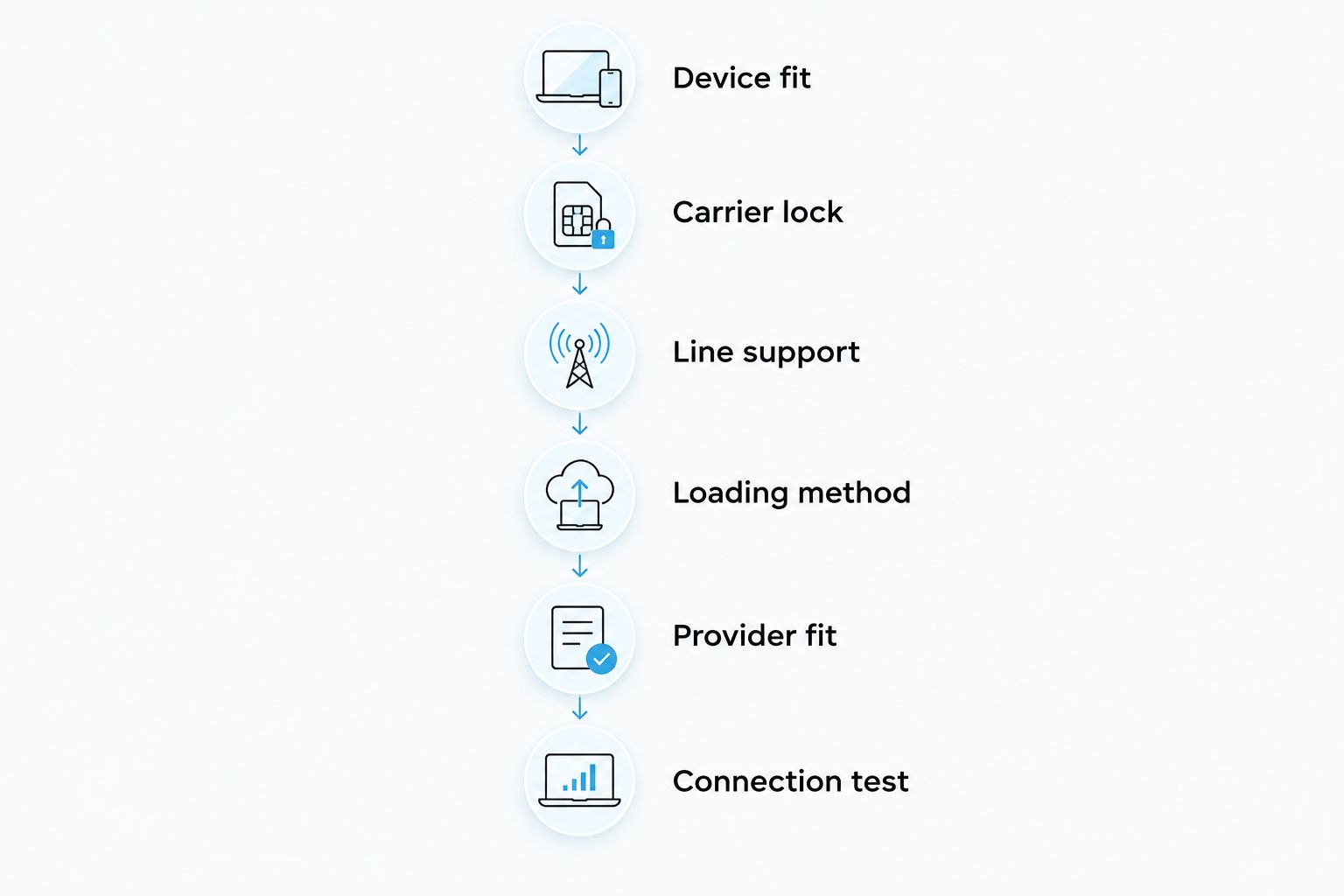
Use this sequence for a 2026 purchase. Complete the phone-support checks before selecting a card or destination plan; loading hardware cannot correct an unsupported SIM arrangement.
- Device fit: record the phone’s exact model and regional variant, then confirm the compatible physical SIM slot.
- Carrier lock: establish whether the handset accepts the intended operator’s subscription.
- Line support: check the manufacturer’s supported combinations of physical SIM and native eSIM.
- Loading method: choose Android management, configured Max use or reader-based provisioning as appropriate.
- Provider fit: confirm the provider’s activation method, device requirements and included services.
- Connection test: after configuration, test calls, messages and data for the intended combination.
The important checkpoint is line support. If the documentation does not establish your intended dual-SIM combination, do not treat a storage specification or accessory listing as a substitute.
After setup, label the subscriptions clearly in the phone’s settings where supported. Select the intended default for calls, messages and mobile data, then test the behavior you actually need. A profile appearing in a management interface is not proof of network service.
For a home-number-and-data arrangement, check an incoming call to the home number while using the other subscription for data. Also test any required messages. Consult the phone manufacturer’s documentation for behavior during an active call rather than assuming both lines remain equally available.
Why simultaneous-line support varies
The relevant differences come from the phone, its configuration and the subscriptions. Compare these factors rather than treating all multi-profile adapters as equivalent:
- Physical SIM arrangement: the target device needs a compatible slot, and the intended second subscription needs a supported route.
- Model and regional variant: the exact handset determines which physical-SIM and native-eSIM combinations are supported.
- Operating system: the target operating system and profile-management software must support the intended workflow.
- Carrier-lock status: a locked handset can restrict the subscriptions it accepts.
- Network bands: the device must support the relevant network connectivity for the destination and provider.
- Provider requirements: activation rules and included services determine whether the subscription meets your calling, messaging or data needs.
Profile capacity is a separate comparison point. It matters when you want to retain several subscriptions for later selection, not as evidence that the phone can operate them together.
Check privacy and provisioning separately
The profile-loading route does not establish the complete privacy model. For a 2026 comparison, inspect the app or provisioning software’s permissions, account requirements and published data-handling information. Check the eSIM provider’s terms separately from the hardware supplier’s information.
Treat activation details as sensitive credentials. Do not publish activation codes or share screenshots that expose them. Before deleting or moving a profile, check the provider’s reinstallation and transfer rules; the card’s storage capability does not override those rules.
An open-source reader gives you a different provisioning option. Open source is not a substitute for checking permissions, software provenance and provider requirements. Evaluate those details for the actual software you intend to use.
Do pre-loaded cards or bulk orders change the answer?
Pre-loaded destination-data cards change the starting setup, not the phone’s supported line configuration. A card supplied with a destination plan still occupies the compatible physical SIM slot. “Data plan” also should not be treated as a promise of a telephone number, voice calls or SMS.
Bulk and white-label options address supply requirements rather than simultaneous-line capability. For a fleet, verify each device variant and provisioning workflow before standardizing the purchase. Repeating an unsupported setup across more devices does not make it compatible.
Can I keep my home number active while using an adapter for data?
2 concurrent lines require a supported dual-SIM configuration. An adapter-based data subscription can sit alongside a home subscription only where the phone supports the specific combination. Confirm incoming-call behavior, messaging support and data defaults before relying on the arrangement.
Does storing 15 profiles mean I can use 15 networks together?
Up to 15 eSIM profiles is the storage claim in the adapter-and-reader bundle listing. It is not a simultaneous-network claim. Choose capacity for the subscriptions you want to retain, and check active-line support independently.
Does the Bluetooth reader let me run a second line?
A second line requires phone-supported cellular capability, not a Bluetooth loading accessory. The reader loads profiles without an Android phone. It does not turn a single supported subscription configuration into a dual-SIM configuration.
FAQ
Can I use two eSIM profiles at once on one adapter?
Do not assume that one multi-profile adapter supports two simultaneous lines. Profile storage and concurrent-line support are separate capabilities; verify the adapter and phone’s exact supported configuration.
Can an eSIM adapter work alongside my physical SIM?
An adapter can work alongside a separate physical SIM only in a compatible dual-SIM arrangement. The phone needs the appropriate physical slots and support for that combination.
Can I use an adapter and my phone’s built-in eSIM together?
That combination requires explicit support from your exact phone model and regional variant. Check the manufacturer’s supported SIM configurations before choosing the adapter.
Does the Bluetooth reader let me avoid an Android phone?
The Bluetooth reader provides a profile-loading route without an Android phone. Confirm the supported provisioning software and operating systems for your intended setup.
Is Switch Max suitable for an iPhone without a SIM tray?
No, this removable adapter route requires a compatible physical SIM slot. Native eSIM support does not provide a place to install the adapter.
Does an eSIM adapter remove a carrier lock?
No, an eSIM adapter is not a carrier-unlocking device. Confirm that the handset accepts the intended subscription before loading a plan.
Does a pre-loaded data card include calls and text messages?
A data-plan description does not establish voice or SMS service. Check the exact destination plan’s included services before using it for calls, messages or account verification.
One last thing
Test reachability, not just mobile data. A successful data connection answers whether that subscription provides internet access; it does not answer whether your other number receives calls or required messages in the same setup.
Before relying on the arrangement, test the tasks that matter to you. Keep profile storage, loading and dual-SIM behavior as separate checklist items. That distinction prevents buying the right card for the wrong problem.



