

Does an eSIM adapter need its own SIM card?
No. A removable eSIM adapter does not need a separate carrier SIM card inserted into it: the adapter itself occupies your device’s compatible physical SIM slot and stores downloaded eSIM profiles. You still need a valid provider profile and service plan; the hardware alone does not provide mobile service.
- Does esim adapter need a sim card? No extra carrier SIM; the adapter occupies the physical SIM slot.
- Switchesim eSIM adapters suit compatible physical-slot devices; check the exact model, operating system and carrier-lock status.
- Switch Pro uses Android profile management. A configured Switch Max supports compatible iPhones.
- The Bluetooth reader loads profiles without an Android phone; it does not replace the adapter or service plan.
Does an eSIM adapter need its own SIM card?
The adapter is the removable SIM hardware. The eSIM profile supplies the subscription credentials. You do not put your existing carrier SIM inside the adapter, and buying the adapter does not automatically move your existing number onto it.
For the distinction between replacing the card and replacing the subscription, see the guide to whether an eSIM adapter can replace a physical SIM completely.
| Component | What it does | Separate carrier SIM required? | Main limitation |
|---|---|---|---|
| Removable eSIM adapter | Holds eSIM profiles in compatible physical SIM hardware | No | Requires a compatible physical SIM slot |
| Provider eSIM profile | Supplies credentials for a mobile subscription | No | Must be accepted by the adapter’s provisioning method |
| Profile-management app | Manages supported adapter profiles | No | Depends on supported hardware and operating system |
| Bluetooth reader | Loads profiles onto an adapter card | No | Does not supply the mobile subscription |
| Existing carrier SIM | Keeps your existing subscription on its original card | Only if you want to keep using that card | Needs its own usable slot when used alongside the adapter |
These components solve different problems. Treating a reader, an adapter and a mobile plan as interchangeable leads to buying the wrong hardware.
Why this matters
A phone without native eSIM support can still be a candidate for removable eSIM hardware. But a physical slot alone is not proof of compatibility. The exact phone model, regional variant, operating system and carrier restrictions still matter.
For a 2026 purchase, start with the device you already own rather than the destination you plan to visit. A suitable data profile cannot compensate for an incompatible slot, a carrier lock or unsupported profile management.
The other common mistake is assuming the adapter preserves your existing subscription automatically. It does not convert the credentials on your old plastic SIM into a downloadable profile. Your carrier controls whether that subscription can be issued as an eSIM.
What you actually need before using an adapter
You need compatible hardware, a usable provisioning route and a provider profile. Keep those requirements separate when checking a product listing. A claim about Android management is not the same as a claim about iPhone use.
A compatible physical SIM slot
The adapter must fit into and work through the target device’s physical SIM interface. An eSIM-only phone with no physical SIM tray cannot accept this type of removable adapter. Native eSIM support is a different route and does not require an adapter card.
If your phone has 1 physical SIM slot, inserting the adapter occupies that slot. Your old carrier SIM cannot remain in the same slot alongside it. If your phone has 2 physical SIM slots, check whether the device supports the intended combination before planning to keep both cards installed.
A tray’s appearance does not establish compatibility. Confirm the exact model and regional variant, including any restrictions on the slot you intend to use.
A carrier-lock check
An eSIM adapter does not bypass a carrier lock. A phone restricted to one carrier can reject another provider’s subscription regardless of whether its credentials sit on a conventional SIM or an adapter.
Ask the original carrier about the device’s lock status before choosing a different provider. Do not confuse an unlocked device with a compatible device: unlocking addresses the carrier restriction, not every hardware or software requirement.
A supported profile-loading method
Profile loading and everyday mobile use are separate tasks. A card can be configured through supported management hardware and then used in a compatible target device. That does not establish that the target device can perform the same management tasks itself.
Check how the provider delivers its activation credentials. QR-code and manual activation workflows need support from the chosen provisioning route. A provider’s ordinary phone-compatibility list does not establish support for every removable adapter.
Which hardware should you choose?
Switchesim separates Android management, compatible iPhone use and reader-based provisioning. Choose the route that matches your target device and the equipment you can use to load profiles. Switchesim eSIM adapters are best for users with compatible physical-slot devices who need removable multi-profile hardware.
The following distinctions reflect Switchesim’s stated product roles. They do not establish compatibility with every device running the named operating system.
| Hardware | Best for | Stated role | Benefit | Limitation to check |
|---|---|---|---|---|
| Switch Pro | Users with a supported Android management path | Android-based profile management through the Switch Android app | Provides a defined Android management route | Confirm the management phone and target device separately |
| Switch Max | Compatible iPhone users who can configure the card | Extends adapter use to compatible iPhones | Lets a configured removable card serve an eligible iPhone | Requires a compatible physical SIM tray; configuration is a separate step |
| Bluetooth reader | Users who need provisioning without an Android phone | Loads profiles onto adapter cards | Avoids dependence on an Android phone for loading | Still requires an adapter card and suitable provider profile |
Switch Pro: Android-based management
Switch Pro uses the Switch Android app for profile management. Choose this route when you have a supported Android device for that task. Do not infer compatibility solely from the Android version or the presence of a SIM tray.
Before choosing Switch Pro in 2026, confirm both roles: the device that manages the card and the device that will use its mobile connection. For a router or hotspot deployment, the provisioning phone and target device are not necessarily the same piece of equipment.
Switch Max: configured-card use on a compatible iPhone
Switch Max is the stated choice for extending adapter use to compatible iPhones. The physical-tray requirement comes first. An iPhone without a physical SIM tray is not a candidate for this removable-card route.
Using a configured Switch Max in an iPhone does not mean every profile-management function runs natively on that iPhone. Establish the loading and switching workflow before purchase. Choose Switch Max for compatible iPhone use, not as a workaround for a missing tray.
Bluetooth reader: provisioning without an Android phone
The Bluetooth reader provides a separate way to load profiles. The reader’s product title states that it works with iPhone and Android without an app or account. That claim describes the reader workflow; it does not remove the provider’s activation requirements.
The reader is not a cellular modem and does not supply a data plan. Its role is provisioning the adapter. After provisioning, the target device still needs compatible hardware, acceptable subscription credentials and access to the relevant mobile network.
Profile capacity is not simultaneous connectivity
Switchesim’s adapter-and-reader bundle states support for up to 15 eSIM profiles. That is a storage claim for the bundle, not a promise of 15 simultaneous mobile connections. Do not treat stored-profile capacity as the number of lines that your phone can use at once.
For a 2026 comparison, ask which exact card the capacity claim applies to and how you select the profile you want to use. Profile storage, profile activation and the phone’s dual-SIM behaviour are different specifications.
A larger profile library helps only if the management route fits your equipment. If you cannot load or select the required profile, unused storage capacity provides no practical benefit.
How to set up an adapter without another carrier SIM
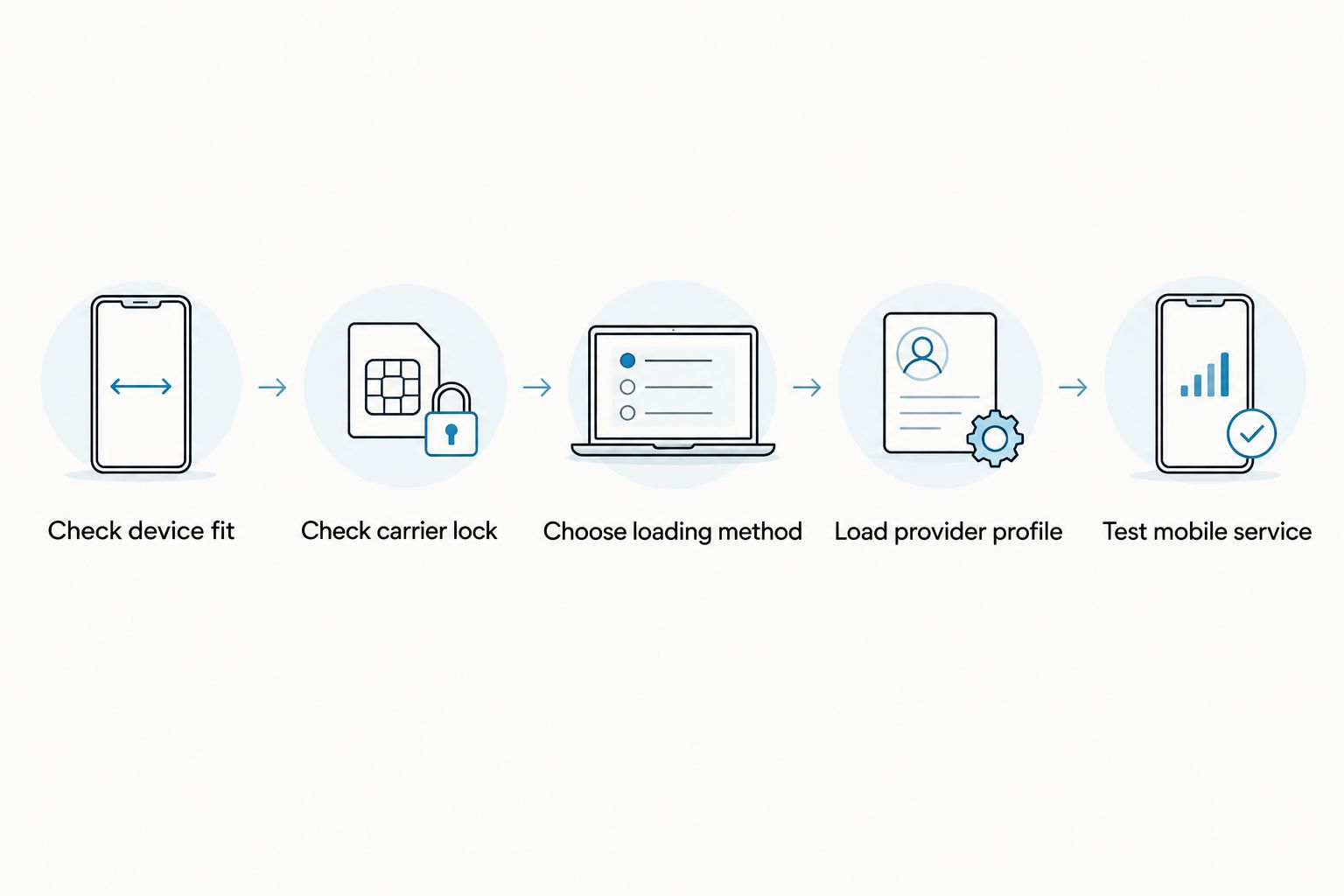
Use this sequence to check the setup path before removing your current card. It separates device compatibility from subscription activation and avoids assuming that insertion alone completes the job.
- Check device fit. Record the target device’s exact model, regional variant, physical-slot arrangement and operating system. Confirm support for the intended adapter.
- Check carrier lock. Establish whether the device accepts the intended provider. Resolve restrictions through the carrier rather than expecting the adapter to bypass them.
- Choose loading method. Select supported Android management or reader-based provisioning. For iPhone use, establish how the Max card will be configured.
- Load provider profile. Follow the provider’s activation instructions and the supported provisioning workflow. Keep activation credentials private.
- Test mobile service. Insert the configured card as instructed, select the intended subscription and verify the required service before relying on it.
A successful setup requires every part of this sequence. Downloading a profile does not establish network-band compatibility, and detecting a card does not establish that the subscription is active.
For buyers who need a reader, distinguish the standalone accessory from the adapter-and-reader bundle. The standalone reader is not the adapter card. Choose the bundle when you need both pieces of hardware, subject to the target-device checks above.

Why adapter requirements vary
No extra carrier SIM is required, but the rest of the setup depends on your device and subscription. Check these factors rather than relying on a broad Android or iPhone label:
- Device model and regional variant: Confirm the physical slot and the exact hardware version.
- Operating system: Verify support for management separately from configured-card use.
- Carrier-lock status: Confirm that the target device accepts the intended provider.
- Provisioning route: Establish whether you will use Android management or the Bluetooth reader.
- Network bands: Check whether the device supports the network needed at the destination.
- eSIM provider: Confirm acceptable activation credentials and any restrictions on installation or transfer.
For your 2026 pre-purchase checklist, get answers to these questions before selecting hardware. A product name alone cannot settle device fit, provider acceptance or the management workflow.
What happens to my existing phone number?
Your existing number stays with its current subscription unless your carrier changes that subscription. Removing its physical SIM does not automatically transfer the number onto the adapter. Obtain a carrier-issued eSIM profile if you want that subscription provisioned through a supported adapter route.
Do not assume that a destination-data profile replaces calls or texts on your home number. Check the service included in that particular plan. Keep your original card until the replacement arrangement is confirmed and tested.
Can I use a pre-loaded card instead of loading a profile myself?
A pre-loaded destination-data card provides a different starting point from an unconfigured adapter. It already carries the specified destination-data profile. You still need a compatible target device and must follow the plan’s activation conditions.
Pre-loaded destination-data cards suit buyers who want the stated destination profile supplied with the hardware. Their limitation is that the included plan must match the trip and intended service. Bulk and white-label options address supply arrangements, not exceptions to compatibility checks.
Does the adapter improve privacy automatically?
No automatic privacy guarantee follows from using removable eSIM hardware. The Bluetooth reader is described as open source, and its product title states no app or account is required. Those facts do not establish anonymity or eliminate the mobile provider’s customer requirements.
For a 2026 purchase, check the privacy model of the exact workflow: management software, reader interface and provider activation. Treat QR codes and manual activation credentials as sensitive subscription information. Do not post them in public support messages or screenshots.
FAQ
Does an eSIM adapter need a separate physical SIM card?
No. A removable eSIM adapter is itself the card that occupies the compatible physical SIM slot. It needs a valid eSIM profile, not another carrier SIM inserted into it.
Can I use an eSIM adapter in a phone without a SIM tray?
No. This removable adapter route requires a compatible physical SIM slot. An eSIM-only phone uses its native eSIM hardware instead.
Do I need an Android phone to load profiles?
Not when using the supported Bluetooth reader route. Switch Pro uses Android-based management, while the reader provides provisioning without an Android phone.
Can I use Switch Max in an iPhone?
A configured Switch Max can be used in a compatible iPhone with a physical SIM tray. Confirm the exact model, regional variant, carrier-lock status and provisioning workflow before purchase.
Does an eSIM adapter unlock a carrier-locked phone?
No. An eSIM adapter does not bypass a carrier lock. The device must accept the provider whose profile you intend to use.
Does storing 15 profiles mean I can use 15 lines at once?
No. Up to 15 eSIM profiles is the stated storage capacity of the adapter-and-reader bundle, not a simultaneous-line claim. Active connectivity depends on the adapter and target device.
Will my existing SIM number move onto the adapter automatically?
No. Your carrier must issue the appropriate eSIM profile for that subscription. Buying or inserting an adapter does not transfer the number or copy the original SIM credentials.
Is the Bluetooth reader all I need for mobile data?
No. The reader provisions an adapter card; it does not provide the cellular subscription. You still need compatible adapter hardware, a provider profile and a suitable target device.
One last thing
Ask two separate questions: can this device use the configured card, and can this setup manage its profiles? A yes to the first does not establish a yes to the second. That distinction is more useful than a broad claim that a product works with Android or iPhone.
Before moving your everyday number, prove the intended workflow with a suitable provider profile and test the services you actually need. Keep the existing subscription accessible until the new arrangement works.



