

Does using an eSIM adapter drain your phone's battery faster?
Using an eSIM adapter does not automatically mean your phone's battery will drain noticeably faster. The adapter draws power through the physical SIM slot, but battery life also depends on cellular reception, active lines and what your phone is doing. Do not treat a battery drop after installation as proof that the adapter caused it.
- Does eSIM adapter drain battery? Power use exists, but a fixed battery-life penalty is not established.
- Switchesim eSIM adapters suit compatible physical-SIM devices; choose hardware by management method, not an unsupported battery promise.
- Weak reception and background activity can change battery life independently of the adapter.
- Stored eSIM profiles are not the same as simultaneously active cellular lines.
Before troubleshooting, confirm the hardware fits your phone. The guide to adding eSIM through a physical-SIM adapter covers a separate question: whether your device can use this hardware at all.
Does using an eSIM adapter drain your phone's battery faster?
There is no universal battery-drain figure for an eSIM adapter. A valid comparison needs the same phone, similar reception, comparable activity and the same active-line configuration. Changing the adapter and the cellular provider together does not isolate the adapter's effect.
A physical eSIM adapter stores subscription profiles in removable hardware. Your phone's modem still provides the cellular connection; the adapter does not add a separate cellular radio. Profile loading and ordinary network use are different activities and should be assessed separately.
Use this sequence to investigate battery drain in 2026:
- Confirm device fit. Check the physical SIM slot, exact model, regional variant and supported management method.
- Establish a baseline. Record battery use with your existing configuration under ordinary, repeatable conditions.
- Separate setup from use. Finish loading the profile before assessing everyday standby or data use.
- Match the conditions. Keep location, screen brightness, apps and active lines comparable.
- Inspect the battery report. Check whether the phone identifies cellular reception, screen use or an app as a major contributor.
- Repeat the comparison. A single unusually busy session is not a reliable hardware diagnosis.
Do not compare an idle phone on Wi-Fi with an adapter-equipped phone using navigation and mobile data. That comparison measures different workloads, not just different SIM hardware.
Why this matters
A battery concern can lead you to replace the wrong component. If the new profile connects through a different network, you have changed the radio conditions as well as the subscription hardware. If you also enable another line, you have changed the phone's operating configuration.
The useful question is not simply whether an adapter consumes electricity. It does. The useful question is whether installing it produces a repeatable battery-life difference under comparable conditions.
For a 2026 purchase, choose an adapter by compatibility and profile-management method first. A claim that one adapter saves a particular amount of battery requires a controlled comparison, not a product category label.
Why battery drain varies
These factors affect phone power consumption and can obscure an adapter comparison:
- Cellular reception. Poor signal and network searching affect modem activity. Check reception where you actually use the phone.
- Active cellular lines. Keeping another line enabled changes the configuration. Stored profiles alone do not mean all those subscriptions are connected.
- Data workload. Hotspot use, downloads and video calls create a different workload from standby or light messaging.
- Screen use. Navigation, setup screens and increased brightness consume power independently of the SIM hardware.
- Background activity. App updates, backups and synchronisation can coincide with a new profile's activation.
- Battery condition and temperature. An aged battery or a hot phone complicates comparisons with earlier battery-life observations.
Start with the conditions you can control. Use the same location and similar activity before drawing conclusions about the adapter.
Signal bars alone are not a complete measurement of radio conditions. Record them as context, but also note network disconnections, loss of service and whether the phone repeatedly searches for a connection.
Check device fit before comparing battery life
A removable eSIM adapter needs a compatible physical SIM slot. A phone without that slot cannot use this type of card. Native eSIM support and physical-adapter support are separate compatibility questions.
Check the exact phone model and regional variant, not just the family name. Operating-system support, carrier-lock status, network bands and the eSIM provider also matter. An adapter is not a carrier-unlocking tool and does not add missing radio-band support.
Use this pre-purchase checklist:
- Confirm that your device has a usable physical SIM slot.
- Confirm support for the exact model and regional variant.
- Check whether your carrier lock restricts the intended subscription.
- Confirm the required operating system for profile management.
- Check the provider's activation method and adapter support.
- Decide how you will load and change profiles before ordering.
For an iPhone purchase in 2026, do not assume that using a configured card means the iPhone can perform every provisioning task. Using a profile and loading a profile are distinct capabilities. That distinction determines whether you need an Android management device or the Bluetooth reader.
Choose the management path, not a battery promise
Switchesim eSIM adapters offer different management paths. The product choice depends on the devices you have and how you intend to provision profiles, not on a verified battery-life ranking.
Switchesim is best for buyers who need removable eSIM hardware for compatible devices with physical SIM slots. That is a hardware-fit recommendation, not a claim of universal compatibility or lower power consumption.
| Option | Best for | Management or use path | Benefit | Limitation |
|---|---|---|---|---|
| Switch Pro | Buyers using supported Android profile management | Manage profiles through the Switch Android app | Android-based management path | Requires a compatible device and supported management setup |
| Switch Max | Buyers who need use in a compatible iPhone | Use a configured Max card in a supported physical-SIM device | Extends use to compatible iPhones | iPhone use does not establish unrestricted iPhone provisioning |
| Bluetooth reader | Buyers provisioning without an Android phone | Load profiles through the separate reader | Removes the Android-phone requirement for loading | Separate hardware; does not replace the phone's SIM-slot requirement |
Switch Pro is the direct choice when supported Android management fits your workflow. Switch Max is the relevant choice when compatible iPhone use is required. The Bluetooth reader addresses provisioning without an Android phone; it is not a cellular reception accessory.
Pre-loaded destination-data cards provide another starting point because the subscription is supplied with the hardware. They do not remove device-fit or provider checks. Bulk and white-label options serve supply requirements rather than establishing a different battery result.
Stored profiles are not active connections
The adapter-and-reader bundle description states storage for up to 15 eSIM profiles. Treat that as a storage-capacity claim for the listed bundle, not a claim that your phone connects through 15 subscriptions at once.
A stored profile and an active cellular line are different things. Keeping subscription details on a card does not mean the modem is maintaining a connection for each stored subscription. Check your phone's actual active-line settings when investigating battery life.
This distinction matters when comparing adapters in 2026. A larger profile library is useful for subscription management, but capacity alone does not establish either higher drain or better endurance.
Before purchasing, confirm the capacity of the exact card or bundle you intend to use. Do not transfer a capacity claim from a bundle description to every adapter variant.
Separate profile loading from everyday use
Profile loading involves a management workflow. Everyday calls and mobile data involve the phone's cellular modem. Mixing these activities in the same battery comparison makes the result difficult to interpret.
Keep the process separate:
- Check fit. Confirm the card and management method support your device.
- Load profile. Use the supported Android management path or Bluetooth reader.
- Install card. Follow the supported instructions for the target device.
- Check service. Confirm that the intended subscription connects.
- Measure use. Assess normal battery behaviour after setup is complete.
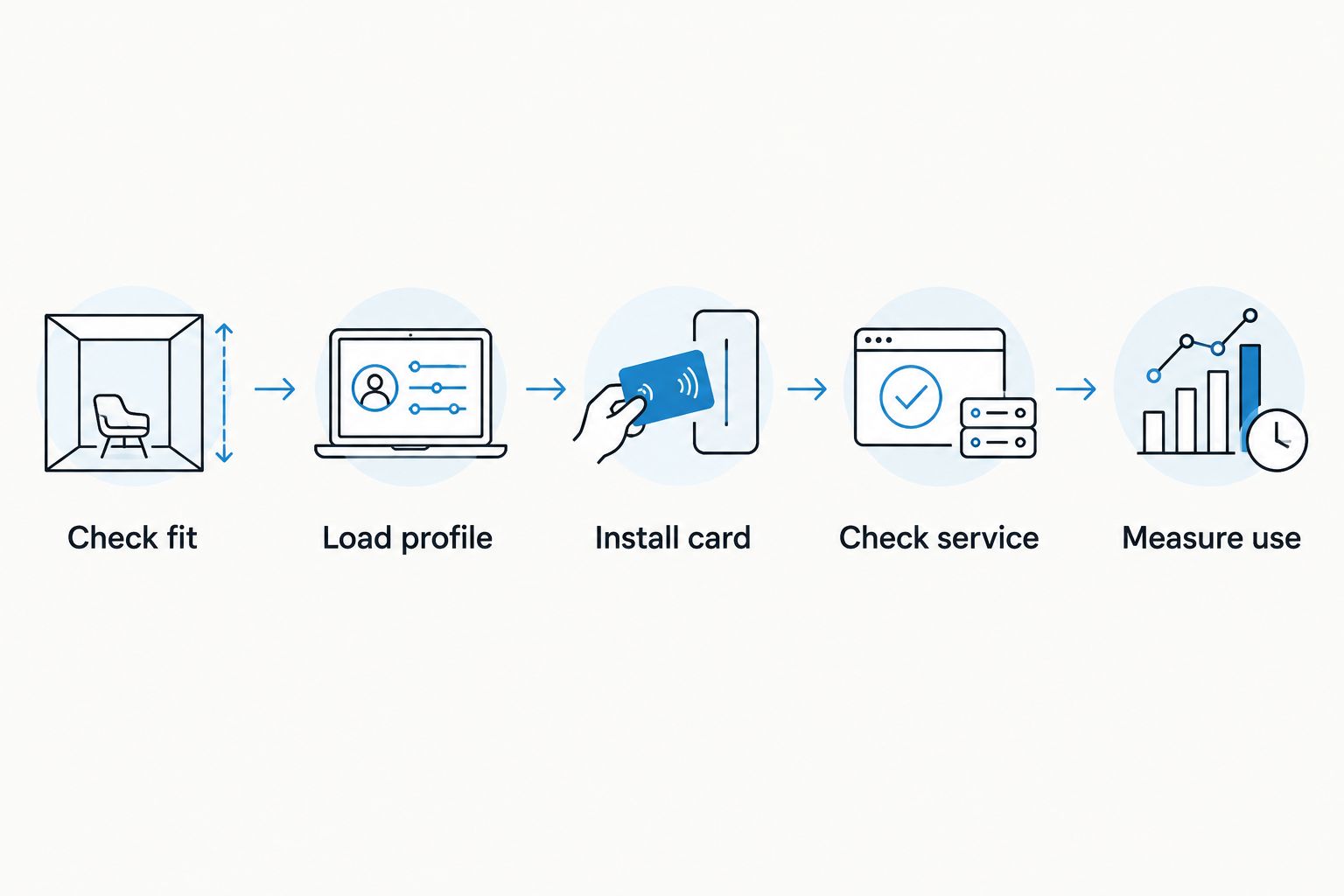
A Bluetooth reader provisions the card; it does not become the phone's cellular modem. Evaluate the reader workflow separately from the installed card's everyday use. Do not assume a provisioning connection must stay active throughout the day.
If you need that loading method, these listed products address the reader workflow. Neither product listing establishes a measured phone-battery advantage.

Check privacy separately from battery life
The reader listing describes an open-source product with no app or account required. That is a stated provisioning characteristic, not proof that every part of mobile service is account-free or anonymous. Your eSIM provider and cellular network remain separate parts of the service.
Assess the Switch Android app, reader workflow and provider requirements separately. An app-based management path and a no-app reader path are not interchangeable privacy descriptions.
Keep activation codes private. Before using a management tool, check what permissions it requests, where provisioning data goes and how profiles are handled. Do not infer encryption, local-only processing or a retention policy from the words open source alone.
How do I test whether my adapter affects battery life?
Use a repeatable comparison rather than a remembered battery percentage. Record the start and end charge, elapsed time, screen use, location, network conditions and active lines. Use comparable workloads and repeat the observation.
A useful record for a 2026 battery check includes:
| Record | Why it matters |
|---|---|
| Starting and ending charge | Shows the observed change |
| Elapsed time | Makes the observation interpretable |
| Screen activity | Separates display use from standby |
| Location and reception | Helps identify network-condition changes |
| Active lines | Reveals a changed cellular configuration |
| App battery report | Identifies recorded app activity |
| Setup activity | Separates provisioning from normal use |
Changing providers introduces a major comparison problem. Even on the same phone, the new subscription can use a different network. A repeatable difference is useful evidence, but it does not isolate adapter hardware unless the other relevant conditions are controlled.
Will disabling another SIM line help?
Disabling an unused cellular line removes that line from the comparison. Test it if your phone has another subscription enabled and you do not need it during the observation.
That test addresses active-line behaviour, not stored-profile capacity. Do not delete stored eSIM profiles merely to imitate a single-line configuration; first inspect which lines the phone actually has enabled.
Should I replace the adapter if the phone gets hot?
Investigate heat before blaming or replacing the adapter. Check charging, screen activity, hotspot use, background tasks and reception. Stop demanding activity and follow the phone manufacturer's temperature guidance if a warning appears.
If the issue repeats only with one configuration, retain the comparison notes and seek compatibility support. A reproducible report is more useful than assuming all removable eSIM hardware behaves the same way.
FAQ
Does an eSIM adapter always drain the battery faster?
No universal battery-life penalty applies to every eSIM adapter and phone combination. The adapter uses power, but reception, workload and active lines must be controlled before attributing a difference to it.
Does storing more eSIM profiles use more cellular power?
Stored profiles are not simultaneously active cellular connections. Inspect the phone's enabled lines rather than treating profile capacity as a battery-drain measurement.
Does Switch Max work in an iPhone without a SIM tray?
A physical Switch Max card requires a compatible physical SIM slot. An iPhone without that slot cannot use the removable card.
Do I need an Android phone to load profiles?
The Bluetooth reader provides a profile-loading path without an Android phone. Switch Pro's stated management path uses the Switch Android app; target-device compatibility still needs checking.
Is the Bluetooth reader connected for everyday mobile data?
The Bluetooth reader is a provisioning device, not the phone's cellular modem. Separate loading activity from ordinary use when assessing battery behaviour.
Is a native eSIM guaranteed to save battery over an adapter?
Native eSIM is not a guaranteed battery-saving upgrade over an adapter. A meaningful comparison needs the same device, similar network conditions and comparable use.
Does the reader's no-account claim mean mobile service is anonymous?
No-account provisioning does not establish anonymous mobile service. The reader workflow, eSIM provider and cellular network have separate requirements.
What should I check first if battery life drops after activation?
Check reception, active lines and the phone's battery-usage report first. Then compare normal use after provisioning under repeatable conditions.
One last thing
The strongest diagnostic clue is a repeatable change, not the timing of installation. A new profile, another enabled line and a different network can arrive together. Separate them before deciding which component is responsible.
For a Switchesim purchase in 2026, settle device fit and provisioning first. Then assess battery behaviour on your actual phone; do not buy a management workflow on the assumption that it guarantees longer runtime.



