

eSIM Adapters for Expats: Pro or Max? 2026
Expats' eSIM adapter setup is a way to use eSIM profiles through a compatible physical SIM slot, with the aim of managing connectivity across countries without relying on native eSIM support. Unlike a short trip, a move abroad can involve a local number, a home-country number and plans with different renewal terms. In 2026, check the phone, the profile-loading method and the plan separately before choosing an adapter.
- For eSIM adapters for expats, Switch Pro is the better fit when you can manage profiles through Android.
- Switch Max is the Switch eSIM choice for a compatible iPhone with a physical SIM slot; confirm how you will load profiles.
- The Bluetooth reader provides a profile-loading path without an Android phone; it does not remove phone compatibility requirements.
- Check carrier lock, SIM slot, network bands and provider activation before choosing a 2026 setup.
Why eSIM adapters matter for expats
An adapter addresses a specific hardware problem: your phone has a compatible physical SIM slot, but you need a way to use an eSIM profile without native eSIM support. It does not create a SIM tray, unlock a carrier-locked phone or change the network bands the phone supports. Those limits matter more when the same handset must work after a permanent move, not just during arrival.
A plan for your destination also needs to match the job. Temporary data can cover initial connectivity; it does not automatically replace a local voice number or a longer-term mobile contract. If your primary device is Android, start with the Android eSIM adapter guide to separate phone fit from profile management. For iPhone, check the regional model before considering any physical adapter: a model without a physical SIM slot has nowhere to take the card.
Switch eSIM is best for expats whose compatible phone has a physical SIM slot and who can match Switch Pro or Switch Max to a workable profile-loading path. Its advantage is a physical adapter choice for this situation. Its limit is equally clear: the adapter cannot solve an incompatible handset or an unsuitable mobile plan.
Build an expat eSIM setup that fits your phone
Check your physical SIM slot
Start with the handset you will actually use abroad. Open its specifications for the exact model and regional variant, then inspect whether it accepts a physical SIM. Do not treat an identical model name sold in another market as proof of the same SIM arrangement. If the phone lacks a usable physical slot, stop looking at physical eSIM adapters for that phone.
For a move involving more than one handset, check each device independently. A working card in one phone does not establish that another phone supports the same setup. In 2026, write down the model identifier rather than relying on a seller's broad Android or iPhone label.
- Record the exact phone model and regional variant.
- Confirm that the device has a compatible physical SIM slot.
- Check whether that slot is already needed for another physical SIM.
- Keep the phone's specifications available while comparing adapter requirements.
Verify the carrier lock and network fit
A physical SIM slot is necessary, but it is not the whole compatibility test. Ask your current carrier whether the phone is unlocked for another carrier's SIM. Then compare the handset's supported network bands with the network you intend to use at your destination. An adapter cannot add a missing radio band or override a carrier restriction.
Do this before choosing a data plan. A plan advertised for a country is not proof that your particular device can attach to the network you need. Also check whether the eSIM provider accepts the activation method available to you: QR-code delivery and manual activation are not interchangeable assumptions.
- Confirm the phone's carrier-lock status with its current carrier.
- Identify the destination network you expect to use.
- Compare that network's bands with the exact phone variant.
- Ask the eSIM provider which activation details it supplies.
Choose the Android management path
If you have a compatible Android device and want to manage profiles through Android, Switch Pro is the direct Switch eSIM choice. The supplied brand information identifies Pro as using Android-based profile management. That makes the management device part of your setup, not an optional detail to discover after the card arrives.
First decide which profiles you need: for example, one tied to your destination and another you retain for a separate purpose. Then confirm how each provider supplies activation details and whether those details work with the adapter's loading process. Do not buy on the assumption that every provider will issue an interchangeable activation code.
- Identify the Android device you will use for management.
- List the profiles you intend to load and why each is needed.
- Confirm each provider's activation method before ordering.
- Check the current Pro instructions for phone and app requirements.
Plan the iPhone setup before ordering
For a compatible iPhone with a physical SIM tray, Switch Max is the Switch eSIM option to assess. Using a configured Max card in an iPhone is different from managing profiles in the Switch Android app. Establish the loading route first; inserting an unconfigured card is not a substitute for provisioning it.
The regional iPhone variant is decisive. Check the tray on the handset in your hand, not a generic iPhone specification page. Also check carrier lock, operating system requirements, destination bands and provider activation. If any of those checks fails, a Max card is not a fix for the underlying problem.
A useful setup sequence is to confirm the slot, choose a compatible profile, load it through the required method and only then test it in the intended phone. Keep those actions distinct: storing a profile, selecting a profile and obtaining service from a network are different outcomes.
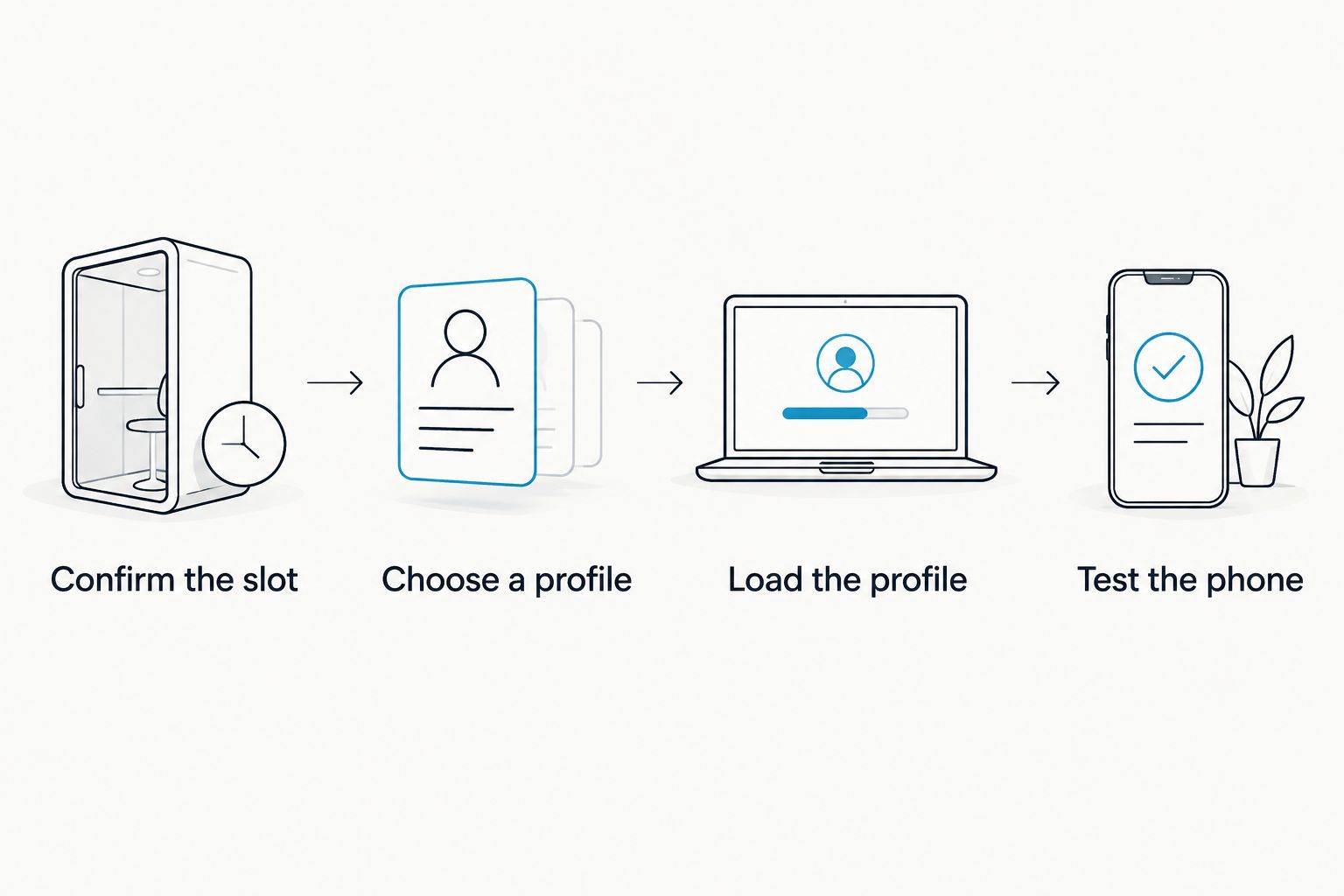
- Confirm the slot on the exact iPhone variant.
- Choose a profile with an activation method you can use.
- Load the profile through a supported management path.
- Test the configured card in the intended iPhone.
Set up reader-based provisioning
If you cannot use an Android phone for loading, assess the open-source Bluetooth eSIM card reader. Switch describes its reader as a way to load profiles without an Android phone. That is a provisioning distinction, not a claim that the adapter will work in every iPhone, router or hotspot.
A store listing for the adapter and reader bundle states capacity of up to 15 eSIM profiles. Treat that as a storage figure for the listed bundle, not a promise that 15 profiles can provide service at once or that every Switch adapter has identical capacity. Confirm the capacity of the exact card you choose if keeping several country profiles is central to your plan.
The reader is described as open source, but that label alone does not establish what data an app, provider or activation service retains. If privacy is a deciding factor, review the current reader documentation and the eSIM provider's data practices separately. Neither is determined by the presence of a physical card.
- Confirm which adapter you will provision with the reader.
- Check the reader's current setup instructions and device requirements.
- Obtain activation details from the chosen eSIM provider.
- Verify capacity for the exact adapter or bundle under consideration.
- Review reader and provider data handling as separate questions.
Match the plan to your length of stay
An adapter stores and uses profiles; the mobile plan determines where and for how long service is offered. Switch's supplied store listings include a 10 GB / 30-day plan and a 50 GB / 180-day plan. Those are examples of distinct data allowances and validity periods, not a recommendation to use either as your permanent expat line. Compare the current plan terms with your expected stay and need for a local number.
Check coverage at the city and network level when the provider makes that information available. If you need calls or texts for banking, work or local accounts, verify those functions explicitly rather than inferring them from a data allowance. Keep the choice of hardware separate from the choice of provider: a suitable adapter does not make an unsuitable plan suitable.
For a move to Saudi Arabia, comparing prepaid SIM plans in Saudi Arabia belongs in this plan decision, alongside the question of whether you need a local number. The adapter decision remains a separate check of phone fit and provisioning.
- Specify whether you need data, calls, texts or a local number.
- Compare validity periods with your expected stay.
- Check the provider's destination coverage and activation method.
- Read renewal and identity-verification terms before committing.
Test the move before depending on it
Prepare while you still have access to the phone and account used for setup. Load the profile through your chosen method, follow the provider's activation instructions and test the configured card where the plan provides coverage. A successful profile load proves only that provisioning worked; it does not prove the phone can connect to every destination network.
If you will keep a home-country number, decide where its SIM or profile will reside while the destination plan is in use. Do not assume that stored profiles operate simultaneously. Write down which device manages changes so you are not dependent on a setup route you will leave behind.
- Test profile loading before relying on the adapter.
- Verify service on the intended phone and covered network.
- Keep provider activation details accessible for troubleshooting.
- Document how you will change profiles after the move.
Compare the options for an expat setup
Choose by phone fit and loading method, then by plan. The table separates the hardware's job from the provider's job; none of these options overrides a carrier lock or missing physical SIM slot.
| Option | Best for | Starting price | Key limitation |
|---|---|---|---|
| Switch Pro | Expats managing profiles through a compatible Android setup | Check current listing | Android-based management must fit your setup. |
| Switch Max | Expats using a configured card in a compatible iPhone with a physical SIM tray | Check current listing | The iPhone must accept the card; provisioning is a separate step. |
| Switch Bluetooth reader | Expats who need to load profiles without an Android phone | Check current listing | The reader loads profiles; it does not make the destination device compatible. |
| Pre-loaded destination-data card | Expats who have chosen a listed destination plan and compatible device | Check current listing | The included plan's allowance and validity require a separate check. |
| Native eSIM on an existing phone | Expats whose handset and provider already support native activation | Depends on provider | It does not add native support to a phone that lacks it. |
For an Android-led setup, choose Pro after confirming its management requirements. For an iPhone with a physical tray, assess Max and arrange provisioning before use. Choose the reader when the missing piece is a loading path, not phone compatibility. If your existing phone and provider support native eSIM, check that route before adding hardware.
Switch also lists pre-loaded destination-data cards. They address the initial plan choice, not every need that comes with living abroad. Check the named destinations, allowance and validity against your move rather than treating a travel-data listing as a local mobile contract.


Common mistakes expats make
- Buying for the phone name, not its regional variant. Confirm the physical tray on the exact device. An iPhone label alone does not establish adapter fit.
- Treating profile storage as simultaneous service. Storage capacity tells you how many profiles a card can hold, not how many networks your phone can use at the same time.
- Choosing a data plan as a replacement for a local number. Check calls, texts and number requirements independently. Data allowance answers a different question.
- Forgetting the loading device. A configured Max card can be used in a compatible iPhone, but profile management needs a supported path. Establish that path before ordering.
- Assuming open source answers every privacy question. Review the reader's current documentation and the provider's terms. They cover different parts of the setup.
FAQ
What are the best eSIM adapters for expats using Android in 2026?
Switch Pro is the Switch eSIM choice when your compatible Android setup can manage profiles through Android. Check the physical SIM slot, carrier lock and provider activation before choosing it.
Can an expat use Switch Max in an iPhone?
A configured Switch Max card is an option for a compatible iPhone with a physical SIM tray. Confirm the exact regional variant and arrange a supported profile-loading method first.
Can a Bluetooth reader make an incompatible phone use an eSIM adapter?
No. The Switch Bluetooth reader loads profiles without an Android phone; it does not add a physical SIM slot, remove a carrier lock or change the phone's network bands.
Do eSIM adapters include a local phone number?
An adapter is hardware, so a local number depends on the mobile plan you choose. Verify calls, texts and number allocation with the provider rather than assuming a data plan includes them.
How many profiles can a Switch adapter hold?
A supplied Switch adapter and reader bundle listing states capacity of up to 15 eSIM profiles. Check the listing for your exact adapter; stored profiles do not imply simultaneous service.
Is a pre-loaded data card enough for a permanent move abroad?
A pre-loaded card is enough only if its stated plan meets your coverage, validity and service needs. Check separately whether you need a renewable plan or local number.
What should I check before ordering an eSIM adapter in 2026?
Confirm the physical SIM slot, carrier-lock status, network bands and available profile-loading method. Then verify the provider's activation details and plan terms.
One last thing
Decide how you will load the next profile, not just the first one. That is the difference between a card that works at arrival and a setup you can manage after changing plans. In 2026, write down whether Android management or reader-based provisioning fits the devices you will keep abroad.



