

eSIM Adapters for NGO Field Workers: Best Fit 2026
NGO field worker eSIM adapters are physical cards that hold eSIM profiles for use in compatible devices with a physical SIM slot, with the aim of keeping field staff connected across assignments. In 2026, the right choice depends on the device, the method used to load profiles and the mobile network at each destination. An adapter does not remove a carrier lock or guarantee coverage.
- For eSIM adapters for NGO field workers, choose Switch Pro when an Android phone can manage profiles.
- Switch Max suits a compatible iPhone only after its profile-loading path is confirmed; the phone needs a physical SIM slot.
- The Bluetooth reader loads profiles without an Android phone, but it is not a mobile data plan.
- Check device fit, carrier lock, network bands and eSIM provider before issuing hardware to a team.
Why eSIM adapters matter for NGO field workers
A field team can include Android phones, iPhones, routers and hotspots. Some have native eSIM support; others have a physical SIM slot but no native eSIM support. Those differences change the setup path. The same purchase decision cannot be made from the job title or destination alone.
The practical question is whether each assigned device can use the card and whether staff can load the required profile before they need it. A configured card and an unconfigured card create different deployment tasks. For workers who also use specialist equipment, the field service technician adapter guide provides a related device-first checklist.
Switchesim eSIM adapter hardware is best for NGO field workers whose assigned devices have compatible physical SIM slots and a confirmed profile-loading method. It is not a substitute for checking the provider, local network or organization’s security requirements.
How to choose and deploy adapters in 2026
Confirm the physical SIM slot on every assigned device
Start with the actual device, not a product-category label. Record its model and regional variant, then check whether it has an accessible physical SIM slot. A device without that slot cannot use a physical eSIM adapter card. Native eSIM support is a separate capability; if it already meets the worker’s needs, an adapter is not a prerequisite.
Check phones and shared equipment separately. A router or hotspot with a SIM slot still needs its own compatibility check. Do not infer that support on one phone model carries over to another model, a different regional variant or a different type of equipment.
- Record the model and regional variant of each device.
- Verify that its physical SIM slot is present and accessible.
- Separate native-eSIM devices from adapter candidates.
- Check routers and hotspots as individual models, not as a group.
Check the carrier lock, network bands and provider
A physical slot answers only one part of the fit question. Check carrier-lock status with the device’s carrier or administrator. Then compare the device’s supported network bands with the networks available through the intended eSIM provider at the destination. An adapter does not change the radio bands built into a phone.
Ask the provider how its profile is issued and activated. Confirm whether its QR-code or manual activation details can be used with the chosen loading method. Do this before distributing cards: a profile that the team cannot load is not a useful backup. The provider’s own service terms and coverage information govern the mobile connection, not the adapter listing.
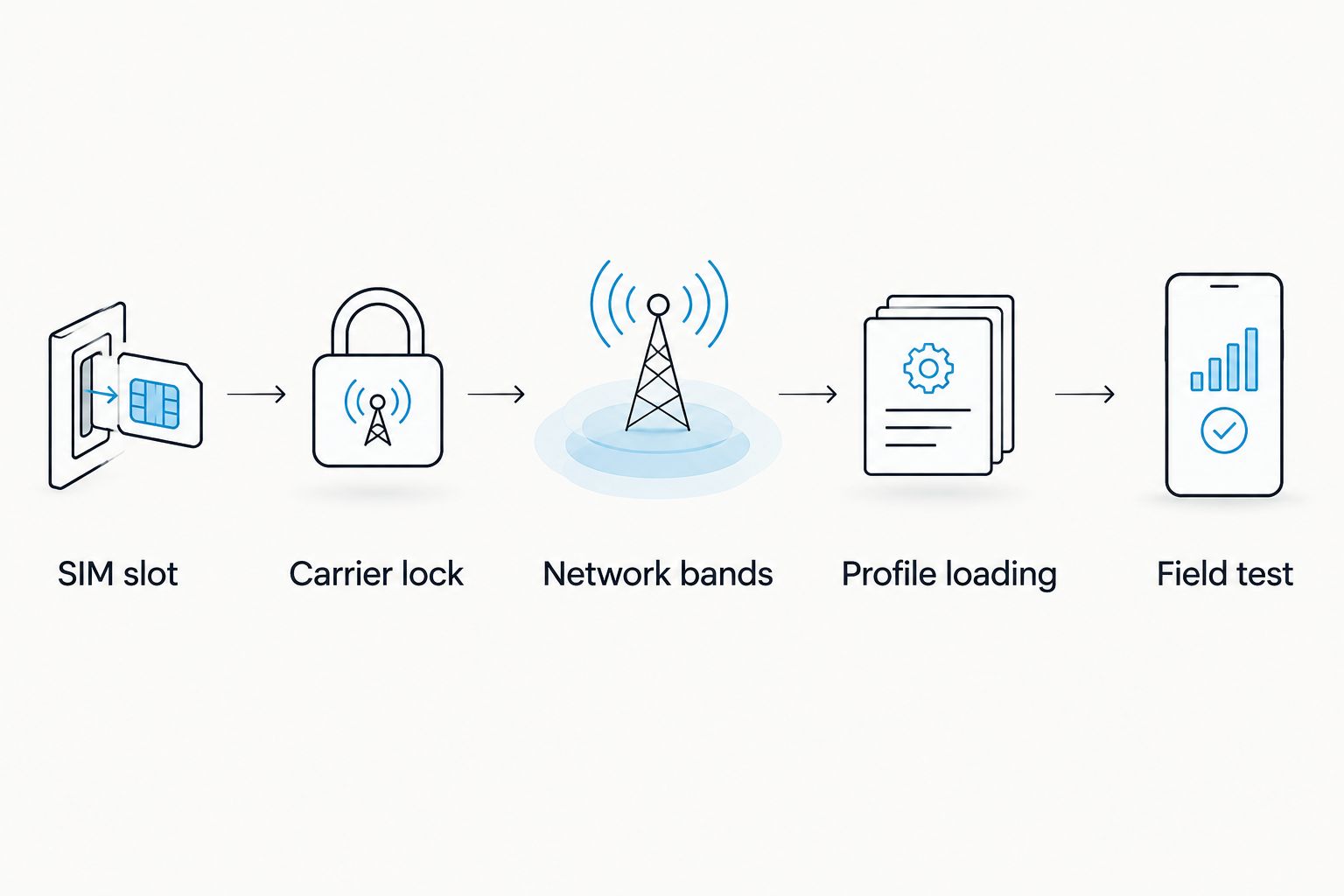
- Confirm carrier-lock status for each assigned device.
- Match device network bands to the intended provider’s networks.
- Check the provider’s activation instructions before buying cards.
- Test the intended device, card and profile together.
Choose Android management when Android is available
For an Android-led deployment, Switch Pro is the Switchesim adapter option that uses Android-based profile management. Assign a compatible Android phone for setup and document who will manage profile changes. Do not select it solely because the worker’s destination phone has a SIM slot; the team also needs a workable management path.
This distinction matters when equipment is issued centrally. A card prepared by an administrator and a card that a worker must provision personally place different demands on the team. Decide which person handles activation before issuing the card, and verify the process with the actual device and provider profile.
- Identify the Android phone used to manage profiles.
- Confirm that the destination device has a compatible SIM slot.
- Assign responsibility for loading and changing profiles.
- Record the activation method supplied by the provider.
Separate iPhone use from profile provisioning
Switch Max extends adapter use to compatible iPhones. The iPhone must have a compatible physical SIM slot; an iPhone without one is not a candidate for this card. Establish how the Max card will be configured before it reaches the worker. Using a configured card in an iPhone and loading a new profile onto the card are different tasks.
Do not assume that a field worker can manage the card through an iPhone in the same way an Android user manages a card through the Switch Android app. Check the exact iPhone model, regional variant and carrier-lock status. If the worker cannot use an Android phone for preparation, plan a separate provisioning method rather than leaving setup until arrival.
- Verify the iPhone’s physical SIM slot and regional variant.
- Check its carrier-lock status and required network bands.
- Confirm who configures the card before deployment.
- Test the configured card in the assigned iPhone.
Provision profiles without an Android phone
The open-source Bluetooth eSIM card reader loads profiles without an Android phone. It addresses a provisioning task; it does not itself provide mobile data or replace the adapter card in the destination device. Confirm the reader workflow and the provider’s activation method before adopting it as the team’s standard setup path.
For centrally managed equipment, define where provisioning happens and who holds the reader. Keep that decision separate from who carries the phone. A worker using a configured Max card in an iPhone need not be the person who loaded its profile. Equally, having a reader does not settle whether a particular phone, router or hotspot will accept the card.
- Decide who operates the reader and prepares cards.
- Check that the chosen provider supplies usable activation details.
- Pair each prepared card with its intended destination device.
- Verify connectivity on that device before handover.
Verify profile capacity and the data plan separately
Profile storage and mobile data allowance are different measures. The Switchesim adapter-and-reader bundle listing states up to 15 eSIM profiles. Treat that as a claim for the listed bundle, not a capacity guarantee for every card or a promise that all stored profiles can provide service at one location.
The listed pre-loaded Switch Max bundle names 20GB–75GB data options across 25+ destinations. Those figures describe listed plan options, not coverage for an NGO’s specific worksite. Check the destination, provider, activation conditions and required service before treating a pre-loaded card as ready for an assignment. Keep a record of which profile belongs to which provider and device.
- Check the capacity claim for the exact card or bundle selected.
- Distinguish stored profiles from the profile selected for use.
- Confirm the data allowance and destination on any pre-loaded card.
- Record provider and activation details under the team’s access rules.
Test the complete setup before issuing cards
Run a small device-by-device test before a wider 2026 rollout. Use the assigned phone or equipment, the selected adapter, the intended profile and the provisioning method the team will actually use. A successful load on a different phone does not establish that the assigned device will connect.
Include privacy and recovery in the handover. Set rules for who can access activation details, the Android management phone and the Bluetooth reader. Check the provider’s and any management software’s privacy information against the organization’s policy; an open-source reader is not, by itself, a complete privacy assessment. Document what staff should do when a profile fails to load or a device cannot connect, without assuming that another stored profile will have coverage.
- Load the profile using the planned Android or reader workflow.
- Test the card in its assigned phone, router or hotspot.
- Confirm service with the intended provider and network.
- Restrict access to activation details and provisioning equipment.
- Give the worker a documented failure and escalation path.
Compare the options for a field team
Choose the option by device fit and setup responsibility. The table separates the destination device from the tool used to prepare a card; those are not interchangeable purchases.
| Option | Best for | Setup path | Key limitation |
|---|---|---|---|
| Native eSIM on an assigned device | Teams whose existing devices and providers already meet the requirement | Follow the device and provider activation instructions | Does not add a physical SIM-slot adapter path to other devices |
| Existing physical SIM | A worker whose current SIM and provider meet the assignment’s needs | Follow the carrier’s SIM instructions | Changing provider can require changing the physical SIM |
| Switch Pro | Android-led teams with a confirmed management phone | Manage profiles through the Switch Android path | Android-based management must fit the team’s workflow |
| Switch Max | Teams issuing compatible iPhones with physical SIM slots | Configure the card before use in the iPhone | An iPhone without a physical SIM slot cannot use the card |
| Bluetooth reader | Teams that need to load profiles without an Android phone | Provision the adapter card through the reader | The reader is not a data plan or a substitute for device compatibility |
| Pre-loaded destination-data card | A team that has confirmed its destination and provider | Verify the supplied profile on the assigned device | The listed destination does not establish coverage at the worksite |
The simplest valid setup wins: use native eSIM or an existing SIM if it already meets the assignment; choose adapter hardware only after confirming the device and loading method. For a Switchesim deployment, choose Pro for Android-based management, Max for a compatible iPhone, and the reader when loading profiles without an Android phone is the requirement.
For teams considering prepared cards or a centrally managed reader, the relevant store listings are below. Check the exact contents and destination options before selecting either bundle.


Common mistakes NGO field teams make
- Buying by phone brand instead of regional variant. An iPhone or Android label does not confirm a usable physical SIM slot. Verify the assigned unit before ordering an adapter.
- Confusing card use with card provisioning. A configured Max card can be used in a compatible iPhone, while loading its profile requires a confirmed preparation path. Name the person and equipment responsible for that step.
- Treating stored profiles as guaranteed coverage. Capacity says nothing about whether the selected provider serves a worksite. Confirm the provider’s network information and test the assigned device.
- Assuming the reader solves every compatibility issue. The Bluetooth reader loads profiles without an Android phone; it does not remove carrier locks, change network bands or create a physical SIM slot.
- Issuing cards without an access process. Activation details and provisioning equipment need an owner and a handover rule. Set those rules before field distribution, especially when a team shares devices.
FAQ
What are the best eSIM adapters for NGO field workers in 2026?
Choose Switch Pro for Android-based profile management or Switch Max for a compatible iPhone with a physical SIM slot. Confirm the assigned device, provider and loading method before choosing either card.
Can an NGO worker use Switch Max in any iPhone?
No. The iPhone needs a compatible physical SIM slot, and fit depends on its model, regional variant and carrier-lock status. Plan how the card will be configured before issuing it.
Does Switch Pro require an Android phone?
Switch Pro uses Android-based profile management. If the team cannot use an Android phone to load profiles, check a reader-based provisioning path instead of assuming the iPhone can perform the same management task.
Can the Bluetooth reader provide mobile data by itself?
No. The Bluetooth reader loads profiles onto an adapter card without an Android phone; mobile service depends on the selected profile and its provider. The destination device must also accept the card.
Will an eSIM adapter work in a carrier-locked phone?
A physical eSIM adapter does not remove a carrier lock. Check the lock with the carrier and verify that the intended provider can be used on the assigned device before deployment.
Are pre-loaded data cards ready for every field location?
No. A listed destination does not confirm service at a specific worksite. Check the provider’s coverage information, activation conditions and the assigned device before issuing the card.
How many eSIM profiles can the adapter-and-reader bundle store?
The Switchesim adapter-and-reader bundle listing says up to 15 eSIM profiles. Verify the capacity of the exact card being purchased and keep profile storage separate from questions about provider coverage.
One last thing
For a 2026 field deployment, test the assigned device, selected card, intended provider profile and actual loading method together. That single check catches a problem a product comparison cannot: a workable adapter on paper with no workable handover path for the person carrying it.



