

esim adapters for journalists: Switch picks in 2026
Journalists’ eSIM adapter setup is a way to use eSIM profiles through a compatible physical SIM slot, with the aim of keeping a reporting device connected across assignments. In 2026, the first checks are the SIM slot and carrier-lock status, not the destination plan. Field reporters also need a workable way to load and change profiles before they lose access to their usual setup device.
- For esim adapters for journalists, Switch Pro is best for compatible Android devices when Android-based profile management fits the workflow.
- Switch Max is the iPhone option only when the iPhone has a compatible physical SIM slot and the card is configured.
- The Switch Bluetooth reader provides a profile-loading path without an Android phone; confirm device and provider fit before an assignment.
- A pre-loaded destination-data card reduces setup work, but its destination, allowance and validity still need checking.
Why eSIM adapters matter for journalists
A reporter’s phone can be a reporting tool, a source-contact device and a route back to the newsroom. An adapter is useful when that device lacks native eSIM support but has a compatible physical SIM slot. It is not a fix for a missing SIM tray, a carrier lock, unsupported network bands or an incompatible eSIM provider.
For Android-based management, start with Switch Pro. It is the clearest Switch eSIM choice for a journalist whose compatible Android device can handle profile management. If the working phone is an iPhone, check its regional hardware variant before considering Max: an iPhone without a usable physical SIM slot cannot take a physical adapter. That distinction determines the buying path in 2026.
Reporting also changes the order of setup. You need to establish how profiles will be loaded before leaving for an assignment, then check whether the selected provider serves the locations on the itinerary. A stored profile and a usable connection are different things. Network access still depends on the provider, the target device and the networks available where you work.
Set up an eSIM adapter for field reporting
Check the physical SIM slot first
Inspect the exact phone or other target device you will carry. A model name alone does not settle the question: regional variants can differ, and the adapter must fit a compatible physical SIM slot. Record the model and regional variant so you can check the intended adapter against the actual hardware rather than a general product category.
Check carrier-lock status separately. An adapter does not remove a carrier lock, and an unlocked device is not automatically compatible with every network. If you use a router or hotspot as the main reporting connection, apply the same checks to that device instead of assuming a phone result transfers to it.
- Find the physical SIM slot on the device you will actually use.
- Record its model and regional variant for the compatibility check.
- Confirm carrier-lock status with the device or carrier information available to you.
- Check the device’s network bands against the networks you intend to use.
Map how you will load profiles
Choose the provisioning path before choosing a destination plan. The Switch Android app is the Android-based management path for Pro. A configured Switch Max card extends use to a compatible iPhone, but using the card in an iPhone is not the same as managing profiles through the Android app. The Bluetooth reader provides a way to load profiles without an Android phone.
For a manual check, write down which device will load the profile, which device will carry the card and which device you expect to have available on assignment. If those are different devices, test the full handoff before travel. In 2026, that matters more than a claim of broad phone compatibility.
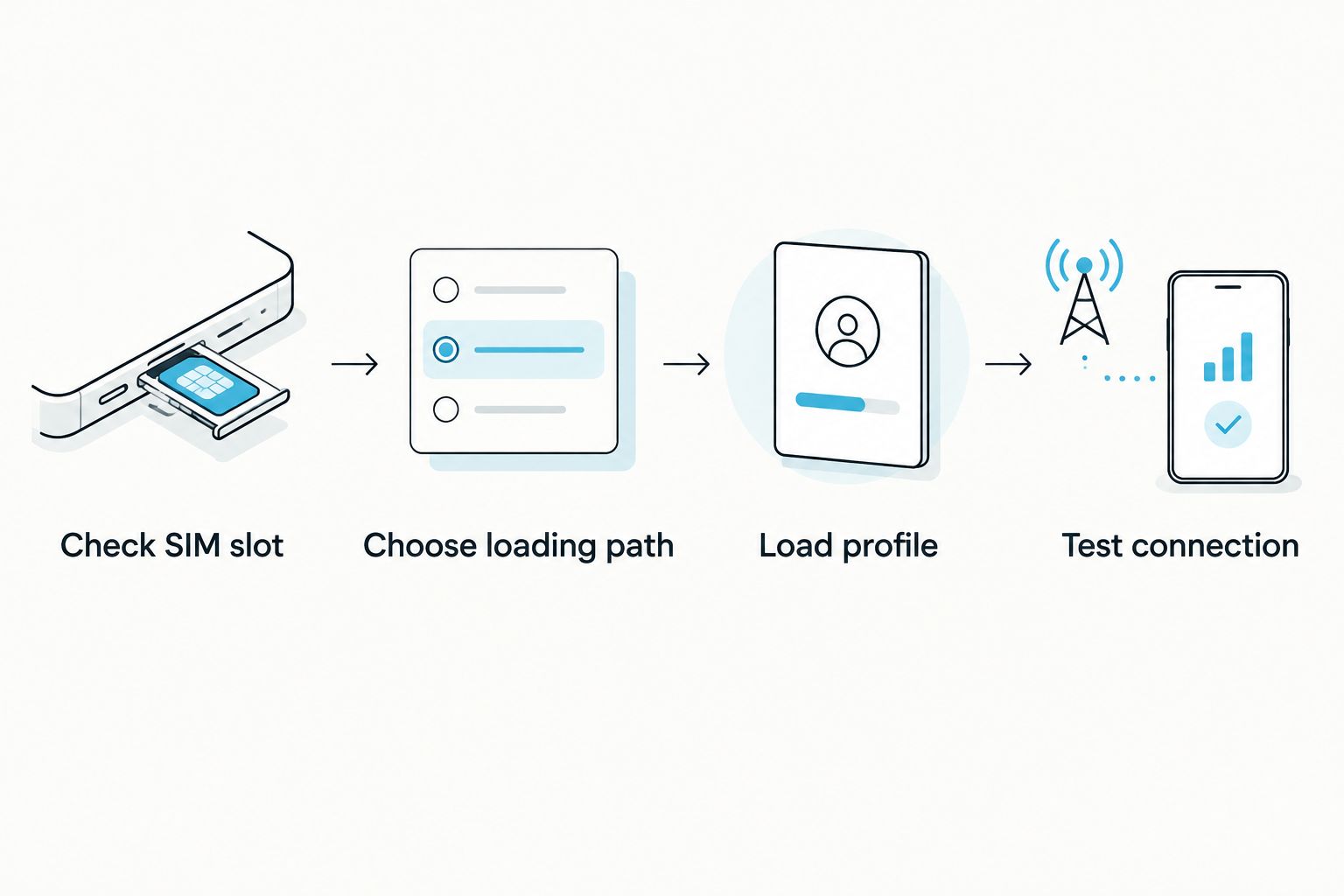
The diagram separates loading a profile from testing service on the target device. Complete both actions while you still have access to the equipment needed for setup.
- Identify the device that will perform profile loading.
- Decide whether Android management or reader-based provisioning fits that setup.
- Confirm the target device can use the configured card.
- Test the intended setup before the assignment begins.
Verify each provider and destination
An adapter holds a profile; it does not determine where that profile has service. Read the selected provider’s activation instructions and destination coverage for the specific plan. Check whether its installation method fits the profile-loading path you have chosen. Do not treat support for one provider or destination as evidence for another.
If you move between reporting locations, make a separate entry for each planned provider. Note the destination, activation method and intended target device. A pre-loaded destination-data card is another setup option, but its listed geography still needs to match the assignment. Switch eSIM’s store listings include destination-data options; they do not establish universal coverage.
- Check the provider’s stated destination coverage for each assignment.
- Confirm the profile’s activation method before buying the plan.
- Match the plan to the exact loading device and target device.
- Keep provider instructions available for the setup you selected.
Size the profile plan to the work
Separate stored profiles from usable data. The Switch adapter and Bluetooth reader bundle is described as storing up to 15 eSIM profiles. That is a storage claim for the listed bundle, not a promise that all profiles work on every device or network. Check current product details for the exact configuration you intend to buy.
Plan allowance and validity are different checks. Store listings include a China mainland, Japan and South Korea option with 20 GB and 30 days, and a United Arab Emirates option with 10 GB and 60 days. Those figures describe listed plans, not the amount a particular reporter needs. Match the published plan terms to your itinerary and expected work instead of buying by profile capacity alone.
- List the destinations and providers you need to prepare.
- Check the selected hardware listing’s profile-capacity claim.
- Read each data plan’s allowance and validity terms.
- Verify whether the selected plan fits the intended reporting locations.
Set a privacy and source-safety boundary
Do not infer a privacy guarantee from an adapter’s hardware format or from an open-source reader. The provided product information identifies an open-source Bluetooth reader, but it does not establish what a carrier, eSIM provider, operating system or newsroom account records. Treat each as a separate part of the reporting setup.
Decide which device and account you will use for provisioning, and follow your newsroom’s source-handling rules. Review the selected provider’s published privacy terms before using its service for sensitive work. An eSIM adapter is a profile-management tool, not a substitute for a source-protection policy. That boundary remains the same in 2026 whether you use Android management, a configured iPhone card or the reader.
- Review the eSIM provider’s privacy terms and account requirements.
- Identify who can access the provisioning device and account.
- Apply newsroom rules to source communications and stored material.
- Keep connectivity decisions separate from source-protection decisions.
Test the complete connection before departure
Loading a profile successfully is only one test. Put the configured card in the intended phone, router or hotspot and confirm that the chosen provider works under the conditions available to you. Check the functions your reporting workflow needs, such as data access and contact with the newsroom, without assuming that one successful check proves service in another location.
Repeat the test after a device or provider change. Keep a record of the configuration that worked: the target device, card, provider and loading method. A reporter covering multiple locations needs a known setup path, not an untested collection of profiles.
- Load the intended profile using the chosen management method.
- Install the configured card in the actual target device.
- Confirm the services your reporting workflow requires.
- Record the working device, card, provider and setup method.
Choose the hardware path that fits your kit
Make the purchase decision from the equipment you already carry. For a compatible Android device with Android-based management, Switch Pro is the direct choice. For a compatible iPhone with a physical SIM slot, Switch Max is the relevant card; establish its configuration path before treating it as ready to use. Add the Bluetooth reader when you need to load profiles without an Android phone.
Pre-loaded destination-data cards address a different need: having destination data prepared rather than selecting and loading a separate profile yourself. Check their listed destinations and terms against the assignment. Bulk and white-label supply are available for organisations planning a wider deployment, but individual compatibility and provisioning checks still apply to each device.
- Choose Pro for the stated Android management path.
- Choose Max only after checking iPhone slot and configuration requirements.
- Include the reader if provisioning must work without an Android phone.
- Check pre-loaded data against the actual destination and assignment dates.
Compare the options for a reporting kit
Switch eSIM hardware is best for journalists with compatible physical-SIM devices who can verify their profile-loading path before an assignment. No option below bypasses device compatibility, carrier-lock checks or provider requirements. The comparison describes the stated product roles; confirm the current listing before choosing a configuration in 2026.
| Option | Best for | Pricing check | Key limitation |
|---|---|---|---|
| Switch Pro | Reporters using a compatible Android device for profile management | Check the current listing | Android-based management does not itself establish an iPhone setup path |
| Switch Max | Reporters using a configured card in a compatible iPhone | Check the current listing | The iPhone needs a compatible physical SIM slot; configuration must be arranged |
| Open Source Bluetooth eSIM Card Reader | Reporters who need to load profiles without an Android phone | Check the current listing | The reader handles provisioning; it does not make the target device compatible |
| Pre-loaded destination-data cards | Reporters whose listed destination and plan terms fit the assignment | Check the current listing | A listed plan is limited by its stated geography and terms |
The Bluetooth reader is not a replacement for the adapter in the target device. Pro and Max address card use on different device paths; the reader addresses profile loading. If the phone has native eSIM support, compare that built-in path with the extra hardware and setup work before selecting an adapter.
The relevant store bundles pair a Switch adapter with destination data or with the Bluetooth reader. Check the card variant in a bundle against your target device rather than treating the bundle title as a compatibility test.


Common mistakes journalists make
- Buying for the phone name rather than its SIM slot. Check the exact regional variant. An iPhone without a compatible physical SIM slot cannot use a physical adapter, even if another version of that model can.
- Confusing iPhone use with iPhone provisioning. A configured Max card can be used in a compatible iPhone. Establish how you will load or change profiles instead of assuming the Android management path is available on that phone.
- Treating profile storage as coverage. The bundle’s stated capacity of up to 15 eSIM profiles says nothing about whether a selected provider serves the reporting location. Verify each plan separately.
- Leaving activation until arrival. Test the card, loading method and target device together before an assignment. A profile saved on a card is not proof that the intended connection works.
- Assuming the adapter settles privacy questions. Review provider terms and newsroom policy. Hardware selection alone does not define how source-related accounts or communications are handled.
FAQ
What are the best esim adapters for journalists in 2026?
Switch Pro is the direct choice for a journalist using a compatible Android device for Android-based profile management; Switch Max is the iPhone path when the iPhone has a compatible physical SIM slot and the card is configured. Choose according to the exact device and loading method, not the job title.
Can a journalist use Switch Max in an iPhone without a SIM tray?
No. A physical eSIM adapter requires a compatible physical SIM slot in the target iPhone. Check the exact model and regional variant before selecting Max.
Does Switch Pro let an iPhone manage eSIM profiles through the Android app?
No. Switch Pro’s stated management path is Android-based. For iPhone use, assess Switch Max as a configured card and confirm how its profiles will be loaded.
What does the Switch Bluetooth reader do for a field reporter?
The Switch Bluetooth reader provides a way to load eSIM profiles without an Android phone. It does not remove the need for a compatible adapter, target device and eSIM provider.
How many eSIM profiles can the adapter and reader bundle store?
The listed Switch adapter and Bluetooth reader bundle says it stores up to 15 eSIM profiles. Check the exact product configuration before purchase; storage capacity does not establish network coverage.
Will an eSIM adapter work in a carrier-locked reporting phone?
Do not assume it will. Check the phone’s carrier-lock status and the intended provider before purchase; an adapter does not remove a carrier lock.
Are pre-loaded destination-data cards enough for a reporting trip?
Only if the listed destination, plan terms and compatible device fit the assignment. Verify the geography, allowance, validity and setup path before relying on the card.
One last thing
Test the loading path, not just the card. In 2026, the useful question for a reporter is whether the equipment available on assignment can handle the next required profile change. If your workflow depends on a separate Android device, account for that device; if it depends on reader-based provisioning, confirm that setup before leaving.



