

eSIM Adapters for Cruise Ship Crew: Switch Max 2026
Cruise ship crew eSIM adapter use is the use of a physical eSIM card in a compatible SIM-slot phone to manage mobile profiles for time ashore. It does not provide a connection at sea. In 2026, the choice depends on your phone, how you will load profiles and whether your data plan covers the ports on your itinerary.
- eSIM adapters for cruise ship crew are for compatible SIM-slot devices and port coverage, not offshore service.
- Switch Max is the Switchesim choice for a compatible iPhone; configure the card before relying on it ashore.
- Switch Pro suits crew who can manage profiles through Android; the Bluetooth reader provides a loading path without an Android phone.
- Check the phone, carrier lock, loading method and destination coverage before boarding.
Why eSIM adapters matter for cruise ship crew
A crew member can visit several destinations while continuing to use the same phone. An adapter offers a way to keep eSIM profiles on a removable card when that phone lacks usable native eSIM support. It does not extend a destination data plan into open water. The useful question is whether a chosen profile works with the phone and the networks available where you will use it ashore.
In 2026, start with device fit rather than a list of destinations. Switchesim sells physical eSIM adapters, including Switch Pro for Android-based profile management. A compatible physical SIM slot is essential. Your phone model, regional variant, operating system, carrier-lock status, network bands and eSIM provider also affect whether a particular setup works. A physical slot alone is not proof of compatibility.
Switchesim is best for cruise ship crew with compatible SIM-slot phones who want removable eSIM profile storage for use ashore, not connectivity at sea. That distinction prevents an adapter purchase from being mistaken for a maritime connectivity plan.
Set up an eSIM adapter for crew use
The manual route comes first: inspect your phone, verify its carrier status and confirm the intended provider's activation and coverage terms. Then choose hardware. Do this in 2026 before you depend on a new profile during a short port visit.
Check your phone's physical SIM slot
Find the specifications for your exact model and regional variant. Check the device itself if you have it in hand. A model name shared across regions does not settle whether your particular handset has a usable physical SIM slot. An eSIM-only phone has no slot for this type of adapter, even if it supports native eSIM.
A removable tray is the beginning of the check, not the end. You still need to confirm that your phone can use the proposed adapter and that its operating system supports the intended management path. If you also use a physical SIM for your regular number, plan which card will occupy the slot when you go ashore.
- Identify the exact phone model and regional variant.
- Confirm that the device has a compatible physical SIM slot.
- Check whether another SIM must leave that slot during use.
- Keep the phone's existing SIM available for a reversal.
Clear carrier and network restrictions
Check carrier-lock status with your carrier or in your phone's settings. A locked phone can restrict which carrier profiles it accepts; the adapter does not remove that restriction. Check the bands used by your intended provider against the phone's supported bands as well. A successful profile download is not the same as a working mobile connection.
Separate these checks before buying a plan. First decide whether the hardware can run in the phone. Then determine whether the provider's profile can be loaded. Finally, confirm that its service is intended for the places on your itinerary. If any answer is no, change the setup rather than assuming another QR code will fix it.
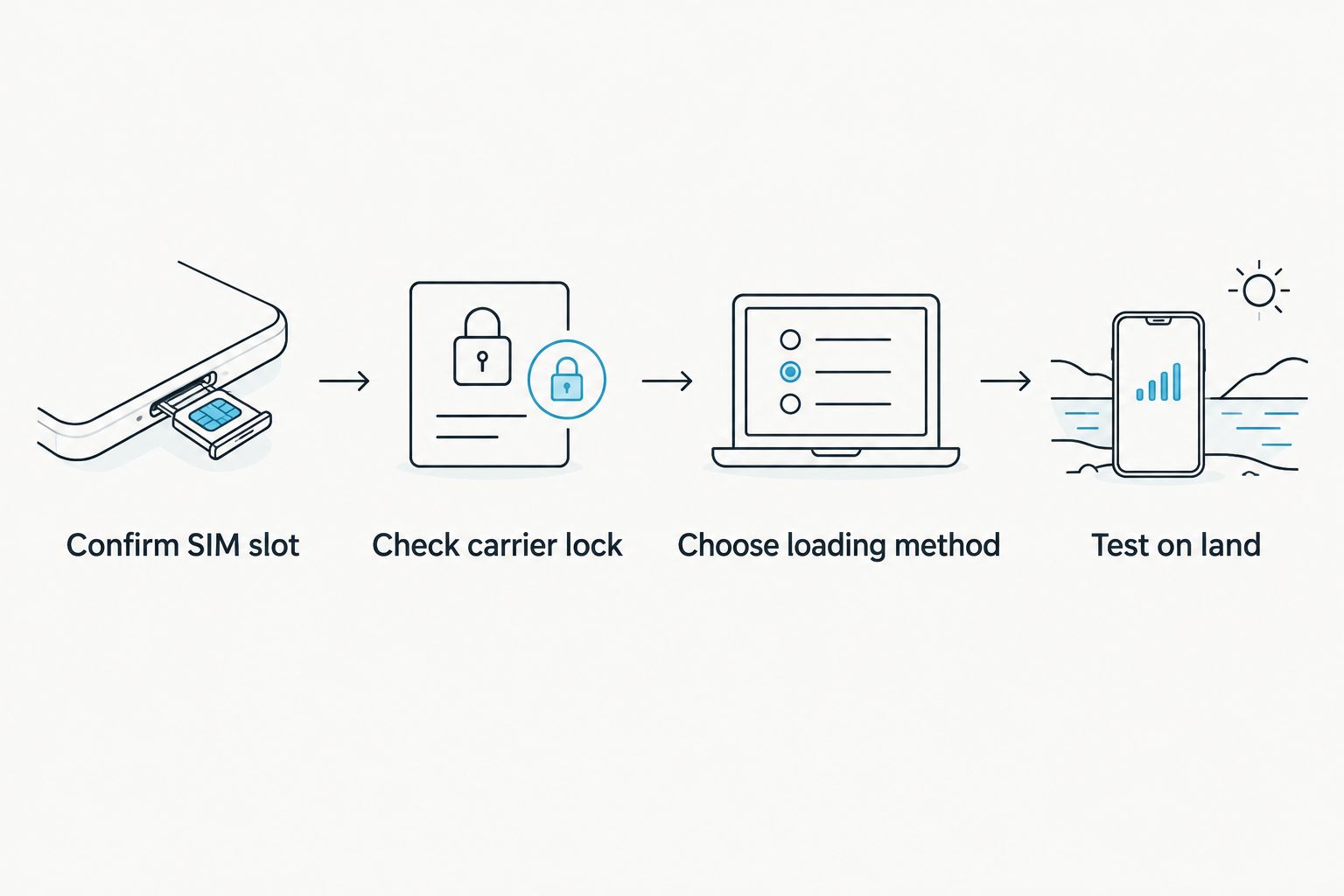
- Confirm SIM slot compatibility for your exact device.
- Check carrier lock before selecting another carrier's profile.
- Choose loading method based on the equipment you have.
- Test on land where the intended provider offers service.
Choose an Android management path
If you have a compatible Android phone, decide whether you can use it to manage profiles before boarding and during your trip. Switch Pro uses Android-based profile management. This makes Pro a direct choice for a crew member who already has the required Android setup; it is not a promise that every Android handset will work.
Keep provisioning separate from day-to-day use. Loading a new profile requires the right management path. A card already configured with a profile still depends on phone compatibility and provider coverage when you insert it. If your Android phone is also your only work device, complete setup while you have time to resolve activation problems.
- Confirm the Android phone's compatibility before selecting Pro.
- Identify how you will obtain the provider's activation details.
- Load the intended profile before it becomes urgent.
- Check that the selected profile connects on land.
Plan iPhone use separately from loading
For a compatible iPhone with a physical SIM slot, Switch Max extends adapter use to iPhone. The important limit is the setup path: using a configured Max card in an iPhone is not the same thing as managing and loading profiles through the Switch Android app. Do not make the iPhone your only provisioning plan without verifying how you will load the card.
If you have a compatible Android phone available for management, establish the profile there first. If you do not, assess the Bluetooth reader as a separate provisioning tool. A pre-loaded destination-data card is another product option, but you still need to check its destination, activation terms and fit for your phone. None of these choices makes an iPhone without a compatible physical slot accept a physical adapter.
- Confirm that your iPhone variant has a compatible physical SIM slot.
- Decide how the Max card will be configured.
- Verify the intended provider's activation requirements.
- Test the configured card in the iPhone on land.
Set up reader-based provisioning
The open-source Bluetooth eSIM card reader offers a way to load profiles without an Android phone. That addresses a specific obstacle for crew whose main phone is an iPhone or whose Android management phone will not be available. It does not change the target phone's slot requirements, carrier lock or coverage.
Treat provisioning and privacy as separate buying checks. Open-source reader hardware is a stated product characteristic; it is not, by itself, a statement about an eSIM provider's data handling or an app's permissions. Review the software and provider terms you intend to use. Keep activation details under your control, and establish how you will recover if a profile does not load.
- Confirm the reader supports your intended loading workflow.
- Check the provider's QR-code or manual activation method.
- Review the software permissions and provider privacy terms.
- Complete an initial load before relying on the reader away from home.
Match profiles to ports, not sea days
Use your itinerary to assess coverage. List the destinations where you expect to use mobile data, then read each provider's coverage and activation terms for those places. A regional plan name is not proof that every stop is included. A plan that works ashore also does not promise service while the ship is at sea.
For 2026, keep the adapter decision distinct from the data-plan decision. The adapter holds or presents a profile; the provider determines the plan's service terms. If you are considering a pre-loaded destination-data card, verify that its included destination and validity match the trip before depending on it. Do not choose solely from the card's name.
- List the ports where you need mobile service.
- Check each destination against the provider's coverage terms.
- Read when the plan activates and when its validity ends.
- Confirm how you will obtain another profile if plans change.
Test the full switch before departure
Run a practical test with the phone, adapter and intended profile together. Confirm that the phone detects the card, that the profile has been loaded through the chosen method and that mobile data connects where the provider offers service. Then check that you can return to your usual SIM arrangement. This catches setup faults before a brief visit ashore becomes your only chance to troubleshoot.
Do not treat a stored profile as proof of coverage. Nor does a working profile establish how many other profiles your particular card can hold. The listed adapter-and-reader bundle says it can store up to 15 eSIM profiles; confirm the capacity of the exact product you choose rather than applying that figure to every adapter.
- Insert the card and check that the phone detects it.
- Select the intended profile using the planned management method.
- Test mobile data on a covered network ashore.
- Restore your regular SIM setup and check that it works.
Compare the options for cruise ship crew
The table separates the job each option does. It is not a compatibility guarantee. For every choice in 2026, verify your specific phone and provider before purchase. Product listings establish what Switchesim offers; they do not establish that a destination plan works offshore.
| Option | Best for | Key limitation |
|---|---|---|
| Switch Pro | Crew with a compatible Android management setup | Profile management depends on Android; check the target device and provider. |
| Switch Max | Crew using a compatible physical-SIM-slot iPhone | iPhone use requires a configured card; plan a separate loading method. |
| Open-source Bluetooth eSIM card reader | Crew who need to load profiles without an Android phone | It provisions a card; it does not resolve phone, carrier or network restrictions. |
| Pre-loaded destination-data card | Crew who know the destination and want a card with a profile already loaded | The included plan still needs to match the itinerary and device. |
| Native eSIM on a compatible phone | Crew whose phone already supports the intended eSIM | It does not add eSIM capability to a phone that lacks it. |
Choose Pro for Android-based management, Max for a compatible iPhone, and the reader when you need a loading path without an Android phone. A pre-loaded card changes the initial setup task, not the coverage boundary. If your phone already handles the profiles you need through native eSIM, check that path before adding hardware.
The bundle below pairs an adapter with the reader. The pre-loaded Max bundle addresses a different need: arriving with destination data already associated with a card. Check the current listing for the precise contents and plan terms; these are not interchangeable solutions to the same setup problem.


Common mistakes cruise ship crew makes
- Expecting an adapter to provide service at sea. It is eSIM hardware, not a maritime network. Judge the data plan against the places where you will actually use it.
- Buying for a model name instead of a regional variant. Check the physical slot and device specifications for the phone in your hand. Do not assume every variant accepts a physical card.
- Confusing iPhone use with iPhone provisioning. A configured Max card can be used in a compatible iPhone. Establish an Android or reader-based loading path before you need a new profile.
- Ignoring carrier lock and network bands. Neither a reader nor a loaded card removes those restrictions. Confirm them before purchasing a destination profile.
- Assuming every card has the same profile capacity. The bundle listing's up-to-15 figure applies to that stated bundle, not automatically to Pro, Max or every pre-loaded card.
FAQ
Do eSIM adapters for cruise ship crew work at sea?
An eSIM adapter does not provide service at sea. It lets a compatible device use a stored profile; connectivity depends on the provider and available network where you are.
What is the best Switchesim option for an Android crew member?
Switch Pro is the direct option when you have a compatible Android management setup. Check the phone's physical SIM slot, carrier status and provider requirements before choosing it.
Can cruise ship crew use Switch Max in an iPhone?
A configured Switch Max card can be used in a compatible iPhone with a physical SIM slot. Plan how to load profiles separately; iPhone use is not the same as Android-based profile management.
Can I load an eSIM profile without an Android phone?
The Switchesim Bluetooth reader provides a way to load profiles without an Android phone. Confirm that your intended provider's activation method and your target device fit the planned setup.
Does a pre-loaded card cover every port on an itinerary?
No; check the included plan's stated destinations and terms against each port where you need data. The card itself does not expand the provider's coverage.
Will an adapter work in an eSIM-only phone?
No; a physical eSIM adapter needs a compatible physical SIM slot. Use the phone's native eSIM setup instead if it supports the profile you need.
How many profiles can the adapter hold?
Check the capacity stated for the exact product you select. The listed Switchesim adapter-and-reader bundle specifies up to 15 eSIM profiles; that figure should not be assumed for every card.
One last thing
For a 2026 itinerary, write down your loading method next to each intended profile. A phone can have the right slot and a suitable destination plan, yet leave you unable to install a replacement profile when your only management device is unavailable. Set up and test that path before boarding.



