

eSIM Adapters for Study Abroad Students: 2026 Verdict
Study abroad students’ eSIM adapter setup is the use of a removable card in a compatible physical SIM slot to load destination data without relying on native eSIM support. The right choice depends on your phone, how you will load profiles and whether you need to keep a home number active during the term.
- For eSIM adapters for study abroad students, Switch Pro is best for compatible Android phones that can manage profiles through the Switch Android app.
- Switch Max is the choice for a compatible iPhone with a physical SIM slot; plan how you will load its profiles.
- A Bluetooth reader provides a profile-loading path without an Android phone. Check the SIM slot, carrier lock and destination coverage first.
Why eSIM adapters matter for study abroad students
A semester abroad creates a different problem from a short trip. You need a connection on arrival, but you must also work out what happens to your home number, whether your destination plan lasts long enough and how you will change profiles later. An adapter addresses profile storage in a physical SIM card. It does not replace a data plan or make an incompatible phone work.
Switch Pro is best for study abroad students with a compatible Android phone and access to the Switch Android app for profile management. Start with the Switch Pro setup path if that describes your device. If you use an iPhone, do not treat the Android management path as an iPhone feature: check the Max card and its loading method instead.
In 2026, the decisive question is not simply whether your phone supports eSIM. It is whether your exact model and regional variant have a compatible physical SIM slot. A carrier lock, missing network bands or an unsupported eSIM provider can still stop a planned setup from working. Confirm those conditions before choosing an adapter or destination plan.
Set up an eSIM adapter for a study abroad term
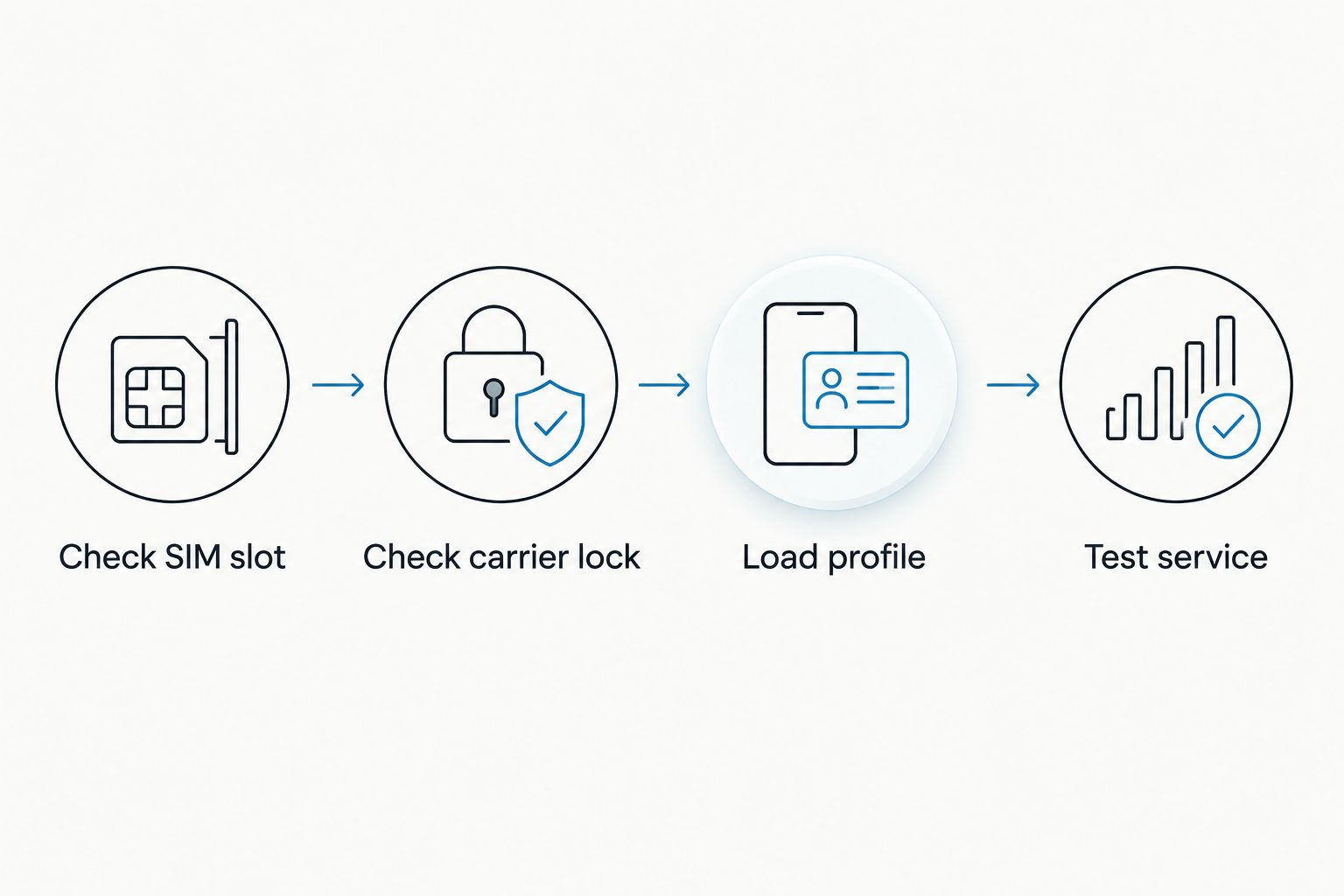
Check your physical SIM slot
Look at your exact phone model, not just its product-family name. Regional variants can differ. If your phone has no physical SIM slot, a removable eSIM adapter card has nowhere to go; choose a different connectivity path. If you plan to keep a home SIM in the phone, check whether another usable slot is available and how your device handles both lines.
Your own phone settings, purchase documentation and carrier account are the first places to verify the model and SIM configuration. Do this before comparing profile counts or destination plans.
- Check SIM slot: Confirm that your exact model and regional variant have a physical SIM slot compatible with the adapter.
- Identify which slot currently holds your home SIM and whether removing it affects calls or messages you need.
- Check the phone’s settings for how it selects a line for calls, texts and mobile data.
- If there is no suitable slot, stop the adapter purchase and assess native eSIM or another phone instead.
Verify the carrier lock and destination network
An adapter cannot remove a carrier lock. Ask your current carrier whether the phone accepts another carrier’s SIM, then check the answer on the device itself before departure. Next, compare your exact phone variant’s supported bands with the networks used by the destination plan you intend to activate. A plan’s country label alone does not establish device compatibility.
For a study term, also check the provider’s coverage where you will live and study, not only at the arrival airport. Keep the hardware decision separate from the plan decision: a suitable adapter does not certify a particular provider’s network.
- Check carrier lock: Confirm that the phone can use a SIM from another carrier.
- Check your exact device variant’s network bands against the intended provider’s network.
- Read the provider’s stated destination coverage and activation requirements.
- Confirm whether the plan supplies data only or also supports the calling and messaging functions you need.
Choose your profile-loading path
The operating system changes the setup. Switch Pro uses Android-based profile management through the Switch Android app. Switch Max extends use to compatible iPhones, but using a configured Max card in an iPhone is not the same as managing profiles with an Android app on that iPhone. The open-source Bluetooth reader offers a separate way to load profiles without an Android phone.
Decide how you will load the next profile before you leave. A card already configured for arrival can solve the first connection, but it does not answer how you will add a different provider later. Treat the reader as a provisioning tool, not as a substitute for the card, the phone slot or a data plan.
- Choose Android app management if you have a compatible Android phone and intend to manage profiles there.
- Choose a configured Max card for a compatible iPhone with a physical SIM slot; establish its future loading path separately.
- Choose reader-based provisioning if you need to load profiles without an Android phone.
- Load profile: Check whether your provider supplies a QR code or manual activation details that your chosen path can use.
- Test service: Verify the installed card and selected profile while you can still troubleshoot your home connection.
Match the plan to your actual term
An adapter stores profiles; the provider determines the data allowance, coverage, activation conditions and plan duration. Do not assume one travel-data bundle covers an entire academic term. The supplied product listings include a Switch Pro bundle with a China mainland, Japan and South Korea 10 GB / 30-day plan, and a Switch Max bundle with a China mainland, Hong Kong and Macao 50 GB / 180-day plan. Those are distinct destination and duration combinations, not general adapter specifications.
In 2026, choose the destination and validity window from the specific plan listing. Check when the validity period begins, how to add data after it ends and whether a new profile is required. Keep an independent way to access account information if your current plan expires before the next one is ready.
- List every country where you expect to use mobile data, including any transit stop where service matters.
- Compare each plan’s stated coverage, data allowance and validity period with your study dates.
- Check the provider’s activation instructions before saving a QR code or manual details.
- Record what you must do when the plan ends or its data allowance runs out.
Plan around your home number
Decide whether you need the home number for calls, texts or account sign-ins while abroad. A physical adapter occupies a SIM slot. If it displaces your home SIM, retaining that number on the same phone depends on the device’s other supported line options and your carrier arrangement. Do not assume storing several eSIM profiles makes several numbers active at once.
A practical test is to write down the functions you cannot lose, then check each one against your intended phone configuration. Data access and receipt of messages to a home number are separate requirements.
- Identify accounts that send sign-in messages to your home number.
- Check whether the home SIM must remain in the phone to receive those messages.
- Confirm your phone’s supported active-line configuration for the exact model.
- Save essential account-recovery methods before changing SIMs or leaving home.
Check capacity and the privacy model
Capacity matters if you intend to keep profiles for several destinations or change providers during the term. Do not infer a profile limit for every Switch card from one bundle. The listed Switch adapter and Bluetooth reader bundle says it can store up to 15 eSIM profiles; verify the capacity of the exact card you choose. Storage capacity also differs from the number of profiles a phone can use simultaneously.
The reader is described as open-source. That label does not, by itself, tell you how every app, provider or activation process handles your data. Review the software and provider instructions that apply to your chosen setup. Keep activation credentials private, and check what information you must retain to restore or change service.
- Confirm the stated profile capacity for the exact adapter or bundle, not just the product family.
- Separate stored profiles from the lines your phone can actively use.
- Review the management app, reader and provider instructions for account and credential handling.
- Keep a record of which provider issued each profile without sharing activation codes publicly.
Test the complete setup before departure
A successful profile download is not the same as working mobile data. Fit the card, select the intended profile and test a connection under the conditions your provider permits. Then check how your phone selects mobile data and whether your home number still behaves as expected. Some destination service cannot be fully tested until you reach its coverage area; know which checks remain.
The goal is a repeatable process for the next profile, not just one successful arrival. In 2026, keep the loading instructions available offline so a failed connection does not prevent you from finding the steps needed to fix it.
- Insert the card and confirm that the phone recognizes it.
- Load and select the intended profile using your chosen Android or reader-based path.
- Test available service, then check mobile-data and line-selection settings.
- Save provider support details and activation instructions for offline access.
- Recheck service after arrival where the destination network is available.
Compare the options for a study abroad student
Choose by phone fit and loading method, not by destination plan alone. The options below address different parts of the setup. The reader loads profiles; it does not replace the adapter card. Native eSIM is a separate route when the phone supports it.
| Option | Best for | Starting price | Key limitation |
|---|---|---|---|
| Switch Pro | A student with a compatible Android phone who wants Android app-based profile management | Check current listing | Needs a compatible physical SIM slot and the Android management path |
| Switch Max | A student using a compatible iPhone with a physical SIM slot | Check current listing | iPhone use does not mean the Switch Android app runs on the iPhone; establish a profile-loading path |
| Open-source Bluetooth reader with a compatible adapter | A student who needs to load profiles without an Android phone | Check current listing | A provisioning tool, not a replacement for the adapter, phone compatibility or data plan |
| Pre-loaded destination-data card | A student who wants a destination profile prepared before arrival | Check current listing | Check the exact destination, validity period and how later profiles will be loaded |
| Native eSIM on a supported phone | A student whose exact phone already supports the intended provider’s eSIM | Check provider listing | Does not add native eSIM capability to a phone that lacks it |
Switch eSIM is a hardware choice for a compatible physical SIM slot. Its advantage is a route to stored eSIM profiles on devices that cannot use the intended profile through native eSIM alone. Its limitation is the extra fit and provisioning check: the card, phone, management method and provider all have to work together.


Common mistakes study abroad students make
- Buying for the phone name, not its regional variant. Check the exact model’s physical SIM slot and network bands. A similar-looking version sold elsewhere does not settle either question.
- Treating an unlocked phone as fully compatible. Carrier-lock status is only one check. The slot, operating system, adapter, provider activation method and destination network still matter.
- Confusing iPhone use with iPhone provisioning. A configured Max card can be used in a compatible iPhone, but the Switch Android app is an Android management path. Arrange reader-based loading if you will not have an Android phone to manage profiles.
- Assuming stored means active. Profile capacity tells you how many profiles the specified card can hold, not how many lines your phone can operate at once.
- Buying a short destination plan for a long term. Check the listed validity period and the renewal or replacement process before relying on that plan for study-related access.
FAQ
What are the best eSIM adapters for study abroad students with an Android phone?
Switch Pro is the direct choice for a compatible Android phone when you want profile management through the Switch Android app. Confirm the physical SIM slot, carrier-lock status and provider activation method before choosing it.
Can I use an eSIM adapter in an iPhone without native eSIM support?
Switch Max can be used in a compatible iPhone with a physical SIM slot after the card is configured. Check the exact iPhone variant and arrange how you will load or change profiles; iPhone use is not Android app management.
Do I need a Bluetooth reader for Switch Max?
You need a workable way to load the profiles you intend to use. The Bluetooth reader provides a loading path without an Android phone; a card configured before arrival addresses that initial profile, not necessarily later changes.
Will an eSIM adapter work in a phone with no physical SIM slot?
No. A removable eSIM adapter card requires a compatible physical SIM slot. Check the exact model and regional variant before buying hardware.
Does an eSIM adapter include a mobile data plan?
An adapter by itself is hardware, not a destination data plan. Some listed Switch bundles include pre-loaded data; check the specific destination, allowance, validity period and provider conditions.
Can I keep my home number while using a study abroad eSIM adapter?
That depends on your phone’s supported line configuration and how your home number is provided. Check whether the adapter displaces your home SIM and test calls, messages and sign-ins before departure.
How many eSIM profiles can a Switch adapter store?
Check the capacity of the exact card or bundle you select. The listed Switch adapter and Bluetooth reader bundle states storage for up to 15 eSIM profiles; that does not establish the capacity of every Switch product or the number of simultaneously active lines.
One last thing
Your second profile is the real setup test. In 2026, a pre-loaded card can make the first arrival straightforward, but a study term can require a later provider or destination change. Before buying, confirm how you will load that next profile, where you will get its activation details and what connection you will use if the first plan has already ended.



