

How do you switch from a physical SIM to eSIM?
To switch from a physical SIM to eSIM, check your phone and carrier support, request an eSIM replacement for your existing line, install the carrier-issued profile, and test calls, texts and data before removing the old SIM. A phone without native eSIM support needs a compatible physical eSIM adapter and SIM slot; installing a separate data plan does not transfer your existing number.
- How to switch to eSIM: request a carrier replacement, install the profile, then test your existing line.
- Native eSIM needs device and carrier support; an eSIM adapter needs a compatible physical SIM slot.
- Switchesim eSIM adapters suit compatible SIM-slot devices, with Android management or Bluetooth reader provisioning.
- A new data profile is not a number transfer. Keep your existing service until the replacement works.
How do you switch from a physical SIM to eSIM?
Ask your carrier to replace the physical SIM on your existing line with an eSIM. Do not buy an unrelated data plan if your goal is to keep the same number and service. The carrier must issue the replacement credentials and associate them with your account.
Follow these steps for a physical-to-eSIM replacement in 2026:
- Check device fit. Confirm your exact model, regional variant and supported operating system. For an adapter, confirm a compatible physical SIM slot.
- Check carrier support. Ask whether the carrier supports eSIM replacement for your account and intended device. Check carrier-lock restrictions before using another provider.
- Request the replacement. Use the carrier's supported account, app, store or support process. Complete the required identity checks.
- Install the profile. Follow the carrier's activation instructions through the phone's native settings or the adapter's supported provisioning method.
- Test the line. Check outgoing and incoming calls, text messages and mobile data. Test with Wi-Fi disabled so it does not hide a mobile-data problem.
- Retire the old SIM. Remove it after the replacement works. Keep it secure until the carrier confirms whether it remains useful for recovery.
For an Android adapter setup, the Switch Android app and Switch Pro management guide covers the separate profile-management path. Native phone activation and adapter provisioning are different processes.
Why this matters
Replacing your SIM and changing your mobile service are separate decisions. A carrier-issued replacement preserves the existing line when the carrier processes it that way. Adding another provider's eSIM creates a separate service, not an automatic replacement for your number.
This distinction matters before you remove the physical SIM. Account verification messages, incoming calls and your usual data connection depend on the line that is actually active. Decide whether you want a replacement, an additional data connection or a move to another carrier before starting.
Which setup fits your phone?
A physical eSIM adapter cannot help a device that has no physical SIM slot. Native eSIM support also depends on the exact device variant, not just the name printed on the box. Check the manufacturer's specifications and your carrier's requirements for your 2026 setup.
| Setup | Best for | Benefit | Limitation |
|---|---|---|---|
| Native eSIM | A supported phone and carrier | Uses the phone's built-in eSIM activation process | Device, regional variant and carrier support must match |
| Switch Pro | Compatible devices with an Android management path | Uses the Switch Android app for profile management | Requires compatible hardware and an Android-based management setup |
| Switch Max | Compatible iPhones with a physical SIM slot | Extends adapter use to compatible iPhones | A configured card and supported provisioning path are still required |
| Bluetooth reader | Buyers who need provisioning without an Android phone | Loads profiles through a separate reader-based process | Adds a hardware provisioning step; it does not replace carrier approval |
Switchesim eSIM adapters are best suited to users with compatible physical SIM-slot devices who need an alternative to native eSIM support. They are not the first choice when your phone and carrier already provide a supported native replacement process.
Check carrier-lock status separately from eSIM capability. An adapter changes how you store and load a profile; it does not remove the phone's network restrictions. Network bands and provider compatibility also remain part of the device-fit check.
How do you switch using native eSIM?
Start with your carrier's instructions, not a generic menu path. Phone manufacturers and carriers use different activation flows. Some supported setups offer conversion within settings; others require carrier-issued activation credentials.
On an iPhone, look in the cellular or mobile-service settings for the carrier-supported activation or conversion option. If no supported conversion option appears, request an eSIM replacement from the carrier. Do not assume that a missing button means the phone cannot use eSIM.
On Android, use the manufacturer's SIM or mobile-network settings and the carrier's activation process. Menu names differ across devices. Confirm that the process replaces your current line rather than adding a new subscription.
Connect to a reliable internet connection before installing the profile. Follow any carrier instructions about when the old SIM stops working. Do not delete a working profile to troubleshoot an unrelated activation problem. Ask the carrier whether replacement credentials are needed first.
How do you switch using an eSIM adapter?
An adapter stores eSIM profiles on removable hardware that uses a compatible physical SIM slot. It does not copy an ordinary SIM into an eSIM profile. You still need valid credentials issued by the provider.
The setup separates into a management device, a provisioning method and a target device. Those roles are not interchangeable. For example, using a configured Max card in a compatible iPhone is different from managing profiles through the Switch Android app.
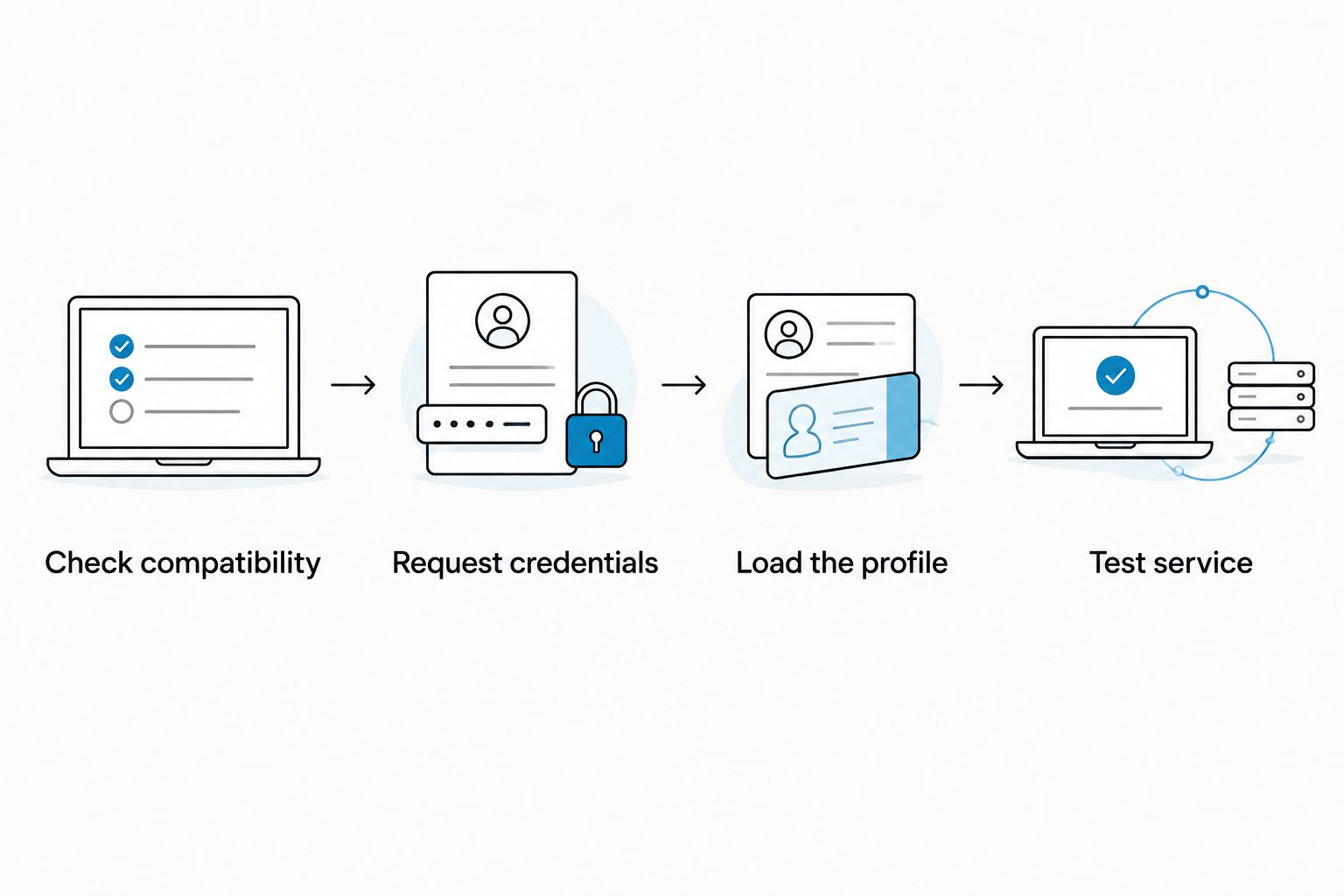
Use this sequence:
- Check compatibility. Verify the target phone, SIM slot, regional variant, operating system and carrier-lock status.
- Request credentials. Obtain a supported eSIM activation method from the provider. Confirm adapter acceptance before replacing an essential line.
- Load the profile. Use the supported Android management path or Bluetooth reader workflow for the chosen hardware.
- Test service. Put the configured adapter in the compatible target device and verify the services included in the plan.
The loading device and the phone that uses the service do not have to play the same role. Choose the provisioning path before buying hardware, especially when your only phone is an iPhone.
Android management with Switch Pro
Switch Pro uses Android-based profile management through the Switch Android app. Choose this route when your management device and target hardware meet the stated requirements. Do not assume every Android phone can manage the card simply because it has a SIM tray.
Before replacing your main SIM, confirm that the app can access the adapter on your exact device. Then verify the provider's activation method. Hardware recognition and successful carrier activation are separate checks.
Compatible iPhone use with Switch Max
Switch Max extends adapter use to compatible iPhones with physical SIM slots. An iPhone without a SIM tray cannot accept the card. Confirm the regional variant before choosing this path.
Using a configured Max card in an iPhone does not mean that native iPhone settings provide every adapter-management function. Plan how you will load and manage profiles, including whether you need an Android management device or reader-based provisioning.
Provisioning with the Bluetooth reader
The Bluetooth reader provides a profile-loading route without an Android phone. It is provisioning hardware, not a mobile network or a replacement subscription. The target device still needs a compatible physical SIM slot.
Switchesim describes the reader as open-source. That description does not, by itself, establish which activation details are logged, retained or transmitted. Review the relevant software documentation and provider requirements before handling sensitive account credentials.
Does profile capacity change the switching process?
Stored-profile capacity is not the number of mobile lines you can use simultaneously. Switchesim states that its adapter and Bluetooth reader bundle stores up to 15 eSIM profiles. Do not extend that figure to every card or assume it guarantees simultaneous service.
For a single-line replacement, successful activation matters more than unused storage slots. For repeated provider changes, check capacity alongside the method for selecting, removing and replacing profiles. Your 2026 purchase decision should match the actual workflow you need.
Pre-loaded destination-data cards serve a different purpose. A listed Max destination plan includes 20GB of data over 30 days for China mainland, Japan and South Korea. Those figures describe a data allowance and validity period, not profile capacity or a transfer of your existing number.
Why does the switching process vary?
The same physical-to-eSIM request can require different steps because the phone, carrier and provisioning method impose separate requirements. Check these factors before making a change:
- Device model and regional variant: Native eSIM support and the presence of a physical SIM tray must be verified for the exact device.
- Operating system: Native activation menus and adapter-management support depend on the supported software environment.
- Carrier-lock status: Using another provider requires the device to meet its network-access requirements.
- Carrier and account support: The carrier controls replacement credentials, identity checks and association with your existing line.
- Profile-loading method: Native activation, Android app management and Bluetooth reader provisioning use different paths.
- Network bands and provider fit: Installing a profile does not establish that the target device supports the intended network service.
Can you keep your number when switching to eSIM?
You can keep your number when your carrier replaces the SIM on your existing line. Specify that request clearly. Buying a separate eSIM plan does not automatically move the number.
Changing carriers requires the new carrier's number-transfer process. Keep the existing account details and follow the receiving carrier's instructions rather than cancelling the old service yourself first.
Will your physical SIM still work after the switch?
The old physical SIM stops serving the line when the carrier deactivates it during replacement. The carrier's process determines that point. Keeping the card does not keep the old credentials active.
Plan the change when you can contact support through another connection. Do not start immediately before a situation in which you depend on incoming verification messages.
What should you check before buying adapter hardware?
For a 2026 purchase, use this checklist before comparing extras:
- Confirm a compatible physical SIM slot in the target device.
- Record the exact model, regional variant and operating system.
- Check carrier-lock status and the intended network's bands.
- Ask the provider whether its activation method supports the adapter workflow.
- Choose Android management or Bluetooth reader provisioning.
- Verify the exact card's profile capacity; separate stored profiles from active lines.
- Review activation-code handling, app permissions and relevant privacy documentation.
- Decide whether you need an existing-line replacement or separate destination data.
Choose Switch Pro for a supported Android management setup, Switch Max for compatible iPhone use, and the Bluetooth reader when you need provisioning without an Android phone. Do not choose by profile capacity alone.
Pre-loaded destination-data cards address a separate data requirement. Bulk and white-label options are relevant to resale or deployment projects, not necessary for replacing one personal SIM.
FAQ
How do I switch to eSIM and keep my phone number?
Request an eSIM replacement for your existing line from your carrier. Install the carrier-issued profile and test calls, texts and data before retiring the physical SIM.
Can I switch to eSIM if my phone has no native eSIM support?
A compatible physical eSIM adapter provides an alternative for supported devices with a physical SIM slot. Check the exact model, regional variant, operating system, carrier lock and provider requirements.
Can I turn my physical SIM into an eSIM myself?
You cannot create a replacement carrier profile simply by scanning or copying the physical SIM. Your carrier must issue valid eSIM credentials and associate the replacement with your line.
Is Switch Pro or Switch Max better for an iPhone?
Switch Max is the stated choice for compatible iPhone use with a physical SIM slot. Confirm the profile-loading path separately; using a configured card is different from Android app management.
Do I need an Android phone to load an adapter profile?
The Bluetooth reader provides a provisioning route without an Android phone. Confirm that the chosen adapter, reader workflow and provider activation method work together.
Does storing 15 profiles mean I can use 15 lines at once?
Up to 15 stored eSIM profiles is the stated capacity of the adapter and Bluetooth reader bundle, not a simultaneous-line claim. Verify active-line support separately for the target device and hardware.
Will a pre-loaded data card transfer my existing number?
A pre-loaded destination-data card does not transfer your existing number. Keeping or moving that number requires the carrier's replacement or number-transfer process.
One last thing
Write down whether your goal is replacement, additional data or a carrier change before you request activation. Each goal needs a different carrier action, even when all three involve an eSIM profile.
For your 2026 switch, test an incoming call and verification text as well as mobile data. A working internet connection alone does not prove that your existing number moved successfully.



