

How long does it take to switch eSIM profiles with Switch Pro?
You need to measure Switch Pro eSIM profile switching time on your compatible Android phone; do not treat an unverified seconds-or-minutes estimate as a performance guarantee. Time the switch through to restored mobile service, not just profile selection in the app. Loading a new profile is a separate task and should not be included when comparing switches between profiles already stored on the card.
- Switch Pro eSIM profile switching time needs a device-specific measurement through to usable mobile service.
- Switch Pro uses Android-based profile management and requires a compatible physical SIM slot.
- Switch Max supports use in compatible iPhones; that is distinct from Android profile management.
- The Bluetooth reader loads profiles without an Android phone; provisioning is not a switching-speed benchmark.
How long does it take to switch eSIM profiles with Switch Pro?
Use an end-to-end measurement on your actual phone and provider, not a universal time estimate. For a useful 2026 comparison, start when you issue the profile-change command and stop when the service you need works again.
Switch Pro uses Android-based profile management. That identifies the management path, but it does not establish how quickly a particular phone reconnects to a particular network.
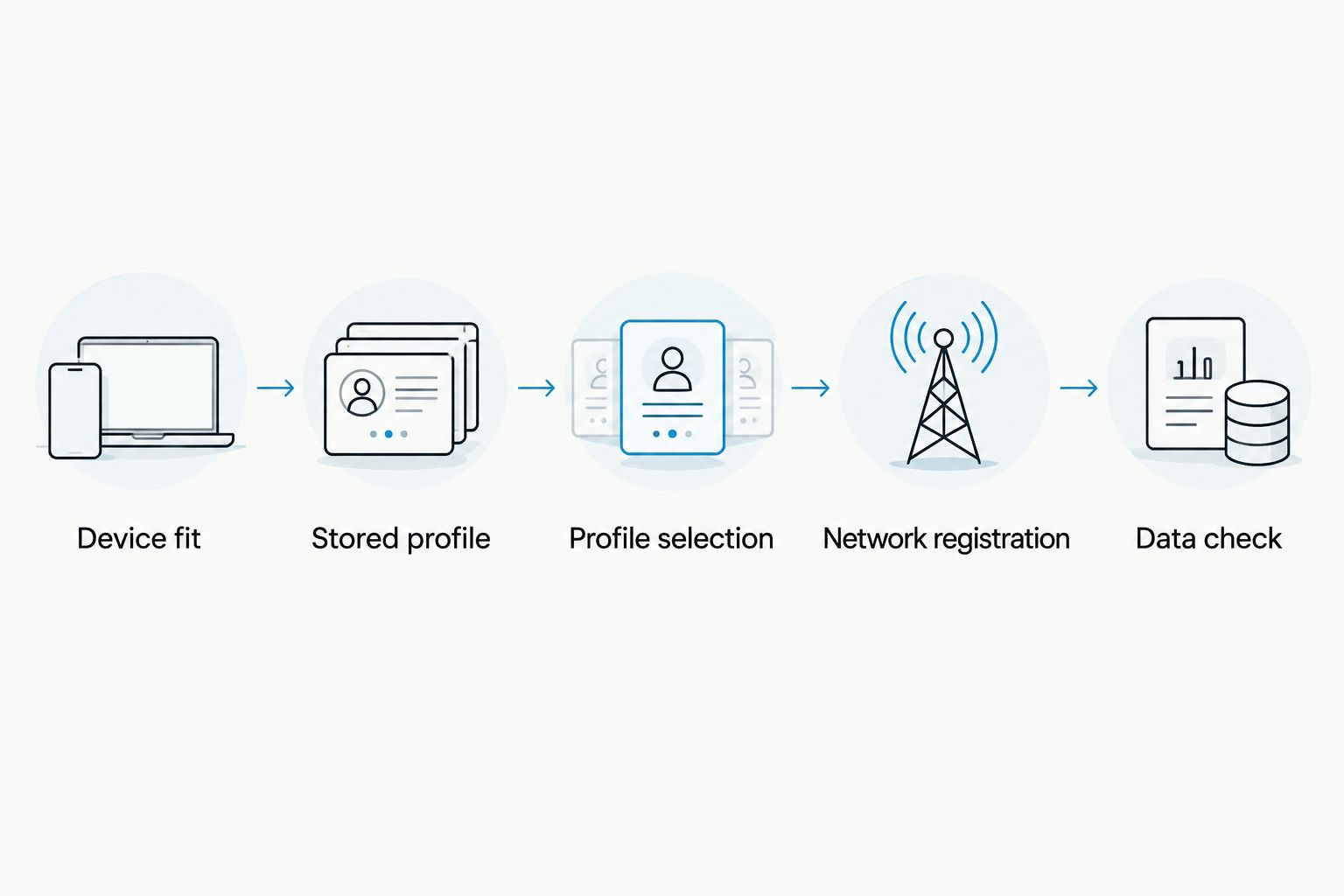
Separate the operation into these checkpoints:
- Stored profile: Confirm that the destination profile is already on the adapter. Otherwise, you are measuring provisioning as well as switching.
- Profile selection: Select the intended profile through the supported Switch Android app workflow. Record when you issue the change.
- Network registration: Check whether the phone registers on the intended mobile network after the change.
- Data check: Confirm that mobile data works with Wi-Fi disabled. Stop the timer at that point if data connectivity is your goal.
For a voice-capable plan, test calling separately. A successful data connection does not establish that every service included in a different plan works.
Why this matters
An app action and a working mobile connection are different finish points. A comparison that stops at profile selection answers a narrower question than a comparison that ends when you can use mobile data.
For your 2026 purchase decision, define the result you actually need: changing the selected profile, restoring internet access, or restoring the services included in your plan. Then compare the same result across devices.
Switchesim eSIM adapters are best for buyers who need removable profile hardware for compatible devices with physical SIM slots. The limitation comes first: you still need a suitable device, a supported management path and a compatible provider profile.
Check device fit before testing switching time
A physical SIM slot is required for the adapter's use in the target device. A phone without a SIM tray is not a candidate for this hardware path, regardless of its native eSIM features.
A SIM tray alone is not sufficient proof of compatibility. Check the exact model, regional variant, operating system and carrier-lock status before treating the phone as suitable.
Use this device-fit checklist:
- Physical SIM slot: Confirm that the target device accepts a removable SIM card.
- Exact model: Identify the model number, not just the commercial phone name.
- Regional variant: Check the version sold in your market; variants can differ in SIM configuration and network support.
- Operating system: Confirm that your installed Android version supports the required management workflow.
- Carrier lock: Establish whether the phone accepts service from the intended provider.
- Network bands: Check that the phone supports the network you intend to use.
- Provider requirements: Confirm that the supplied profile and activation method fit the adapter workflow.
Resolve compatibility before judging speed. A connection failure caused by a locked phone or unsuitable provider profile is not evidence of slow profile switching.
Keep the device details with your timing notes. Without them, a result from another buyer is difficult to apply to your own setup.
How to measure switching time in 2026
Measure an already-loaded profile change under conditions you can describe and repeat. Do not combine app installation, profile download, initial activation and routine switching into a single result.
Prepare the comparison
Choose the source and destination profiles before starting. Confirm that the destination plan covers your location and that the service you intend to test is included.
Keep Wi-Fi available for preparation if your setup instructions require internet access. Disable it for the final mobile-data check so a working Wi-Fi connection does not disguise a mobile connection problem.
Record the start
Start timing when you issue the profile-change command through the supported workflow. Use that same starting point for every comparison.
Do not start at the moment you open the app for one test and at the confirmation action for another. Those measurements include different amounts of user interaction.
Record the finish
For a data-focused test, stop timing when a fresh request succeeds over mobile data. Use the same test action each time.
Also record whether the phone shows network registration before data becomes usable. This separates a visible network connection from the outcome you actually need.
Keep the result interpretable
Record the phone model, operating-system version, source profile, destination profile, location and chosen finish point. Note any extra action you took during the test, such as changing a setting or restarting the device.
Treat results involving extra troubleshooting separately from uninterrupted switches. Both are useful observations, but they answer different questions.
Why the end-to-end result varies
A profile change involves the adapter workflow and the target device's connection to a mobile network. For a 2026 comparison, document these supported compatibility factors rather than assigning an unexplained delay to the card.
- Device model and regional variant: Compare results from the exact device configuration you intend to use.
- Operating system: Keep the Android version and supported management path explicit.
- Carrier-lock status: Verify that the phone permits the intended provider before testing.
- Network bands: Confirm that the target device supports the network serving your location.
- eSIM provider: Check activation requirements, destination coverage and whether the profile is ready for use.
- Loading method: Distinguish Android app management from reader-based provisioning and from using a configured card in another device.
These factors identify what to check when service does not return as expected. They do not justify a numerical switching-time claim without a measurement.
Avoid comparing unlike tasks. Downloading a profile through a reader and selecting a stored profile through an Android management workflow are different operations.
Which hardware fits your workflow?
Choose the management path before comparing switching speed. Switchesim offers Android-managed adapters, an iPhone-capable adapter path and a Bluetooth reader for loading profiles without an Android phone.
The following comparison covers their stated roles. It does not rank them by speed.
| Option | Best for | Stated capability | Limitation to check |
|---|---|---|---|
| Switch Pro | Compatible Android users who want app-based management | Android-based profile management | Requires a suitable physical SIM-slot device and supported Android workflow |
| Switch Max | Buyers who need use in a compatible iPhone | Extends adapter use to compatible iPhones | A configured card's iPhone use is not the same as Android app management; a compatible physical SIM slot remains necessary |
| Open-source Bluetooth eSIM card reader | Buyers who need profile loading without an Android phone | Reader-based provisioning | Adds a separate piece of hardware; loading profiles does not establish switching speed in the target device |
| Pre-loaded destination-data cards | Buyers who want a destination profile supplied on the card | A pre-loaded destination-data option | Match the destination, plan terms and device fit; pre-loading is not a switching-time guarantee |
Choose Switch Pro for the stated Android management path. Choose Switch Max when compatible iPhone use is a requirement, and assess the Bluetooth reader when you need a separate provisioning method.
Do not infer identical controls across these paths. Confirm how you will load profiles, select the required profile and use the configured card in your target device before buying.
Bulk and white-label options serve a different purchasing need. Their existence does not establish a different switching duration or change the need to validate the intended device workflow.
Profile capacity is not switching speed
Switchesim's supplied adapter-and-reader bundle description states storage for up to 15 eSIM profiles. That figure applies to the described bundle; it should not be transferred to every adapter variant without checking the exact product specification.
Stored-profile capacity answers how many profiles the hardware can hold. It does not answer how long your phone takes to regain service after you select a different profile.
For a 2026 purchase, check the capacity of the precise card you are ordering. Also distinguish stored profiles from simultaneously usable connections: a storage figure alone does not establish simultaneous operation.
Keep your buying criteria separate:
- Capacity determines whether the card can hold the profiles you need.
- Device fit determines whether the intended hardware path is suitable.
- Management method determines how you load and manage those profiles.
- Your end-to-end test determines the switching result on your setup.
A capacity claim cannot substitute for a timing result. Neither can a successful profile download.
Privacy and activation details to check
An open-source Bluetooth reader and an Android management app are distinct parts of the setup. The reader's open-source description does not, by itself, establish the app's data handling or the provider's privacy practices.
Before using Switchesim eSIM adapter hardware with sensitive work or personal accounts, review the relevant software permissions and privacy information. Check the reader software, the Android app where applicable, and the eSIM provider separately.
Treat QR codes and manual activation details as sensitive provisioning information. Do not include them in public screenshots, support-forum posts or timing reports.
For your notes, use descriptive profile labels rather than copying activation credentials. You need enough information to reproduce the test, not a public record of the credentials used to load the profile.
What should you check before buying?
Build a short checklist around your actual workflow. In 2026, a product choice should follow verified fit, not an unsupported promise of instant switching.
- Confirm the physical SIM slot on the target device.
- Record the exact device model and regional variant.
- Check carrier-lock status and network-band support.
- Confirm the supported operating system for management.
- Identify whether you will use Android management or reader-based provisioning.
- Verify the intended eSIM provider's activation requirements.
- Check the exact adapter's profile capacity.
- Review permissions and privacy information for each software component.
- Define how you will verify restored service after a change.
Keep a fallback connection available when testing a new configuration. Test before relying on the adapter for a time-sensitive task, and retain the results for the device and provider you actually use.
Does loading a new eSIM take the same time as switching?
Loading a new profile and switching a stored profile are different tasks. Loading introduces provisioning steps, while a stored-profile comparison should start with the destination profile already present on the adapter.
Measure them separately. Otherwise, the reported switching time includes work you will not necessarily repeat during a routine change.
Can you switch Switch Pro profiles directly on an iPhone?
Switch Pro's stated management path is Android-based. Switch Max is the stated option for use in compatible iPhones; using a configured Max card does not establish that the Switch Android app runs on iOS.
Confirm the management and selection workflow for the exact product before buying for an iPhone. The physical SIM-tray requirement still applies.
Does the Bluetooth reader make switching faster?
The Bluetooth reader provides a profile-loading path without an Android phone, not a verified speed improvement. Choose it because its provisioning method fits your setup.
Compare switching performance only after the relevant profiles are loaded and the card is in the intended target device.
FAQ
How many seconds does Switch Pro take to switch an eSIM profile?
Use a timed result from your compatible Android phone and provider rather than an unverified seconds estimate. Start at the profile-change command and finish when the required mobile service works.
What should I include in Switch Pro eSIM profile switching time?
Include the interval from issuing the stored-profile change to restored service. Keep new-profile downloading and initial setup separate from routine switching.
Does Switch Pro work with a phone that has no physical SIM slot?
Switch Pro requires a compatible physical SIM slot. Native eSIM support does not replace the physical slot needed for this adapter path.
Is Switch Max better than Switch Pro for an iPhone?
Switch Max is the stated option for compatible iPhone use, while Switch Pro uses Android-based management. Confirm the iPhone's physical SIM tray and the exact management workflow before choosing.
Can the Bluetooth reader load profiles without an Android phone?
The Bluetooth reader provides a profile-loading method without an Android phone. That capability is separate from the time the target device takes to regain service after a profile change.
Does storing more profiles prove that switching is faster?
Profile capacity does not establish switching speed. The supplied adapter-and-reader bundle description states up to 15 eSIM profiles, but that storage figure is not a timing result.
Why does my phone show a network but mobile data still fails?
Network registration and usable mobile data are different checks. Verify the provider's coverage and activation requirements, device compatibility and relevant mobile-data settings before treating the issue as slow switching.
One last thing
Wi-Fi can hide the failure you are trying to measure. If your finish point is working mobile data, disable Wi-Fi for that final check and use a fresh request rather than content already visible on the screen.
A precise finish point makes your result useful. Record it alongside the phone model and provider, then use that evidence—not an unattributed speed claim—to decide whether the workflow suits you.



