

How long does Switch Pro's battery last on a single charge?
Switch Pro does not have a rechargeable battery, so it has no single-charge runtime. It is a physical eSIM adapter card powered through a compatible device’s SIM slot, not a battery-powered controller or hotspot. For switch pro battery life, the relevant question is how long your phone or other host device runs—not how often you charge the adapter.
- Switch Pro battery life is not measured per charge: the eSIM adapter receives power from the host device.
- Switchesim eSIM adapters require a compatible physical SIM slot; carrier locks and device variants still matter.
- Switch Pro uses Android profile management; configured Switch Max cards extend use to compatible iPhones.
- The Bluetooth reader loads profiles without an Android phone; it is separate from the installed adapter.
How long does Switch Pro’s battery last on a single charge?
Switch Pro has no independent battery to charge or exhaust. Like a physical SIM card, the adapter receives electrical power through the SIM interface while installed in a powered device. A rechargeable-device battery rating does not describe this hardware.
The distinction matters when shopping in 2026. Switch Pro is an eSIM adapter, not a separate cellular modem that supplies your phone with wireless internet. Your phone still provides the cellular radio, operating system and battery.
| Hardware | What powers it during use | What a runtime question means |
|---|---|---|
| Switch Pro installed in a compatible phone | The phone through its physical SIM slot | How long the phone runs under your actual usage |
| Configured Switch Max installed in a compatible iPhone | The iPhone through its physical SIM slot | How long that iPhone runs under your actual usage |
| Bluetooth reader used for provisioning | A separate accessory with its own power requirements | A reader-specific power question, not Switch Pro runtime |
| Adapter installed in a compatible router or hotspot | The host device through its SIM interface | Whether the host remains powered and connected |
Do not apply a Bluetooth accessory’s battery specification to the card. They perform different jobs. The reader provisions profiles; the adapter sits in the target device’s SIM slot.
Why this matters
A battery-life question can send you toward the wrong purchase criteria. For this hardware, device compatibility and profile management come before runtime. An adapter that does not work with your device cannot be fixed by charging it.
Switchesim eSIM adapters are best for users who need removable eSIM hardware for a compatible physical SIM slot. That fit comes with a limitation: the adapter occupies a physical slot and still depends on the host device’s compatibility.
For a practical 2026 buying decision, establish which device will manage profiles and which device will use the configured card. Those roles are not always the same. Android management, iPhone use and Bluetooth-reader provisioning are separate setup paths.
Device fit: check the slot before the battery
A physical eSIM adapter needs a compatible physical SIM slot. An eSIM-only phone without a SIM tray cannot accept the card. Native eSIM support and removable-adapter support are different questions.
Check your exact model and regional variant rather than relying on a family name. Phones sold under similar names can have different hardware arrangements. The operating system and supported management method also belong in the compatibility check.
Carrier locking remains relevant. An eSIM adapter is not a carrier-unlocking device. If your phone restricts service to a particular carrier, resolve that restriction before expecting an unrelated provider’s profile to work.
Use this pre-purchase checklist:
- Physical slot: Confirm that your target device accepts a physical SIM card.
- Exact model: Identify the model and regional variant, not just the marketing name.
- Operating system: Confirm support for the management or usage path you intend to follow.
- Carrier lock: Check whether the phone accepts the intended network provider.
- Network bands: Confirm the host device supports the network you plan to use.
- Provider requirements: Check the eSIM provider’s activation instructions and device restrictions.
The adapter does not replace the host device’s radio hardware. Network-band support stays a property of the phone, router or hotspot. A compatible card format alone is not proof that the entire connection will work.
Which hardware fits your setup in 2026?
Choose by management method first. Switchesim distinguishes Android-based profile management, configured-card use in compatible iPhones and provisioning through a Bluetooth reader. None of those distinctions supplies a battery-hour rating for Switch Pro.
| Option | Best for | Supported role | Benefit | Limitation |
|---|---|---|---|---|
| Switch Pro | Users with a compatible Android management setup | Profile management through the Switch Android app | A removable adapter for devices without native eSIM support | Requires a supported Android management path and compatible physical slot |
| Switch Max | Users needing configured-card use in a compatible iPhone | Extends adapter use to compatible iPhones | Provides an iPhone usage path | Does not make an eSIM-only iPhone accept a physical card |
| Bluetooth reader | Users who need to load profiles without an Android phone | External profile provisioning | Separates loading from Android-phone management | Is an additional accessory, not the installed cellular adapter |
| Pre-loaded destination-data cards | Users choosing an adapter with destination data already loaded | A configured card paired with a destination plan | Starts with a supplied destination-data configuration | Plan validity and coverage still need checking |
Choose Switch Pro for the Android management path, not for a claimed number of hours between charges. Choose Switch Max when the requirement is configured-card use in a compatible iPhone. Choose the Bluetooth reader when loading profiles without an Android phone is the requirement.
Pre-loaded destination-data cards answer a different buying question. They combine hardware with a supplied data plan. They do not turn the adapter into a rechargeable hotspot or remove the physical-slot requirement.
How do you set up Switch Pro without charging it?
There is no adapter-charging step. Your preparation is to confirm compatibility, power the host device and follow the supported profile-management instructions. Avoid treating profile loading as the same operation as connecting to a cellular network.
- Check device fit. Verify the physical SIM slot, exact device variant, operating system and carrier-lock status.
- Choose management. Use the Switch Android app for the supported Switch Pro management path. Select reader-based provisioning if your setup requires loading without an Android phone.
- Load the profile. Follow the provider’s activation instructions and the hardware’s supported loading procedure.
- Use the card. Install the configured adapter in the compatible target device according to its instructions.
- Check service. Confirm that the intended profile and cellular service work before depending on the connection.
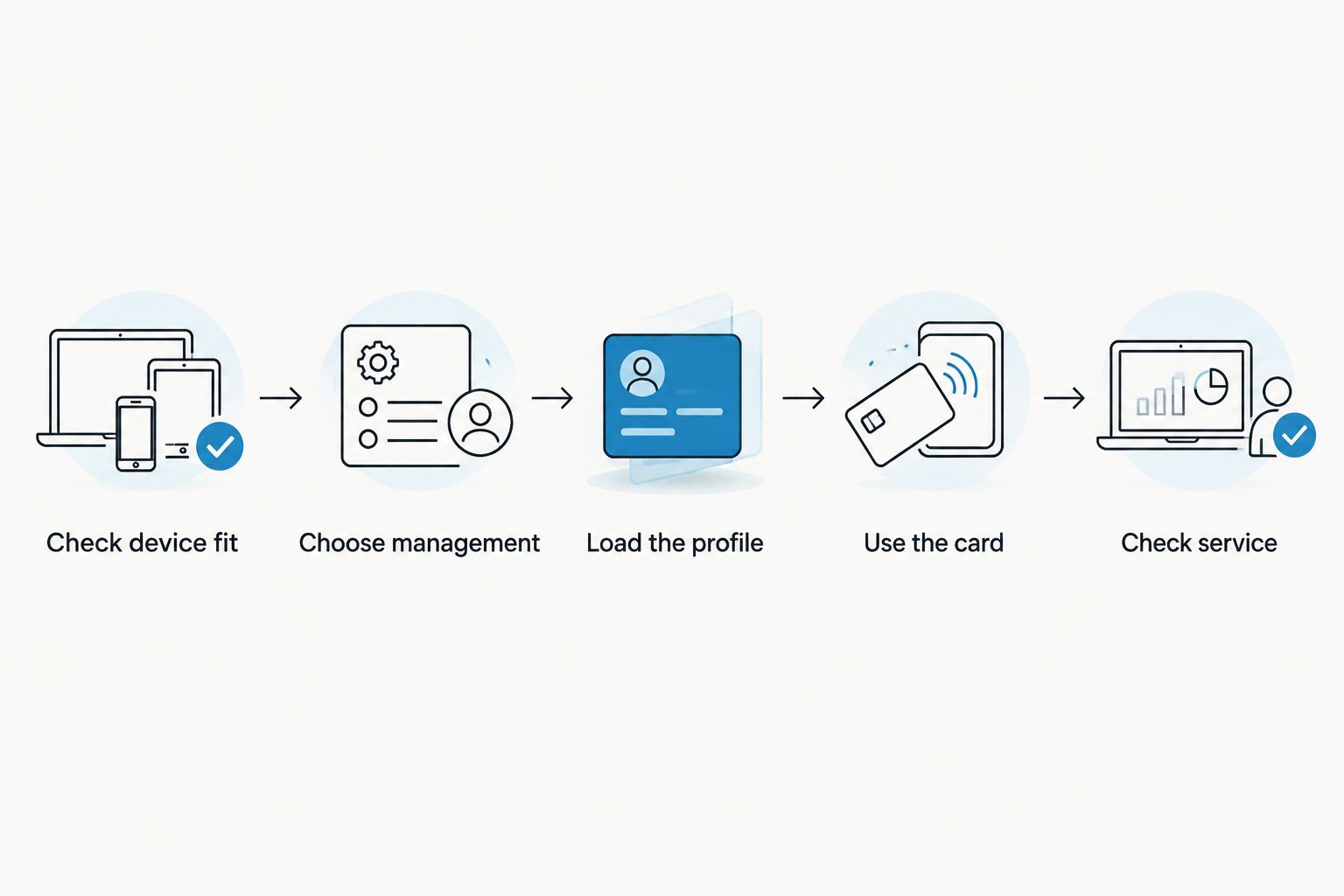
A successful profile-loading operation is not the same as confirmed network service. The host device, selected provider and network compatibility still matter. Test the complete setup while you have another way to access the provider’s instructions.
For your 2026 setup, keep the device model and chosen management path in the same notes as the activation instructions. That gives you a useful troubleshooting record without confusing the adapter, reader and host device.
Why your phone’s runtime varies
Switch Pro has no separate charge cycle, but your phone’s runtime still changes with usage. These are host-device battery considerations. They are not evidence of a measured Switch Pro battery penalty or saving.
- Signal conditions: Cellular radios consume power while maintaining network connections, and difficult reception affects that workload.
- Screen use: Display brightness and screen-on activity contribute to the phone’s total power demand.
- Data activity: Downloads, uploads and background applications create work for the phone and its cellular connection.
- Hotspot use: Sharing a connection adds wireless activity to the host device.
- Battery condition: An older or degraded phone battery provides less usable runtime than a healthy one under comparable conditions.
Do not interpret a change in phone runtime as an adapter-specific measurement without a controlled comparison. Different reception, applications or screen use can change the result. A single day’s battery percentage does not isolate the SIM hardware’s contribution.
If phone endurance is your concern, compare similar usage on the same device. Keep the network conditions and settings as consistent as practical. Record what changed rather than assigning every difference to the adapter.
Does Switch Pro drain your phone’s battery faster?
Switch Pro draws power from the host device through the SIM interface. That does not establish a specific increase in overall phone battery consumption. There is no basis here for an hours-lost figure or a percentage penalty.
Treat claims of longer or shorter runtime as measurement questions. A useful comparison must identify the phone, network conditions, workload and comparison SIM setup. Otherwise, it mixes adapter behavior with the rest of the device’s power use.
For a 2026 purchase, prioritize confirmed device fit over an unsupported battery claim. If you need long phone endurance, assess the phone and your intended cellular workload rather than looking for a Switch Pro charging specification.
Is the Bluetooth reader the same as a battery-powered hotspot?
No. The Bluetooth reader is a profile-provisioning accessory, not a replacement for your phone’s cellular modem. Loading a profile and supplying an internet connection are different functions.
Switchesim’s reader listing states that the reader is open source and requires no app or account. That is a specific provisioning claim, not proof that your eSIM provider requires no account or collects no information. Keep hardware-management requirements separate from provider requirements.
Do not transfer a reader’s power requirements to Switch Pro. Check the reader’s own instructions for its power method. The installed adapter continues to use the target device’s SIM interface.
Does a data plan’s validity tell you the adapter’s battery life?
No. Data allowance and plan validity describe service, not electrical runtime. A card with a destination-data plan does not have a rechargeable battery that lasts for the plan’s validity period.
For example, the supplied product catalog names a pre-loaded China mainland, Japan and South Korea option with 20GB of data and 30 days of validity. Neither figure measures battery endurance. The phone must remain powered, and the service must meet its applicable activation and coverage conditions.
Likewise, the adapter-and-reader bundle description states storage for up to 15 eSIM profiles. That is a storage claim for that bundle, not a battery rating or proof of simultaneous active connections. Do not automatically apply the bundle’s capacity claim to every adapter model.
Privacy and profile capacity: keep the claims separate
The management method determines how you load profiles. It does not, by itself, establish every detail of the privacy model. An open-source reader and a no-account provisioning claim should not be rewritten as a blanket promise about cellular-service privacy.
Before loading a profile, review the permissions and instructions for your chosen management route. Protect activation information as you would other service credentials. Check the provider’s terms separately from the hardware’s documentation.
Profile storage also deserves its own check. Confirm capacity for the exact product you choose, and distinguish stored profiles from active service. Neither storage capacity nor profile count answers how long the host battery lasts.
For bulk or white-label deployments, Switchesim offers those supply options. Specify the intended devices and provisioning path before selecting hardware. A fleet deployment needs a repeatable compatibility check, not an invented per-charge adapter runtime.
FAQ
How long does Switch Pro’s battery last on a single charge?
Switch Pro has no rechargeable battery or single-charge runtime. The physical eSIM adapter receives power through the compatible host device’s SIM slot.
Do I need to charge Switch Pro before installing it?
No, Switch Pro does not have a charging step. Power the compatible host device and follow the supported installation and profile-management instructions.
Can Switch Pro keep my phone online after the phone battery dies?
No, Switch Pro cannot power your phone or replace its cellular radio. The host device must remain powered for cellular service to operate.
Is Switch Pro the right choice for an iPhone?
Switch Max is the stated option for configured-card use in compatible iPhones. Switch Pro uses Android-based profile management, and the target device still needs a compatible physical SIM slot.
Do I need an Android phone to load profiles with the Bluetooth reader?
The Bluetooth reader provides a loading path without an Android phone. Reader-based provisioning is separate from managing profiles through the Switch Android app.
Does a 30-day data plan mean the adapter runs for 30 days?
No, 30 days describes the named data plan’s validity, not adapter battery life. The host device must remain powered, and service follows the provider’s applicable conditions.
Does storing up to 15 profiles reduce Switch Pro battery life?
The up-to-15-profile figure is a storage claim for the listed adapter-and-reader bundle, not a battery-life measurement. It does not establish Switch Pro capacity or a phone-runtime penalty.
One last thing
The most useful correction is simple: do not buy a charger for a SIM-slot adapter. Identify the host device, confirm its physical slot and choose the right profile-loading method instead. Those checks determine whether the hardware fits your setup.
In 2026, keep three questions separate: how the card receives power, how profiles are loaded and how long your phone lasts. Only the last is a phone-battery runtime question. Mixing them produces the wrong specification and often the wrong purchase.



