

How many eSIM profiles can Switch Max store at once?
Switch Max stores up to 15 eSIM profiles, according to Switchesim's capacity reference. That is a storage limit, not a promise of 15 simultaneous mobile connections. In 2026, choose Switch Max only after confirming your device has a compatible physical SIM slot and that you have a supported way to load and manage profiles.
- Switch Max eSIM profile storage supports up to 15 profiles; stored profiles do not establish simultaneous connection capacity.
- Switchesim's Switch Max suits compatible iPhone users who need removable eSIM adapter hardware.
- Switch Android app management, configured iPhone use and Bluetooth reader provisioning are distinct workflows.
- Check the physical SIM slot, regional model, carrier lock and provider activation method before buying.
How many eSIM profiles can Switch Max store at once?
Switch Max supports up to 15 stored eSIM profiles. Switchesim's Samsung Galaxy setup reference names that capacity, and its adapter-plus-reader bundle description also states storage for up to 15 profiles. Treat that figure as the stated upper limit, not a guarantee that every provider and device combination will work.
The useful distinction is between keeping a profile on the card and using that profile for service. A stored profile does not establish network coverage, an active subscription or permission to use the profile on your intended hardware. Those checks remain separate.
| Question | What the 15-profile figure tells you | What it does not tell you |
|---|---|---|
| How many profiles can the card retain? | Up to 15 eSIM profiles | That every provider's profile is compatible |
| How many connections can run together? | Storage capacity alone does not answer this | That 15 lines can connect simultaneously |
| Does an iPhone work? | Max extends use to compatible iPhones | That an iPhone without a physical SIM slot can use the card |
| How do you load profiles? | Android management and reader-based provisioning are separate paths | That inserting the card completes activation |
| Does a stored plan still work? | The profile can remain stored | That its data allowance or service validity remains usable |
For a 2026 purchase, write down both requirements: how many profiles you want to retain and how you will manage them. The correct card is the one that fits your device and setup path, not just your desired profile count.
Why this matters
Profile storage helps when you want to retain several provider subscriptions or destination profiles on removable hardware. It does not remove the need to check each plan's terms. Keep the hardware decision separate from the mobile-service decision.
A buyer comparing Switch Max eSIM profile storage needs three answers: whether the card fits the target device, whether the profile can be installed and whether the resulting service works on the intended network. A capacity headline answers only part of the purchase question.
Do not replace a working SIM setup until you have checked the adapter, management method and provider together. This matters particularly when the phone you intend to use is not the device you intend to use for provisioning.
Device fit comes before profile capacity
A compatible physical SIM slot is mandatory for this adapter approach. A phone with no physical SIM slot cannot accept the card. Native eSIM support and removable eSIM adapter support are different capabilities.
Check the exact model and regional variant rather than relying on a phone family name. The operating system, carrier-lock status, network bands and eSIM provider also belong in the compatibility check. The presence of a tray alone is not enough.
Use this pre-purchase checklist:
- Physical slot: Confirm that the intended device accepts a compatible physical SIM card.
- Exact model: Record the full model identifier and regional variant.
- Operating system: Check the supported management route for your current software.
- Carrier lock: Confirm that the intended provider is permitted on the device.
- Network fit: Check the device's bands against the service you want to use.
- Provider activation: Confirm that the provider's installation method works with the chosen workflow.
In 2026, the same product name can still cover different regional hardware variants. Ask about the exact device you own. An adapter does not remove a carrier lock or add missing radio bands.
Choose the management path separately from the card
The Switch Android app manages profiles through supported Android hardware. A configured Max card can then be used in a compatible iPhone. The Bluetooth reader provides a separate provisioning route that does not require an Android phone.
These are not interchangeable claims. Using a configured card in an iPhone does not establish that the iPhone performs the same management tasks as the Android app. Likewise, reader-based provisioning does not mean the reader supplies mobile service to the phone.
| Hardware or workflow | Best for | Supported role | Limitation to check |
|---|---|---|---|
| Switch Pro | Buyers using Android-based profile management | Physical eSIM adapter with Android management | Confirm the target device and app workflow; do not assume Max's iPhone role |
| Switch Max | Buyers using a configured card in a compatible iPhone | Extends adapter use to compatible iPhones | Requires a compatible physical SIM slot and a suitable provisioning path |
| Open-source Bluetooth reader | Buyers who need provisioning without an Android phone | Loads profiles onto adapter hardware | It is provisioning hardware, not a replacement for the adapter or mobile plan |
Switchesim's Switch Max eSIM adapter is best for compatible iPhone users who need removable profile storage. Its benefit is that specific device-use path. Its limitation is equally specific: you still need suitable hardware and a way to configure the card.
Switch Pro is the Android-management choice described by the brand. Choose the Bluetooth reader when your setup requires loading profiles without an Android phone. Neither decision should rest on an assumption that every operating system supports identical controls.
How to prepare Switch Max for profile storage
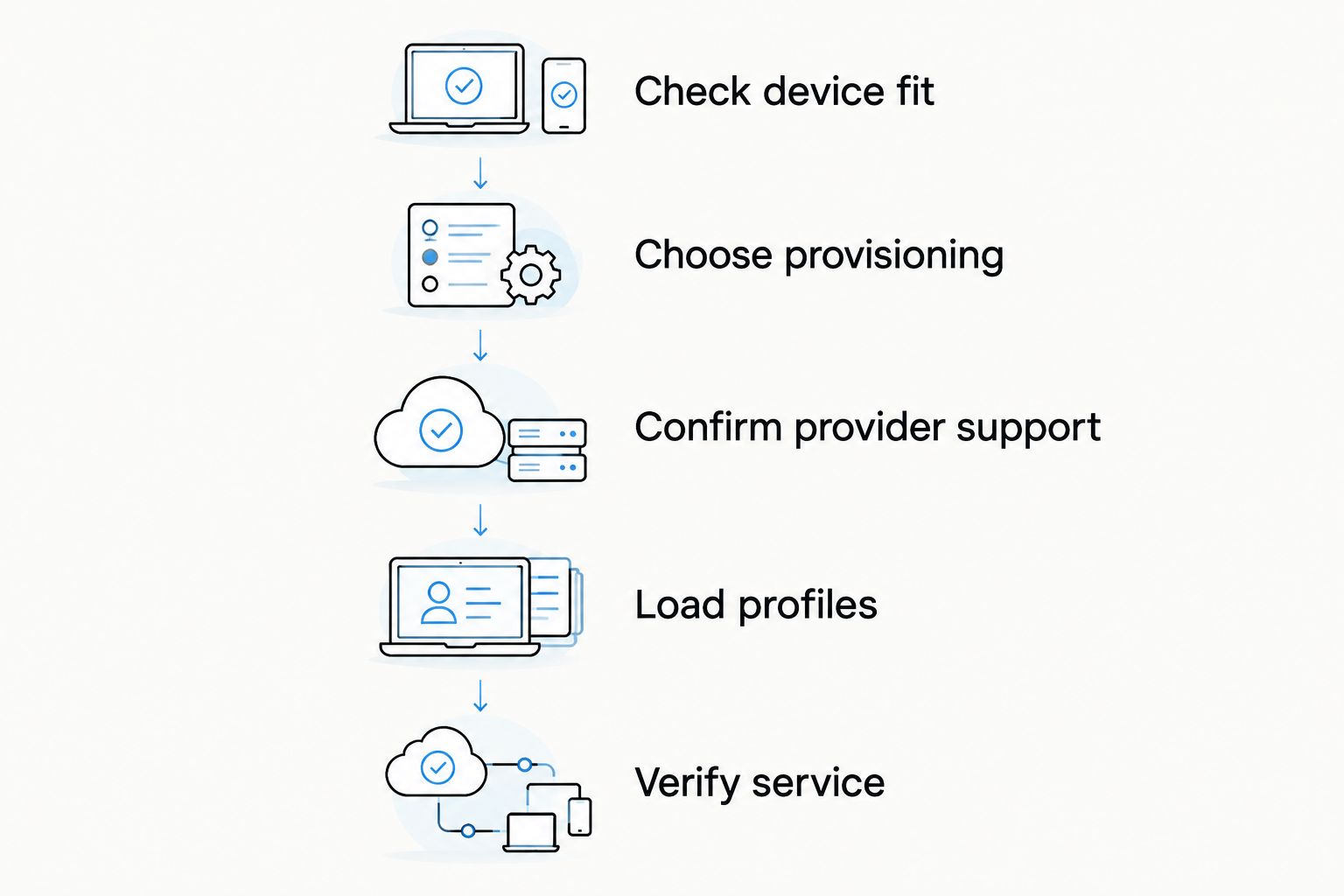
Use this sequence to organize setup. It is a compatibility-first checklist, not a substitute for the current device-specific instructions. Follow the installation instructions for the exact card, app or reader you choose.
- Check device fit. Confirm the physical SIM slot, model, regional variant and carrier-lock status before purchasing or moving service.
- Choose provisioning. Decide between supported Android app management and the Bluetooth reader route. Keep provisioning separate from final iPhone use.
- Confirm provider support. Check the provider's activation requirements, including its QR-code or manual activation process where applicable. Do not assume every code is reusable.
- Load profiles. Follow the current instructions for your chosen management hardware. Keep provider identifiers and installation details organized.
- Verify service. Check that the intended profile works in the target device before depending on it. Test the services included in that plan rather than assuming voice, messages and data are all provided.
Before starting, keep another way to access the provider's instructions and account. You need those details if activation requires confirmation or support. Do not delete a working profile merely to experiment with installation.
The 2026 setup decision is practical: identify which device manages the card and which device uses it. If those are different devices, plan the handoff before buying.
Why usable profile storage differs from the headline limit
The stated maximum is up to 15 eSIM profiles. Your useful collection depends on more than how many entries you can retain. A stored profile is valuable only when its service and hardware requirements match your intended use.
The following factors affect whether a retained profile is useful; they are not evidence of a different storage limit:
- Provider compatibility: A profile must support the adapter's applicable installation workflow.
- Device compatibility: The target model and regional variant must support the card's use.
- Carrier restrictions: A locked device can restrict the network you intend to use.
- Network bands: The device needs suitable radio support for the intended service.
- Plan terms: A retained profile does not extend the provider's allowance or validity period.
- Management access: Keep access to the supported app or reader workflow needed for future provisioning.
Do not turn these factors into an invented lower capacity figure. Instead, verify the profiles you actually need. A full card of unsuitable or expired services does not solve your connectivity requirement.
What should you check about privacy?
Separate the adapter, the management application, the Bluetooth reader and the mobile provider when evaluating privacy. Each performs a different role. The description of an open-source reader is not a blanket statement about every component in the setup.
Ask which software handles activation information, what permissions it requires and whether it sends information to external services. Review the provider's account and identity requirements separately. A removable card does not eliminate the provider's own procedures.
Protect activation codes and account access details. Avoid posting them in public troubleshooting threads. For a 2026 purchase, assess privacy using the current application documentation and provider terms rather than treating profile capacity as a security feature.
Are pre-loaded cards the same as Switch Max storage?
Pre-loaded destination-data cards combine adapter hardware with a named mobile plan. Switch Max's storage question concerns how many profiles the hardware can retain. Those are different buying criteria.
For example, the supplied destination range includes a Pro card with a United Arab Emirates 10GB / 30-Day Data Plan and a Pro card with a United Arab Emirates 50GB / 180-Day Data Plan. The allowances and validity periods describe the plans, not the adapter's profile-storage capacity. Neither listing should be treated as proof that Pro and Max have identical management behavior.
Choose a pre-loaded destination-data card when that specific hardware-and-plan combination meets your requirement. Choose Switch Max for its stated compatible-iPhone use case after checking provisioning. Bulk and white-label options serve retail or deployment requirements; they do not establish a different Max storage limit.
Does storing 15 profiles mean 15 active connections?
Up to 15 stored profiles does not mean 15 simultaneous connections. Storage describes retained profiles; concurrent service depends on the hardware and device's supported operation. Check the exact active-line behavior before buying for parallel work and personal service.
Can I use Switch Max with an iPhone that has no SIM tray?
A Switch Max adapter needs a compatible physical SIM slot. An iPhone without that slot cannot accept this removable card. Check your regional model before choosing Max or provisioning accessories.
Do I need an Android phone to load profiles?
The Bluetooth reader provides a profile-loading route without an Android phone. That is separate from managing profiles through the Switch Android app. Confirm the reader's current host-device and software requirements before deciding that it fits your setup.
FAQ
How many eSIM profiles can Switch Max store at once?
Switch Max supports up to 15 stored eSIM profiles, according to the brand's capacity reference. That figure describes storage, not 15 simultaneous mobile connections.
Does Switch Max work with every iPhone?
No. Switch Max requires a compatible physical SIM slot, and compatibility also depends on the exact model, regional variant, operating system, carrier-lock status and provider.
Can I manage Switch Max profiles directly on my iPhone?
Do not assume iPhone use provides the same management functions as the Switch Android app. The brand distinguishes using a configured Max card in a compatible iPhone from Android management and Bluetooth reader provisioning.
What's the Bluetooth reader for?
The Bluetooth reader loads profiles onto adapter hardware without requiring an Android phone. It does not replace the adapter card or the provider's mobile service.
Is Switch Pro the same choice as Switch Max?
No. The brand describes Switch Pro around Android-based profile management and Switch Max around extended use with compatible iPhones. Choose according to the target device and provisioning workflow.
Will storing a destination profile keep its data plan valid?
Storing a profile does not extend the provider's data allowance or validity period. Check the plan's activation and expiry terms before relying on a retained profile.
Can I delete a profile and install it again later?
Confirm reinstallation rules with the provider before deleting a profile. Do not assume that an activation code can be reused or that deleting a profile creates a recoverable backup.
One last thing
Before deleting a profile, confirm how you would restore its service. Storage capacity is not a backup policy, and an activation code is not automatically reusable. Keep the provider's recovery instructions with your setup records.
For your 2026 purchase, finish with a written answer to two questions: which device loads the profiles, and which device uses the configured card? If both answers are verified, the up-to-15-profile figure becomes useful rather than distracting.



