

How much does it cost to activate an eSIM profile?
The cost to activate an eSIM profile depends on the provider’s activation terms, the mobile plan you select and whether you need adapter hardware; there is no universal activation charge for 2026. A plan or hardware purchase is not the same as a separate activation fee. Check the provider’s checkout and activation policy, then confirm that your phone supports the profile-loading method before buying.
- The cost to activate esim profile is provider-dependent; separate activation charges from data-plan and hardware purchases.
- Switchesim eSIM adapters suit compatible physical-SIM devices that need a removable profile-storage option.
- Switch Pro uses Android profile management; Switch Max extends use to compatible iPhones.
- The Bluetooth reader provides a profile-loading route without an Android phone.
How much does it cost to activate an eSIM profile?
Your provider determines the activation charge. Your device determines whether you also need hardware. Treat those as separate purchasing decisions rather than calling the whole checkout total an activation fee.
If you are changing an existing mobile line rather than buying a new travel plan, start with the physical SIM to eSIM switching guide. The transfer process and a new-plan purchase answer different questions.
Use this breakdown when reviewing a 2026 offer:
| Cost component | What it covers | What to verify |
|---|---|---|
| Provider activation charge | A separately stated service-activation charge | Whether the provider lists one for your transaction |
| Mobile plan | The data, calls or messages included in the service | Allowance, destinations, validity and renewal terms |
| eSIM adapter | Removable hardware for a compatible physical SIM slot | Exact device fit and profile-management method |
| Bluetooth reader | Hardware used to load profiles onto an adapter | Whether your chosen setup needs a reader |
| Replacement or transfer | Moving service or obtaining another activation credential | The provider’s transfer and replacement policy |
Do not count an adapter purchase as a charge imposed by the mobile network. Equally, do not assume that buying an adapter includes a mobile plan: check the specific product description for a pre-loaded destination-data card or bundle.
Why this matters
An activation question often hides a compatibility question. A downloaded profile is useful only when the receiving hardware supports it and the provider permits that installation path.
Buying the wrong setup creates a different problem from paying an activation charge. You still need a working device, a supported profile and a way to manage that profile. Check those requirements before comparing checkout totals.
For a 2026 purchase, write down what you already own: the target phone, any compatible Android management device, an adapter and a reader. Buy only the missing components. Do not buy a reader solely because a plan uses an eSIM; choose it because your provisioning method requires one.
Check device fit before choosing an activation method
A physical eSIM adapter needs a compatible physical SIM slot. A phone without that slot cannot use this adapter route, even if another regional version of the same phone has a SIM tray.
Check the exact model and regional variant. Also check the operating system, carrier-lock status, supported network bands and eSIM provider. A matching tray is necessary, but it does not establish complete compatibility.
A carrier lock is a separate restriction. An adapter does not remove it, and selecting a different profile is not a substitute for meeting the carrier’s unlocking requirements.
Use this pre-purchase checklist:
- Physical SIM slot: Confirm that your actual device has a compatible slot.
- Regional variant: Use the full model identifier, not only the retail name.
- Carrier lock: Confirm that the target service is permitted on the device.
- Operating system: Check the requirements for the management method you intend to use.
- Network bands: Check the device against the destination network.
- Provider support: Confirm that the profile can be provisioned through your chosen setup.
Routers, hotspots and IoT devices need the same device-specific checks. A physical SIM slot alone does not guarantee that a particular deployment will work.
Choose the profile-loading method, not just the card
The important distinction is between managing profiles, using a configured card and loading profiles through a reader. These are different tasks. Do not assume that support for one proves support for all of them.
Switchesim eSIM adapters are best for users with compatible physical-SIM devices who need removable profile storage. The exact product choice depends on how you will configure and use that storage.
| Option | Best for | Supported role stated by Switchesim | Limitation to check first |
|---|---|---|---|
| Switch Pro | Android-based profile management | Uses Android-based management through the Switch Android app | Confirm the Android device and target device are compatible |
| Switch Max | Use in a compatible iPhone | Extends use to compatible iPhones after configuration | A compatible physical SIM slot is required; iPhone use is not the same as Android management |
| Bluetooth reader | Provisioning without an Android phone | Loads profiles onto adapter hardware | Confirm the reader workflow and receiving adapter support |
| Pre-loaded destination-data cards | Buyers selecting hardware with a stated destination plan | Combines an adapter with the listed travel-data plan | Check destinations, allowance, validity and the start trigger |
Switch Pro: Android-based management
Choose Switch Pro when Android-based profile management matches your setup. The Switch Android app is the stated management route; do not interpret this as a promise that every Android handset supports it.
The benefit is a defined management path. The trade-off is that you must check the Android requirements as well as the device that will ultimately use the card. If those are different devices, verify both.
Switch Max: use in a compatible iPhone
Choose Switch Max when you need to use a configured adapter in a compatible iPhone. Confirm the physical SIM tray first. An eSIM-only iPhone cannot accept a physical adapter.
The benefit is the stated extension to compatible iPhones. The limitation is that using the configured card does not establish an iPhone-native profile-management workflow. Decide how you will load profiles before choosing the card.
Bluetooth reader: a separate provisioning route
Choose the Bluetooth reader when you need to load profiles without an Android phone. Switchesim describes the reader as open-source, but that description does not by itself establish every detail of its privacy or software requirements.
The reader provides a separate provisioning path. It also adds hardware to manage. Check the supported software, adapter and profile-loading instructions before treating it as part of your required setup.
Profile capacity is not a mobile-data allowance
Profile storage and data allowance measure different things. Switchesim’s adapter-and-reader bundle states storage for up to 15 eSIM profiles. That is a storage claim, not a promise of simultaneous network connections or an included allowance for each profile.
The listed destination plans illustrate the distinction. One Switch Max offer names 10GB over 30 days for China mainland, Japan and South Korea. Another names 20GB over 30 days for those destinations. These figures describe the mobile plan, not the adapter’s profile capacity.
For your 2026 comparison, keep these fields separate:
- Profile capacity: How many profiles the specific hardware can store.
- Data allowance: How much mobile data the selected plan includes.
- Validity: How long the selected plan remains valid under its terms.
- Active service: Which profile the device can use under the supported workflow.
Do not apply the bundle’s capacity claim automatically to every card or product combination. Confirm the exact product specification you intend to purchase.
Why the total activation outlay varies
The total purchase changes with the service and hardware you select. These factors explain the difference without turning an adapter’s retail price into a supposed network activation fee:
- Provider terms: Check whether activation, replacement or transfer appears as a separate charge.
- Plan allowance: A 10GB plan and a 20GB plan represent different data allowances, even when both specify 30 days.
- Included destinations: Match the listed countries to your intended use rather than assuming worldwide coverage.
- Existing hardware: An adapter or reader you already own changes what you need to purchase.
- Provisioning method: Android management and reader-based loading involve different equipment requirements.
- Bundle contents: A pre-loaded destination-data card includes a different set of items from hardware alone.
Compare equivalent setups. Hardware-only, hardware-plus-reader and hardware-plus-data offers are not interchangeable quotes for activation.
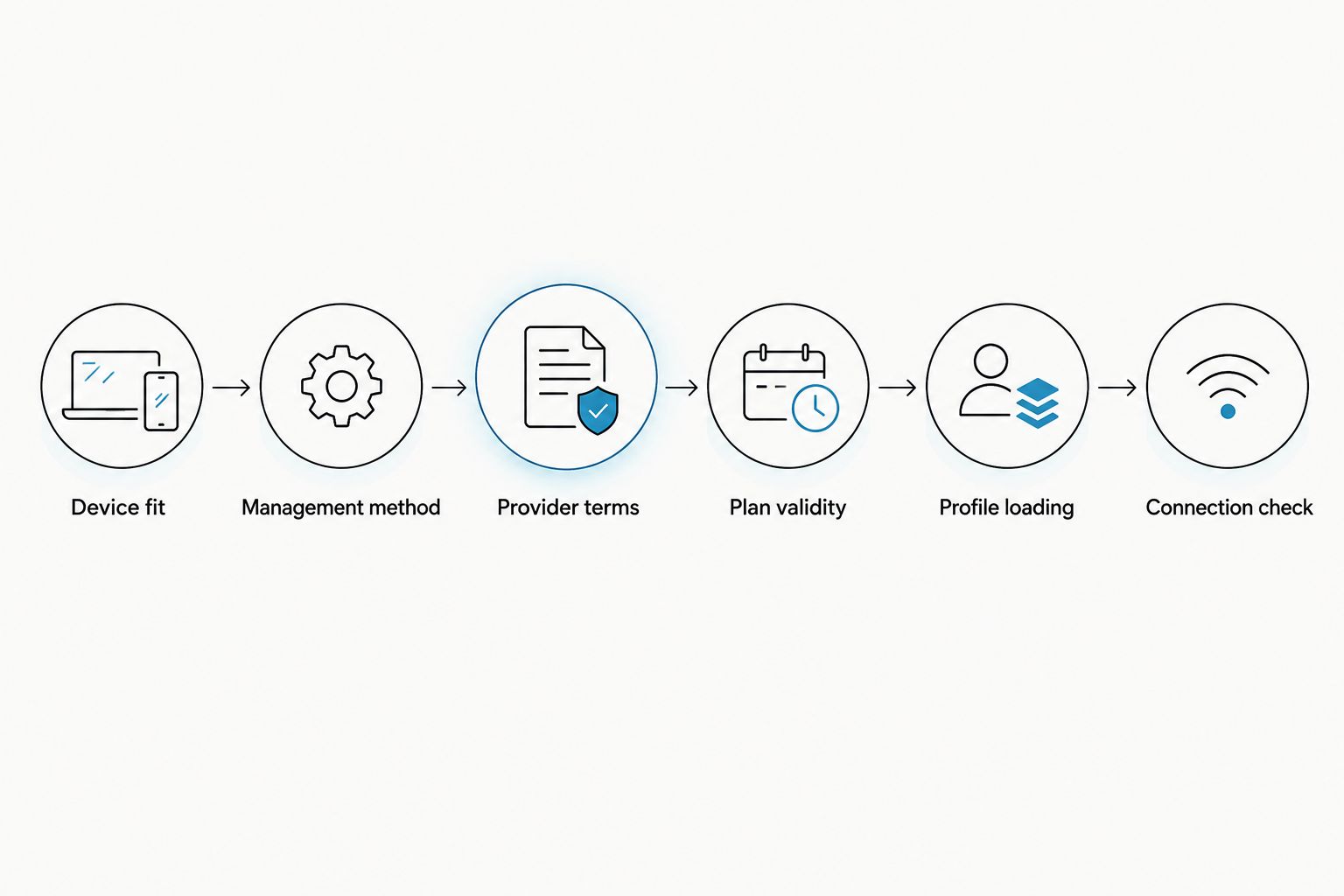
Follow this setup sequence before paying
Start with compatibility and finish with provider terms. Reversing that order leaves you comparing plans before you know whether you can install them.
- Device fit: Record the exact model, regional variant, physical SIM-slot support and carrier-lock status.
- Management method: Choose Android management, configured Max use or reader-based provisioning as appropriate.
- Provider terms: Confirm the supported activation credential and installation route. If the provider supplies a QR code or manual details, check how your chosen workflow accepts them.
- Plan validity: Confirm the allowance, destinations and event that starts the validity period.
- Profile loading: Follow the instructions for the selected app, card or reader. Keep the provider’s activation instructions accessible.
- Connection check: Verify that the device connects to the intended service before relying on it away from your usual connection.
For a 2026 purchase, the products below illustrate different scopes: an adapter-and-reader bundle versus an adapter with a named destination plan. They are not quotes for a standalone activation charge. Choose the scope that matches your missing hardware and service requirements.


Does a pre-loaded card mean the plan is already running?
Pre-loaded describes a supplied profile or plan; it does not establish the validity-start event. Check whether the provider starts validity at purchase, installation or another specified activation event.
A 30-day product label tells you the stated duration, not when the clock begins. Confirm that distinction before purchasing a destination-data card well ahead of use.
Does switching profiles mean buying another plan?
Switching to an existing profile and purchasing new service are separate actions. Check that the stored profile still has valid service, and confirm the provider’s renewal or top-up terms before relying on it.
Do not delete a working profile merely to test installation. Verify replacement and reinstallation rules first; possession of an old activation credential does not establish permission to reuse it.
What should I check about activation privacy?
Treat activation credentials as sensitive. Do not post a QR code, share manual activation details publicly or send them to an unrelated party.
Before choosing a management method, check what software handles the credential, what permissions it requests and what data it stores or transmits. Open-source status describes access to source code; it does not, by itself, answer every privacy question about a particular setup.
FAQ
How much does it cost to activate an eSIM profile in 2026?
The cost depends on the provider’s activation terms and your chosen setup. Separate any stated activation charge from the mobile plan, adapter and reader purchases.
Is an eSIM adapter purchase the same as an activation fee?
No. An adapter purchase pays for hardware; an activation fee is a separately stated provider charge. Check whether the specific hardware offer also includes a mobile plan.
Do I need an adapter if my phone supports native eSIM?
An adapter is not required solely to use a supported native eSIM installation path. Check your exact phone model and provider before buying additional hardware.
Can I use Switch Max in an iPhone without a SIM tray?
No. A physical adapter needs a compatible physical SIM slot. Switch Max use in a compatible iPhone is also distinct from Android-based profile management.
Can I load profiles without an Android phone?
The Bluetooth reader provides a profile-loading route without an Android phone. Confirm its supported workflow, the adapter and the provider’s activation method before purchasing.
Does storing 15 profiles mean I can use them all at once?
No. The adapter-and-reader bundle’s claim of up to 15 stored profiles does not establish simultaneous service. Verify active-profile support separately from storage capacity.
Does a pre-loaded 30-day plan start when I buy it?
A 30-day label does not establish the start event. Check the provider’s validity terms before purchase or installation.
Does an eSIM adapter remove a carrier lock?
No. An eSIM adapter does not remove a carrier lock. Confirm that your device permits the intended carrier before loading its profile.
One last thing
Installation, validity and network connection are separate checkpoints. A profile can be installed without proving that your intended service is ready under its plan terms. Check all three before you leave your usual connection behind.
For a 2026 buying decision, ask one final question: does this purchase supply mobile service, profile-storage hardware, provisioning hardware or a combination? That answer makes the activation total understandable—and stops you buying a component your setup does not need.



