

Bluetooth eSIM Card Reader Setup: Correct Path in 2026
Instead of moving your eSIM adapter into an Android phone whenever you need to load a profile, use a Bluetooth eSIM card reader with its supported phone software to provision the card before placing it in your compatible device. Bluetooth eSIM card reader setup connects your phone to the reader for card management; it does not give an eSIM-only phone a physical SIM slot.
- Switchesim suits eSIM adapter users who need reader-based provisioning without an Android management phone.
- Bluetooth eSIM card reader setup requires compatible reader software, an adapter card and provider activation details.
- Switch Pro uses Android-based profile management; Switch Max extends use to compatible iPhones.
- A successful Bluetooth connection does not prove carrier compatibility or working mobile data.
Device fit comes before Bluetooth setup
Switchesim is best for eSIM adapter users who need profile loading without an Android management phone. Its open-source Bluetooth eSIM card reader provides a separate provisioning path. Confirm that the reader supports your adapter and that its management software supports your phone before buying.
The phone controlling the reader and the device using the loaded card have different requirements. The management phone needs supported software and Bluetooth access. The target phone, router or hotspot needs a compatible physical SIM slot and support for the configured card.
For a 2026 purchase, check the exact model and regional variant, not just the device family. A carrier lock, unsupported network bands or provider restrictions can stop service even after profile loading succeeds. A reader does not remove those restrictions.
Why this matters
Native eSIM installation, adapter profile management and mobile-network registration are separate tasks. Treating them as one task makes troubleshooting harder: you can connect the reader correctly and still have a target device that cannot use the card.
The reader handles the provisioning route. The adapter holds the profile. The target device supplies the cellular modem and physical SIM interface. Verify each part separately, and you will know whether a failure belongs to Bluetooth, card loading or network service.
Before you start
- Check both devices. Confirm reader-client support for your management phone's operating system and compatibility between the adapter and target device. Check the target device's physical SIM slot, regional variant and carrier-lock status.
- Prepare the provisioning materials. Have the reader, compatible adapter, manufacturer-recommended software, required reader power supply and provider-issued activation details ready. Keep an independent internet connection available for profile downloading.
- Check the activation restriction first. Some providers restrict activation-code reuse or profile transfers. Confirm the provider's installation method before loading the card; deleting a profile is not a safe way to assume its activation code becomes reusable.
Use the reader's current instructions for power, card orientation and connection controls. Bluetooth connection methods and software interfaces differ between readers. Do not substitute a generic Bluetooth pairing procedure for the reader's documented process.
Choose the management path
The following comparison separates the Switchesim eSIM adapter workflows. Choose by how you will manage profiles, not simply by whether your phone says Android or iPhone.
| Option | Best for | Management or setup path | Benefit | Limitation to check |
|---|---|---|---|---|
| Switch Pro | Users with a compatible Android management phone | Android-based profile management through the Switch Android app | Uses the Android management route | Requires compatibility with the management phone and target device |
| Switch Max | Users who need a configured card in a compatible iPhone | Configure the card through a supported management route, then use it in the compatible iPhone | Extends adapter use to compatible iPhones | Requires a compatible physical SIM slot; iPhone use is not the same as reader-client support |
| Bluetooth reader | Users who need provisioning without an Android phone | Load profiles through supported reader software | Separates provisioning from the Android management route | Adds hardware and requires verified card and software compatibility |
| Pre-loaded destination-data cards | Users who want destination data already loaded | Start with the supplied profile and follow its activation instructions | Removes the initial profile-loading task | Later profile changes still require a supported management method |
Choose Switch Pro for the Android management path. Choose Switch Max when compatible iPhone use is the requirement. Add the Bluetooth reader when you need its provisioning route rather than assuming every adapter requires it.
Before choosing hardware in 2026, verify profile capacity for the exact card. Also distinguish stored profiles from active service: storing multiple profiles does not establish simultaneous mobile connections. For bulk or white-label orders, confirm the same compatibility requirements for every intended device variant.
Reader preparation
- Record the management phone's operating system and the target device's exact model. Check both against the reader and adapter instructions. Keep these details with your setup notes so later troubleshooting refers to the actual hardware.
- Obtain the reader software through the manufacturer's documented distribution route. Follow its supported installation process. Avoid an unrelated app merely because its name includes Bluetooth or eSIM.
- Insert the compatible adapter into the reader in the documented orientation. Use the reader's handling instructions rather than forcing the card into place. Connect or enable power as specified for that reader.
- Keep the phone and reader together during setup. Enable Bluetooth on the management phone and open the supported reader software. Grant the Bluetooth-related permissions that the software requires on your operating system.
Expected result: the reader is powered, the adapter is seated correctly and the supported software is ready to establish a connection. Do not begin profile downloading yet.
A phone that can use a configured adapter is not automatically a phone that can run the reader client. For an iPhone-based setup in 2026, verify reader-client support separately from Switch Max compatibility. This check prevents choosing the right card but the wrong management route.
Bluetooth connection
- Follow the reader's documented connection method. Use the client to discover or connect to the reader when that is the specified route. Use the phone's system Bluetooth settings only when the reader instructions require them.
- Select the intended reader. If several readers are nearby, isolate the one you are configuring and confirm its identity using the manufacturer's identification method. Do not load credentials through an unidentified device.
- Allow the connection process to finish. Keep the reader powered and avoid moving the card while the software communicates with it. Resolve permission prompts before attempting card operations.
- Use the reader software to inspect the adapter. Confirm that the software can access the inserted card, rather than stopping at a phone-level Bluetooth connection indicator.
Expected result: the reader software communicates with the adapter. A Bluetooth connection alone is not the completion test; card access is.
The setup sequence below keeps provisioning and network testing separate. Finish each stage before advancing, so a later mobile-data problem does not send you back to Bluetooth settings unnecessarily.
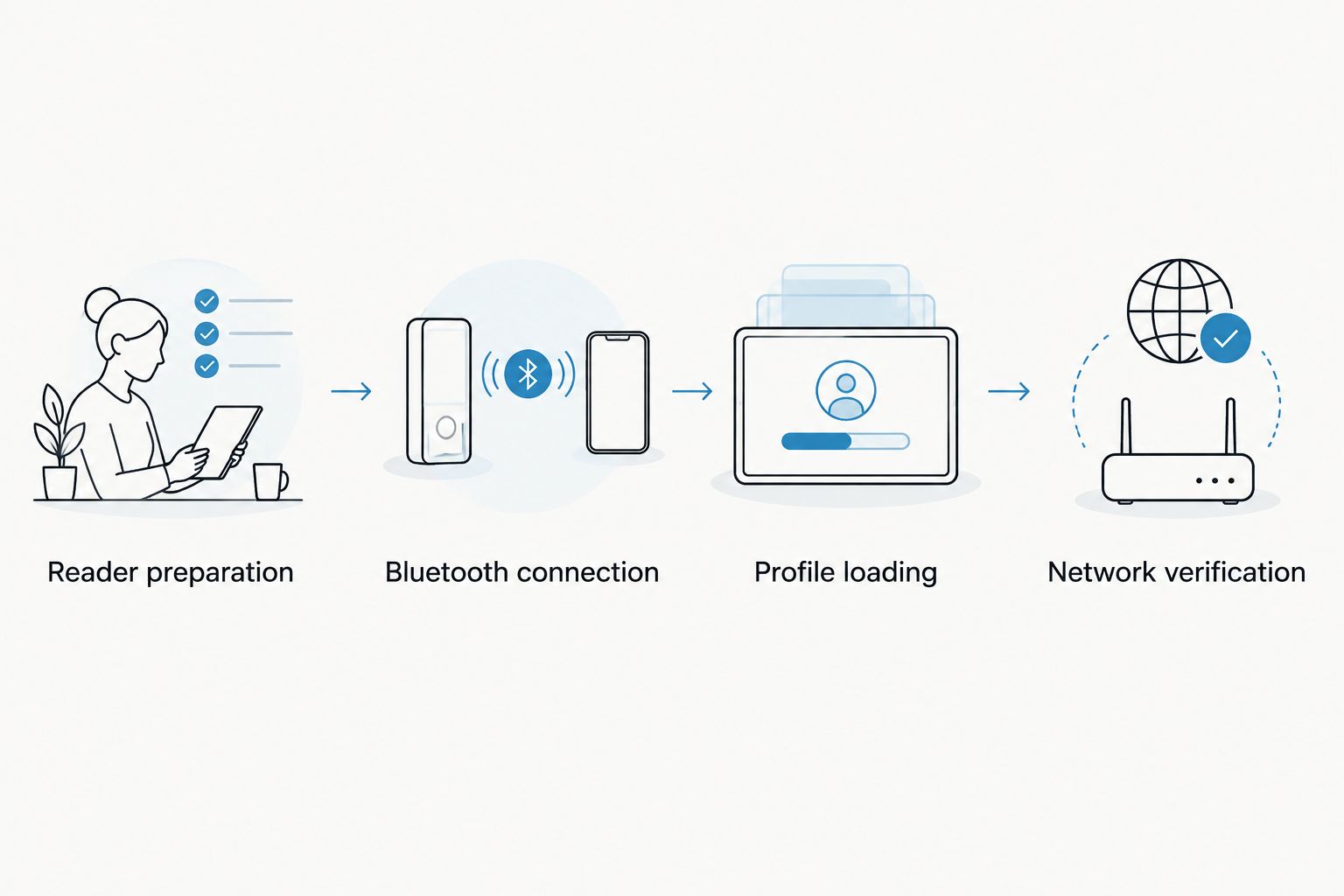
Profile loading
- Check the provider's activation instructions. Establish whether the profile is supplied through a QR code, manual activation details or another supported method. Use only a method supported by both the provider and reader software.
- Keep the management phone connected to the internet. Supply the provider-issued activation details through the reader software's documented profile-loading process. Do not publish the activation code or send it to an unrelated service.
- Start the profile download and leave the reader connected. Keep the adapter seated until the software reports completion or an error. If loading fails, record the error before retrying or changing anything.
- Inspect the card's profile information in the supported software. Confirm that the intended profile appears. Follow the documented method for selecting the profile that the target device will use.
Expected result: the intended profile is present on the adapter, and its selected state matches the reader's instructions. This confirms provisioning, not mobile-network service.
For a 2026 setup, read the provider's activation timing rules before downloading. Installation and the start of a data allowance are not universally the same event. Avoid loading a destination profile early without first checking when its validity begins.
Network verification
- Finish card operations and follow the reader's instructions for disconnecting and removing the adapter. Do not remove the card during an unfinished write or download operation.
- Insert the configured adapter into the target device's compatible physical SIM slot. Follow that device's SIM-handling instructions. Use a configured Switch Max for compatible iPhone use rather than assuming an Android management workflow applies inside iOS.
- Check whether the device recognizes the SIM and registers on a network. If it does, choose the intended SIM for mobile data using the device's own controls. Apply provider-required APN or roaming settings where specified.
- Test mobile data independently of Wi-Fi. Check the provider's service scope separately for calls and messages; a data profile does not establish voice or SMS support.
Expected result: the target device recognizes the configured adapter and provides the service included by the provider. Keep provisioning success and service success as separate entries in your setup notes.
Do not treat a signal indicator as proof that the intended data connection works. Verify an actual mobile-data connection. Then restore your normal Wi-Fi and preferred SIM settings.
Load another profile with the same reader
Use the reader again when you need to add another supported provider profile. Follow the same sequence: prepare the reader, establish card access, load the profile and verify service in the target device.
Before making changes, distinguish adding, selecting and deleting a profile. These actions have different consequences. Check available card capacity and the provider's reuse rules before deleting anything to make room.
If the desired profile is already stored, use the documented selection method instead of downloading it again. Do not assume changing the selected profile adds data to an existing plan or changes its validity period.
For repeated use, keep a private record of the card, profile name, provider and target device. Leave activation credentials out of shared notes. A clear record helps prevent selecting a similarly named profile intended for another device.
Troubleshooting
The reader does not appear
Check reader power, Bluetooth status and the client permissions required by your phone. Confirm that you are using the documented discovery method. System Bluetooth discovery and discovery inside a reader client are not interchangeable instructions.
Bluetooth connects, but the card is inaccessible
Check adapter compatibility and card seating. Disconnect and handle the card according to the reader instructions before reseating it. Do not repeatedly attempt profile downloads when the software cannot first access the card.
The activation code is rejected
Check the activation details for transcription errors and confirm whether the provider allows installation on the adapter. Ask the provider whether the code has already been used or requires a particular activation route. Deleting another profile does not fix a rejected code.
Profile loading stops before completion
Check the management phone's internet connection and reader power. Save the reported error and inspect the card's profile list before retrying. This prevents treating a completed installation as a fresh download after a connection interruption.
The profile loads, but mobile data fails
Check SIM recognition, carrier lock, coverage, provider activation status and required APN or roaming settings. Confirm that the intended SIM is selected for data. Bluetooth troubleshooting will not fix incompatible network bands or a provider-side service restriction.
Customize your workflow
Keep the Android management route and reader provisioning route separate in your instructions. Switch Pro uses Android-based management. A configured Switch Max supports use in compatible iPhones. The Bluetooth reader provides profile loading without an Android phone.
Treat privacy as a setup requirement in 2026. Open-source reader software does not, by itself, establish that every operation stays local. Review software permissions, credential handling and any documented server communication before entering activation details. Provider profile delivery still involves the provider's infrastructure.
For shared or fleet equipment, record compatibility before distributing configured cards. Bulk and white-label supply do not remove model, operating-system or provider restrictions. Test the complete provisioning-to-service path on each intended hardware variant.
FAQ
How do I connect a Bluetooth eSIM card reader to my phone?
Use the reader's supported software and documented Bluetooth connection method, then confirm that the software can access the inserted adapter. Load a supported provider profile only after card access works.
Do I pair the reader in my phone's Bluetooth settings?
Follow the reader's documented pairing method rather than assuming system Bluetooth settings are required. Some Bluetooth accessories establish their connection through their client software.
Can I set up a Bluetooth eSIM reader with an iPhone?
Use an iPhone for reader setup only when the reader client explicitly supports your iOS version and phone. Compatibility with a configured Switch Max card does not establish compatibility with reader-management software.
Does the Bluetooth reader give my phone mobile data?
The reader provisions the adapter; the target device uses the configured card for cellular service. The target device still needs a compatible physical SIM slot, network support and an eligible provider profile.
Do I need an Android phone to load profiles?
Switchesim offers a Bluetooth reader provisioning route that does not require an Android phone. Confirm the reader's supported management software and adapter compatibility before choosing that route.
Can I reuse an eSIM activation code after deleting a profile?
Reuse depends on the provider's activation rules, not on deleting the profile. Check those rules before deletion because some codes cannot be used for another installation.
How many profiles can I store on an eSIM adapter?
Profile capacity depends on the exact adapter and its specifications. Check stored-profile capacity separately from active-profile behavior; multiple stored profiles do not establish simultaneous mobile connections.
One last thing
Make card access your first completion test and working mobile data your final completion test. That distinction saves you from repeating a successful Bluetooth setup when the real problem is the target device or provider.
Keep the activation code private throughout the process. A setup screenshot is useful only if it does not expose credentials someone else could use.



