

eSIM MDM Deployment: Use a Staged Workflow | 2026
Instead of manually coordinating adapter setup and device enrollment for every employee, use a staged eSIM MDM deployment: provision the removable card, assign it to a compatible endpoint, then validate the endpoint under enterprise policy. Treat profile loading and MDM enrollment as separate operations; do not assume a native eSIM management command controls a physical adapter.
- Switchesim eSIM adapter hardware fits fleets that can separate card provisioning from endpoint management.
- Use Switch Pro for Android-based profile management; use configured Switch Max cards in compatible iPhones.
- The Bluetooth reader loads profiles without an Android phone; it does not establish an MDM integration.
- Validate physical SIM slots, carrier restrictions, app access and cellular connectivity before expanding an eSIM MDM deployment.
Why this matters
MDM enrollment establishes device management. It does not, by itself, establish that an administrator can download or switch profiles on a removable eSIM adapter. Confusing those functions creates a deployment plan with an untested dependency.
Switchesim eSIM adapter hardware is best for fleets that can separate card provisioning from endpoint management. Your workflow needs a clear handoff between the technician configuring the card and the administrator approving the device.
For a 2026 deployment, define success as a managed endpoint that connects through its assigned card and passes your access requirements. The enterprise eSIM management guide provides an adjacent reference for evaluating the management layer.
Before you start
- Device and management access: Have the exact endpoint model, regional variant, operating-system version, compatible physical SIM slot, carrier-lock status and MDM enrollment permissions. Check network-band support and the intended eSIM provider, not just the phone's marketing name.
- Provisioning materials: Have the selected adapter, authorized provider activation materials and either a compatible Android management device or the Bluetooth reader's documented setup environment. Keep a separate connection available during initial provisioning.
- The mid-setup gotcha: A managed work environment does not automatically provide the app access or card access needed for profile management. Validate the provisioning path under your actual restrictions before assigning hardware to users.
Use a 2-device pilot as an initial checklist: one provisioning device and one target endpoint. This is a recommended test arrangement, not a compatibility guarantee or a substitute for testing every fleet variant.
Hardware selection
Choose the management path before choosing the card. Switchesim distinguishes Android-based profile management, configured-card use on compatible iPhones and reader-based provisioning without an Android phone.
| Hardware or workflow | Best for | Verified capability | Limitation to resolve |
|---|---|---|---|
| Switch Pro | Android-led provisioning | Android-based profile management | Validate the management device, app access and target-device fit |
| Switch Max | Compatible iPhone endpoints | Extends card use to compatible iPhones | The iPhone needs a compatible physical SIM slot; configured-card use is distinct from profile management |
| Open-source Bluetooth reader | Provisioning without an Android phone | Loads profiles through a Bluetooth reader workflow | Validate the reader's documented host environment and your Bluetooth policy |
| Pre-loaded destination-data cards | Destination-specific assignments | Cards supplied with destination data already loaded | Check destination fit and provider requirements; pre-loading does not establish MDM control |
Choose Switch Pro when Android-based management is your approved setup path. Choose Switch Max when a compatible iPhone is the endpoint. Add the Bluetooth reader when you need a provisioning path without an Android phone.
The adapter-and-reader bundle description states storage for up to 15 eSIM profiles. Treat that as a Switchesim claim for that bundle, not a universal capacity for every card. Storage capacity also does not establish simultaneous connectivity or remote switching capability.
Bulk and white-label supply are offered. They address purchasing and branding, not proof that a device-management connector, remote-control API or unattended provisioning workflow exists.
Device eligibility and pilot record
Your 2026 pilot record should distinguish the endpoint from the removable card. A card can be moved; an endpoint's enrollment record does not automatically follow it.
The labels below are suggested fields for your deployment register, not names of MDM buttons or vendor settings.
- Record Endpoint model, Regional variant, OS version and Physical SIM slot. Reject a target without a compatible physical slot before testing software.
- Record Carrier-lock status, Intended provider and Network requirements. Resolve restrictions with the device owner or carrier before provisioning.
- Record Adapter assignment, Provisioning method and Responsible technician. Use an asset identifier that remains readable when the card changes devices.
- Record MDM enrollment state and Acceptance result separately. An enrolled endpoint with failed cellular service has not passed deployment.
Expected result: You have an eligible endpoint, an assigned adapter and an approved provisioning route. Every exception has an owner before activation materials are used.
Do not use an Android result to approve an iPhone variant, or one regional phone variant to approve another. Separate eligibility records make those differences visible rather than burying them in a general supported-device list.
Profile provisioning and card assignment
Complete card provisioning before making cellular service the endpoint's only management connection. This keeps enrollment failures separate from network activation failures.
- Select the approved loading route: Android management for Switch Pro, or Reader provisioning when you need to load profiles without an Android phone. For Switch Max, distinguish preparation of the card from its later use in the iPhone.
- Obtain activation materials directly from the authorized eSIM provider. Check the provider's installation instructions and any restrictions on activation, transfer or reuse.
- Follow the current hardware instructions to load the intended profile. Use the documented application and controls for that route; do not substitute the phone's native eSIM installation flow without confirming it applies to the adapter.
- Confirm the intended profile is selected through the supported management method. Record the card assignment without copying activation secrets into the general inventory.
- Install the configured adapter in the compatible target endpoint. Check that the endpoint recognizes the card and attempts to register on the intended network.
Expected result: The assigned card works in the target endpoint before enterprise access testing begins. The technician can identify which card and provider assignment produced the result.
The setup has a practical benefit: you can test provisioning separately from MDM. Its operational cost is a distinct card-handling step. Budget technician ownership for that handoff rather than labeling it unattended deployment.
Endpoint enrollment and acceptance tests
Connect the endpoint to your approved enrollment network, then apply the management workflow documented for your MDM and operating system. This is endpoint enrollment, not evidence of an adapter connector.
- Enroll the endpoint through your organization's established process. Confirm it appears under the intended ownership and user assignment.
- Apply the approved policies. Review restrictions affecting app installation, Bluetooth use, network access and the chosen provisioning environment.
- Confirm the endpoint connects through the assigned cellular profile. Check any provider-required network configuration using the provider's instructions.
- Run 3 acceptance tests: cellular access, managed-resource access and connectivity after a restart. Record each outcome separately.
- Release the endpoint only after the required tests pass. Document the recovery route for a failed profile change or an unavailable management connection.
Expected result: The endpoint is enrolled, uses its assigned cellular connection and satisfies your enterprise access requirements. Passing enrollment alone is not the release criterion.
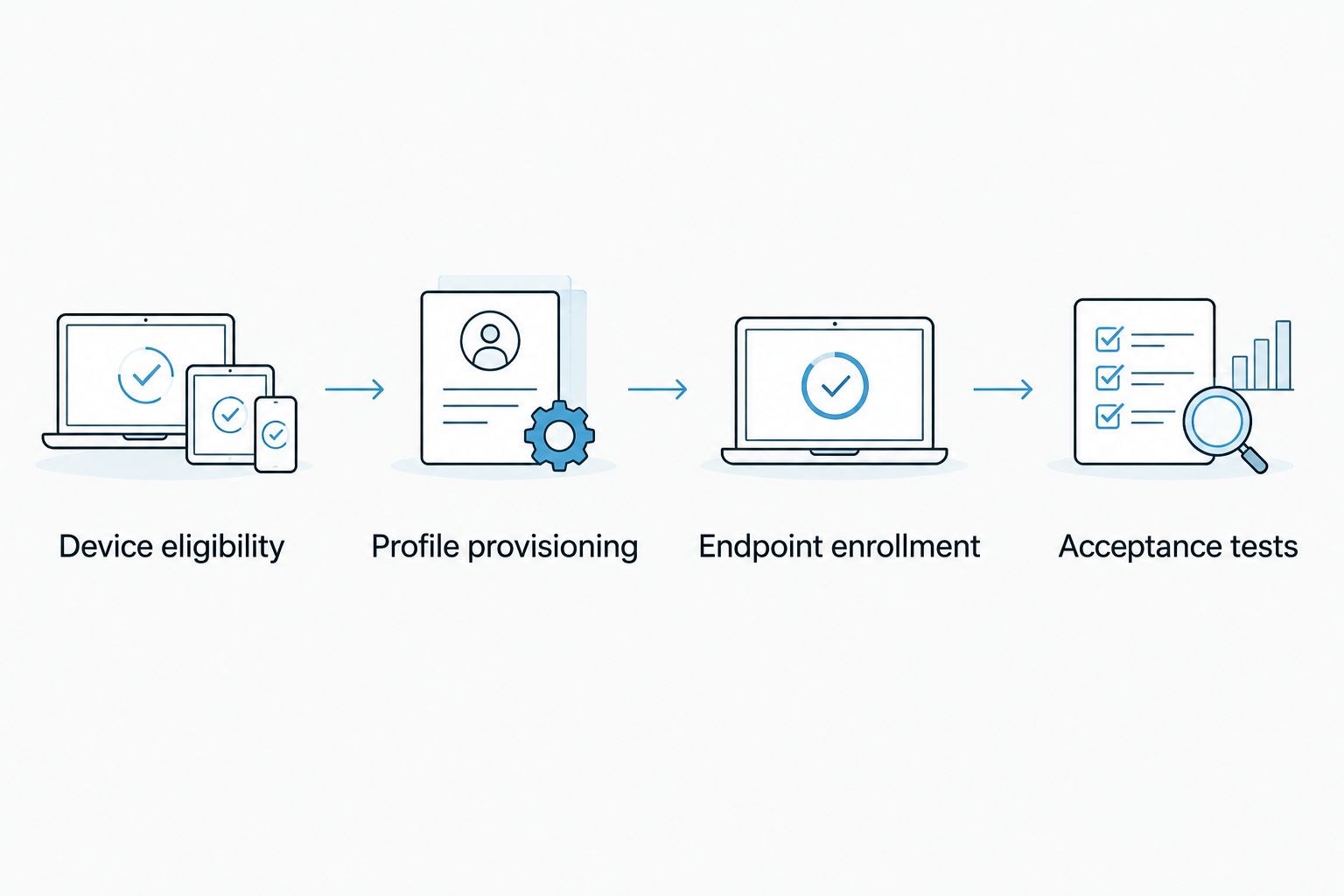
Keep the test evidence specific. Record the endpoint variant, card assignment, provisioning method and tested policy set. A successful pilot without those details cannot establish which combination should be repeated.
Reprovisioning when an assignment changes
A second workflow covers a new employee, destination or provider assignment. Treat it as a controlled change to an existing deployment, not an automatic consequence of an MDM group update.
For your 2026 change procedure, retain the working assignment until the replacement route has passed its checks. Provider rules determine whether an existing activation can be reused or moved.
- Identify the endpoint and removable card currently assigned to the user. Check the physical card, not only the management record.
- Decide whether the change requires selecting an already-loaded profile, loading a new profile or replacing the card. Use the supported hardware-management path.
- Confirm activation permissions and provider requirements before changing the working configuration. Keep recovery connectivity available.
- Repeat cellular, managed-resource and restart checks after the change.
- Update the assignment record and close the old assignment according to your security procedure.
Expected result: The new assignment works and the inventory reflects the card actually installed. The previous assignment is not left as an unexplained active dependency.
For compatible iPhones using Switch Max, retain the distinction between card use and profile provisioning. An iPhone enrollment change is not a demonstrated instruction to reconfigure the removable card.
Troubleshooting
The endpoint enrolls but cellular data fails
Test network registration and provider-required configuration independently of MDM enrollment. Check carrier-lock status, network bands, the selected profile and the physical card installation. A successful enrollment proves management access, not cellular service.
The management app cannot complete provisioning
Compare the approved app permissions and device restrictions with the hardware's documented requirements. Test through the authorized provisioning environment. Do not disable enterprise controls across the fleet to solve a pilot failure.
The reader cannot complete its connection
Check power, the documented connection procedure, host compatibility and Bluetooth restrictions. Repeat the test in an approved environment where Bluetooth is permitted. Keep reader provisioning separate from endpoint cellular troubleshooting.
Activation materials fail after a retry
Ask the provider whether the activation remains valid and whether the earlier attempt consumed or bound it. Do not assume a QR code is reusable. Keep the provider's recovery process alongside your deployment procedure.
A moved card no longer matches the inventory
Verify the card's asset assignment physically, then correct both the old and new endpoint records. Repeat acceptance testing on the receiving endpoint. Moving a removable adapter changes the deployment even when both phones are already enrolled.
Customize your workflow
For 2026 fleet operations, choose where provisioning belongs: a controlled setup desk, an authorized field technician or a documented user-assisted process. Each choice changes custody, permissions and recovery responsibilities.
Keep profile-changing authority explicit. Decide who can obtain activation materials, load profiles, select the working assignment and approve release. Do not infer those permissions from ordinary device enrollment.
Open-source reader hardware does not, by itself, prove that a workflow is offline or that activation data never reaches an external service. Review the actual application, dependencies, provider connection and data handling before approving a privacy model.
Use a pre-purchase checklist:
- Confirm physical-slot fit for every endpoint variant.
- Validate the Android or reader provisioning environment.
- Confirm capacity for the exact card being purchased.
- Review activation-data handling and access controls.
- Define card custody, loss response and reassignment ownership.
- Complete the pilot under the policies intended for production.
Expand the pilot by device variant and policy configuration, not only by user count. A larger batch of identical devices does not test a different operating system or provisioning route.
FAQ
How do I connect Switch hardware to an enterprise MDM system?
Use a staged workflow: provision the adapter, install it in a compatible endpoint, enroll the endpoint and test enterprise access. Treat card provisioning separately unless the exact hardware and management combination has a documented integration.
Can MDM remotely switch profiles on a physical eSIM adapter?
Do not assume native MDM eSIM commands control a removable adapter. Require documented support and a successful test for the exact card, operating system and management platform before relying on remote switching.
Which hardware should I choose for Android-managed devices?
Switch Pro is the choice for Android-based profile management. Validate the Android device, application access and physical-slot compatibility under your enterprise policies before rollout.
Can I use Switch Max in a managed iPhone?
Switch Max extends use to compatible iPhones with a physical SIM slot. Validate the exact model and regional variant, and keep configured-card use separate from the method used to load profiles.
Do I need an Android phone to load profiles?
The Bluetooth reader provides a loading path without an Android phone. Verify its documented host environment, connection requirements and permitted use under enterprise policy.
How many profiles can the adapter store?
The adapter-and-reader bundle description states storage for up to 15 eSIM profiles. Confirm capacity for the exact card selected; that figure does not establish simultaneous connections or remote-management support.
Is an open-source reader enough to satisfy enterprise privacy requirements?
No. Review the application, dependencies, activation-data handling and provider communications; open-source status alone does not establish an approved privacy model.
One last thing
A device wipe is not your complete offboarding procedure for a removable card. Include physical card recovery or reassignment, provider-side account handling and inventory correction in your 2026 process. Verify the card's actual profile state rather than inferring it from the endpoint's reset status.
That distinction protects the deployment record: the managed phone and its removable connectivity hardware have separate lifecycles.



