

eSIM Adapter for Resellers: Use a Handoff in 2026
Instead of manually explaining every activation after a sale, connect your reseller storefront’s order process to a compatibility check, secure profile delivery and Switch Pro setup instructions. Treat this as an order-to-activation handoff: checkout records the purchase; compatible hardware and the provisioning method handle the eSIM profile.
- Switch Pro suits Android-managed activation workflows; confirm device compatibility before accepting the order.
- An eSIM adapter for resellers needs a secure storefront handoff, not a promise that checkout activates hardware.
- Switch Max supports compatible iPhone use; the Bluetooth reader provides a separate profile-loading route.
- Keep payment, profile installation and network connection as separate milestones.
Device fit comes before storefront integration
Switchesim eSIM hardware is best for resellers serving users of compatible physical-SIM devices. A physical SIM slot is required. Compatibility also depends on the device model, regional variant, operating system, carrier-lock status, network bands and eSIM provider.
Switch Pro uses Android-based profile management. Do not present an iPhone’s ability to use a configured adapter as proof that the same iPhone manages Switch Pro profiles.
For your 2026 storefront, distinguish these options before writing activation instructions:
| Option | Best for | Setup advantage | Limitation to state |
|---|---|---|---|
| Switch Pro | Buyers with a compatible Android management device | Android-based profile management | Confirm Android device and app compatibility; do not promise iPhone-based management |
| Switch Max | Buyers using a configured card in a compatible iPhone | Extends adapter use to compatible iPhones | A compatible physical SIM slot and a defined loading method are still required |
| Open-source Bluetooth eSIM card reader | Provisioning without an Android phone | Loads profiles through a separate reader | It is provisioning equipment, not the cellular connection in the target device |
| Pre-loaded destination-data cards | Buyers who want the destination profile loaded beforehand | Moves profile loading ahead of customer setup | Provider terms, destination coverage and device fit still require checks |
| Bulk or white-label supply | Resellers building a repeatable hardware offer | Supports a reseller supply arrangement | Supply arrangements do not establish a storefront activation integration |
Choose Switch Pro when the customer’s management path is compatible Android. Choose Switch Max for compatible iPhone use, with its loading path stated separately. Choose the Bluetooth reader when your provisioning process must work without an Android phone.
Why this matters
A paid order is not an installed profile, and an installed profile is not a working network connection. Combining those events into one storefront status hides the point where support needs to intervene.
Your reseller workflow should answer three different questions: did the customer buy the correct hardware, did the profile reach the correct adapter, and did the target device connect? Keep those questions separate throughout the 2026 activation process.
Switchesim sells eSIM hardware that changes how profiles reach compatible devices. Your storefront still needs an explicit handoff between the hardware order, the provider’s activation credentials and the customer’s setup path.
Before you start
- Storefront access and order records: Use an account that can edit product instructions and customer communications. Prepare an order reference, buyer contact method and support route. Use platform automation only where your storefront actually supports it.
- Compatible hardware and provisioning materials: Have a Switch Pro card, a compatible Android management device and the Switch Android app for that route. Obtain the provider’s accepted activation materials, such as a QR code or manual activation details, and confirm the intended adapter workflow.
- Activation timing and credential handling: Confirm what starts the provider’s validity period before testing or pre-loading. Some activation credentials are restricted to a particular installation or reuse process; do not assume a QR code can be installed repeatedly on different cards.
Gate the order on compatibility, not just the presence of a SIM tray. Record the exact model and regional variant. Resolve carrier-lock questions before sending profile credentials or asking the buyer to install them.
The following field names are suggested labels for your own order record, not existing Switch app buttons or a supplied storefront connector. Keep the same meanings if your platform uses different labels.
Order record configuration
- Create a record for each hardware order. Add Order reference, Hardware choice, Device model, Regional variant and Operating system. Record the actual model rather than a broad label such as Android phone.
- Add Physical SIM slot and Carrier-lock check. Require confirmation before moving the order into the setup stage. A carrier lock is a separate constraint; an adapter does not remove it.
- Add Provisioning route. Use a clear value such as Android management, reader provisioning or pre-loaded card. Do not let the hardware name stand in for the loading method.
- Add Compatibility review and Activation stage. Keep the review result separate from fulfillment and payment. Use operational stages such as awaiting device details, ready for setup, profile installed and connection verified.
- Write the product instructions around the selected route. For Switch Pro, explain Android-based management first. State target-device requirements before describing the benefit of storing and switching profiles.
Expected result: every order identifies the hardware, target device and loading method. An operator can see why an order is ready for setup without opening a support conversation.
Keep this record small. Your storefront needs enough information to route the order correctly, not a permanent copy of every activation secret or diagnostic screen the customer sends.
Activation handoff configuration
- Separate the hardware order from the provider profile. Record which provider and destination belong to the order, but keep activation credentials out of ordinary order notes and analytics events.
- Prepare route-specific instructions. An Android-managed order needs Switch Pro setup guidance. A configured Switch Max order needs compatible-iPhone usage guidance. A reader-managed order needs reader provisioning guidance.
- Select a customer-specific delivery channel with restricted access for the activation materials. Avoid public pages, shared spreadsheets and reusable links that expose another customer’s credentials.
- Define who completes installation: the buyer or your provisioning team. State that ownership in the order message so both sides do not attempt to use the same credentials independently.
- Connect the paid-order event to the compatibility review and instruction delivery only through supported storefront features. If those features are unavailable, use a controlled manual queue with the same checks. Do not label either route automatic hardware activation.
Expected result: the customer receives the correct setup path and activation materials after the order passes the device-fit check. Payment alone never marks the profile installed.
For 2026 operations, treat activation materials as credentials rather than marketing content. Restrict access to staff who handle provisioning, redact them from support screenshots and define when your business deletes its retained copies.
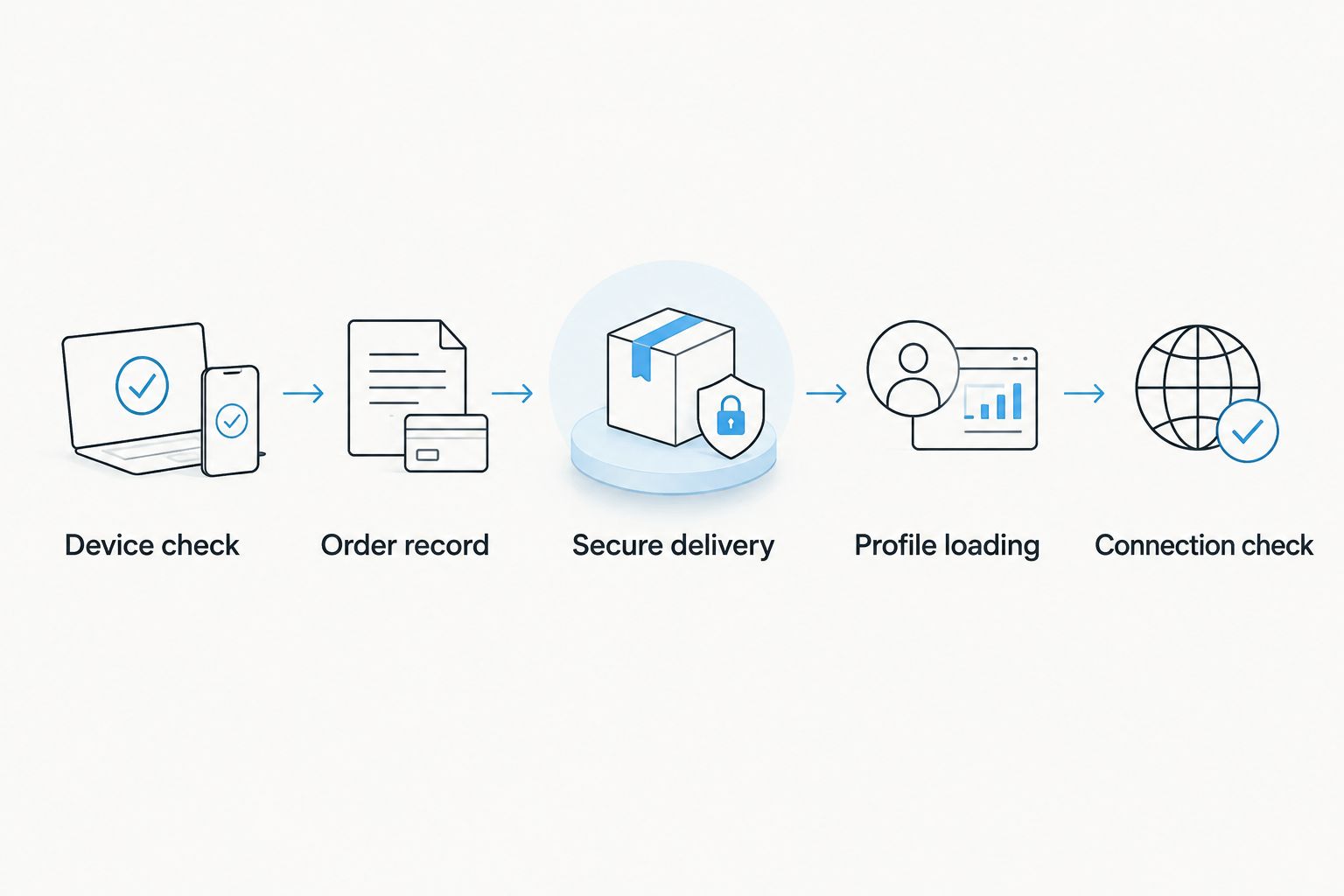
The handoff follows a simple sequence: Device check, Order record, Secure delivery, Profile loading, then Connection check. Each stage has a different owner or piece of evidence.
Profile loading configuration
- Confirm that the order has passed the device-fit review. Match the card and activation materials to the same order before starting installation.
- For Android management, place Switch Pro in the compatible Android device and use the Switch Android app to manage the card. Follow the current app instructions for the provider’s accepted activation method; do not substitute the phone’s native eSIM settings for adapter management.
- For reader provisioning, use the Bluetooth reader’s current instructions with the intended adapter. Keep this route separate from Android-app management in your customer documentation.
- Verify that the intended profile has been installed on the intended card. Record the installation result without copying the activation code into the order record.
- Select the intended profile through the supported management route before testing the target device. Confirm that the customer understands which device manages profiles and which device uses the configured card.
Expected result: the correct adapter holds the intended profile, and the order records the provisioning route used. Installation is now a completed milestone; network connection remains a separate check.
Switch states that its adapter-and-reader bundle stores up to 15 eSIM profiles. Apply that statement to the listed bundle, not automatically to every card or hardware version. Stored-profile capacity is also different from the number of simultaneously active cellular connections.
For example, the supplied product title for Switch eSIM Adapter Max + Australia & New Zealand specifies a 20GB / 30-Day Data Plan. Those are provider-plan attributes, not adapter memory capacity or a promise about when validity begins. Keep destination, data allowance, validity and hardware capacity in separate fields.
Connection verification configuration
- Install the configured card in the reviewed target device. Confirm that the device recognizes the SIM before troubleshooting the provider’s data service.
- Select the intended SIM for mobile data using the target device’s current settings. On a multi-SIM device, verify that the test uses this card rather than the existing line.
- Apply the provider’s documented network settings. Check APN and roaming requirements against the provider’s instructions rather than guessing values.
- Test cellular data with Wi-Fi disabled. Record whether the device recognizes the SIM, registers on a network and transfers data. These observations distinguish hardware recognition from network service.
- Mark the order connection verified only after that test succeeds. If it fails, route the case to device fit, profile installation or provider service according to the observed failure.
Expected result: the order has evidence of cellular service on the intended device. The customer also knows which support route handles a later hardware or provider issue.
Do not include activation credentials in a verification screenshot. A useful support record contains the device model, operating system, selected provisioning route and exact error text, with identifying secrets removed.
Repeat the workflow when a customer changes profiles
A replacement destination profile is a new provisioning task, not proof that the original QR code should be reused. Keep the hardware order and subsequent profile requests connected through the customer’s order reference.
- Reconfirm the target device and provisioning route. A customer who previously used Android management might now need a reader-based route.
- Obtain the new provider’s activation materials and check its installation and validity rules.
- Load the replacement profile through the supported management method. Preserve the existing profile until the replacement is verified, unless the documented process requires otherwise.
- Repeat the cellular connection test and update the order history with the result.
For your 2026 storefront, trigger a provisioning task when a profile request changes—not a claim that the adapter updates itself. Automation can route instructions and support work; profile installation still needs the appropriate hardware and management path.
Troubleshooting the activation handoff
Payment succeeded, but no profile is installed
Inspect the order’s provisioning stage. A payment confirmation establishes the purchase, not installation. Send the route-specific instructions or assign the provisioning task; do not resend activation materials blindly.
The iPhone customer cannot follow Android instructions
Check the hardware choice and loading route. Switch Pro uses Android-based management; compatible iPhone use belongs in the configured Switch Max workflow. Give the customer the correct management path instead of directing them to an Android-only step.
The device recognizes the card but has no data
Check the selected mobile-data SIM, provider APN requirements, roaming instructions and plan validity. Then check coverage and network-band compatibility for the exact device variant. Do not reinstall the profile before identifying the service failure.
The activation code fails after an earlier attempt
Stop repeated installation attempts and record the exact error. Ask the provider to check credential status and its reinstallation procedure. Do not assume deleting a profile makes its original activation code reusable.
The device has a SIM tray but rejects the card
Recheck the model, regional variant, carrier lock and adapter compatibility. A physical slot is necessary, not sufficient. Resolve device eligibility before escalating the case as a provisioning defect.
Customize your reseller workflow
Split your storefront instructions by Android management, compatible-iPhone use and reader provisioning. This is more useful than one generic activation email. It also keeps hardware selection separate from destination-plan selection.
For bulk or white-label orders, define who checks devices, loads profiles, holds credentials and handles provider escalation. Record those responsibilities before accepting a provisioning assignment. Do not describe a supply arrangement as an API integration.
Use the same pre-purchase checklist across your 2026 catalog:
- Exact target model and regional variant confirmed.
- Compatible physical SIM slot confirmed.
- Carrier-lock status checked.
- Hardware choice and profile-loading method stated separately.
- Provider activation requirements and validity trigger checked.
- Profile capacity described only for the specified hardware.
- Credential access and support ownership defined.
Switchesim eSIM hardware belongs in a workflow with those gates. The storefront’s job is to prevent the wrong setup path from reaching the wrong customer.
FAQ
How do I connect Switch Pro to my reseller storefront for activation?
Connect the order process to a compatibility review, secure activation-material delivery and Android-based Switch Pro setup instructions. Keep payment, profile installation and network verification as separate stages.
Does paying for Switch Pro automatically activate an eSIM?
Payment does not establish that a profile is installed or that cellular service works. Complete the supported provisioning process and test the target device before recording activation as verified.
What is the best eSIM adapter for resellers using Android management?
Switch Pro is the appropriate choice when the reseller workflow uses compatible Android-based profile management. Confirm the exact device, physical SIM slot, carrier-lock status and provider requirements first.
Can an iPhone customer manage Switch Pro without an Android phone?
Do not present Switch Pro as an iPhone-managed workflow. Use the compatible-iPhone Switch Max path or confirm a supported Bluetooth-reader provisioning route for the intended adapter.
How many profiles does the adapter-and-reader bundle store?
Switch states that its adapter-and-reader bundle stores up to 15 eSIM profiles. Do not extend that capacity statement to every hardware version or interpret it as 15 simultaneous cellular connections.
Should I put activation QR codes in storefront order notes?
Keep activation credentials out of ordinary order notes and analytics logs. Use a customer-specific delivery channel with restricted access and redact credentials from support material.
Can a reseller preload a destination profile before sending the card?
Pre-loaded destination-data cards are part of the stated offer. Before provisioning, confirm the provider's validity trigger, installation rules and the customer's device compatibility.
One last thing
Name the final storefront stage connection verified, not activated. A profile can be installed while the target device still has the wrong data SIM selected or lacks the provider’s required settings.
That wording forces the support process to ask for evidence of service. It keeps Switchesim hardware setup and provider connectivity from becoming one ambiguous checkbox.



