

What happens when you switch SIM cards on your phone?
Switching SIM cards changes the mobile subscription your phone uses for calls, texts and cellular data; it does not erase your photos, apps or phone-stored files. Your number follows the subscription associated with the inserted SIM, unless your carrier transfers that number to a replacement SIM or another provider. In 2026, the main checks remain device compatibility, carrier locks and access to your original number for verification messages.
- What does switching SIM cards do? It changes your mobile subscription, not your phone-stored photos or apps.
- A different SIM usually means a different number unless your carrier transfers the original number.
- Switchesim eSIM adapters suit compatible physical-SIM devices; choose the management method before choosing hardware.
- Keep your original line accessible if banking or account verification still depends on that number.
Why this matters
A SIM change is a connectivity change, not a phone reset. Confusing those actions leads to unnecessary backups, lost access to verification texts or a purchase that does not fit your phone.
Before buying another SIM in 2026, check whether your handset accepts that carrier. The guide to unlocked phones with eSIM support covers a related device-selection question, but an unlocked phone still needs the correct hardware and network compatibility.
What happens when you switch SIM cards on your phone?
Your phone reads the inserted SIM and attempts to register with the network authorized by its subscription. Once registration succeeds, that line supplies the calling, messaging and cellular-data services included in its plan. A data-only subscription does not automatically add a conventional calling number.
The practical result depends on whether you move your existing SIM, insert another subscription or receive a replacement from your carrier.
| Action | What changes | What stays on the phone | Main limitation |
|---|---|---|---|
| Move your existing SIM to another compatible phone | The device using your existing line | Files remain on the original device | The SIM does not transfer your phone's contents |
| Insert a SIM for a different subscription | Active line, network access and usually the number | Apps, photos and phone-stored files | Your original number needs its own active line |
| Insert a carrier-issued replacement SIM | The card authenticating your existing subscription | Phone-stored content | The carrier must activate the replacement |
| Insert a data-only SIM | Cellular-data connection | Apps and local files | Ordinary carrier calls and SMS are not included merely because data works |
The number belongs to the mobile subscription, not permanently to the handset. Keeping a number while changing providers requires a number-transfer process; swapping cards alone does not perform that transfer.
What changes immediately?
Your phone attempts to connect using the new SIM's subscription. The displayed carrier, signal availability and mobile-data settings can change. Calls and texts then use the enabled line selected in your phone's settings.
If your phone also has another enabled SIM or eSIM, removing one physical card does not necessarily remove all cellular service. Check the selected defaults for calls, messages and data rather than assuming the newly inserted SIM controls everything.
What does not move with the SIM?
Photos, installed apps, downloaded files and messages stored on the phone do not move to another handset with the SIM. Cloud-synced content depends on signing into the relevant account and enabling synchronization.
Some contacts can be stored on a physical SIM. Export or synchronize those contacts before changing cards if you need them on the phone afterward. A SIM is not a substitute for a device backup.
Moving your existing SIM to another phone
Moving the same active SIM usually moves access to the same subscription and number. It does not copy the old phone's apps, passwords or photo library. Use the phone's transfer or backup process separately.
Best for: keeping an existing line when changing compatible handsets. The advantage is continuity of the subscription. The limitation is that the destination phone still needs the correct SIM format, compatible network support and permission to use that carrier.
Test calls, incoming texts and mobile data on the destination phone before putting the old handset away. Working data alone does not confirm that every service is configured correctly.
Replacing your SIM with a different subscription
A SIM for another subscription gives your phone access to that subscription's services. It usually brings another number when voice and SMS are included. Your previous line remains a separate subscription until you change or cancel it through the provider.
Best for: using another carrier or separating mobile lines. The benefit is a different connection without replacing the handset. The trade-off is managing which number people contact and which line receives security codes.
Removing the original SIM does not cancel its contract. It also does not forward incoming calls or messages to the new number. Arrange forwarding with the carrier where supported, or keep the original line accessible.
Using a data-only SIM
A data-only SIM supplies cellular internet under its plan's terms. Messaging and calling apps can use that connection, but ordinary carrier voice calls and SMS require the appropriate service on an enabled line.
Best for: adding a separate internet connection. The benefit is separating data access from your usual line. The limitation is that a working internet connection does not guarantee access to verification texts sent to your original mobile number.
If your phone supports simultaneous lines, check which subscription supplies mobile data and which remains enabled for calls and messages. Also review roaming settings on the original line; inserting another SIM does not automatically correct those settings.
Why the result varies between phones
A SIM that works in one handset is not proof that it will work in another. These checks remain separate in 2026:
- Physical slot and card format: Your phone must have a suitable physical SIM slot for a removable card. An eSIM-only handset cannot accept one.
- Carrier-lock status: A locked phone can reject another carrier's SIM. An eSIM adapter does not remove that restriction.
- Model and regional variant: Phones sold under the same family name can differ in their SIM hardware and supported network bands.
- Operating system and management support: Ordinary SIM use and eSIM-adapter profile management are different compatibility questions.
- Subscription and provider requirements: Activation status, included services, coverage and provisioning rules affect whether the line works.
A phone supporting 5G does not guarantee 5G access with every SIM. Likewise, 4G support does not establish voice-service compatibility on every carrier. Check the exact model with the provider rather than treating the network-generation label as approval.
How do you switch SIM cards without losing access?
Prepare your accounts before removing the original line. A successful card swap can still leave you unable to sign in if an account sends its verification code to the number you just disconnected.
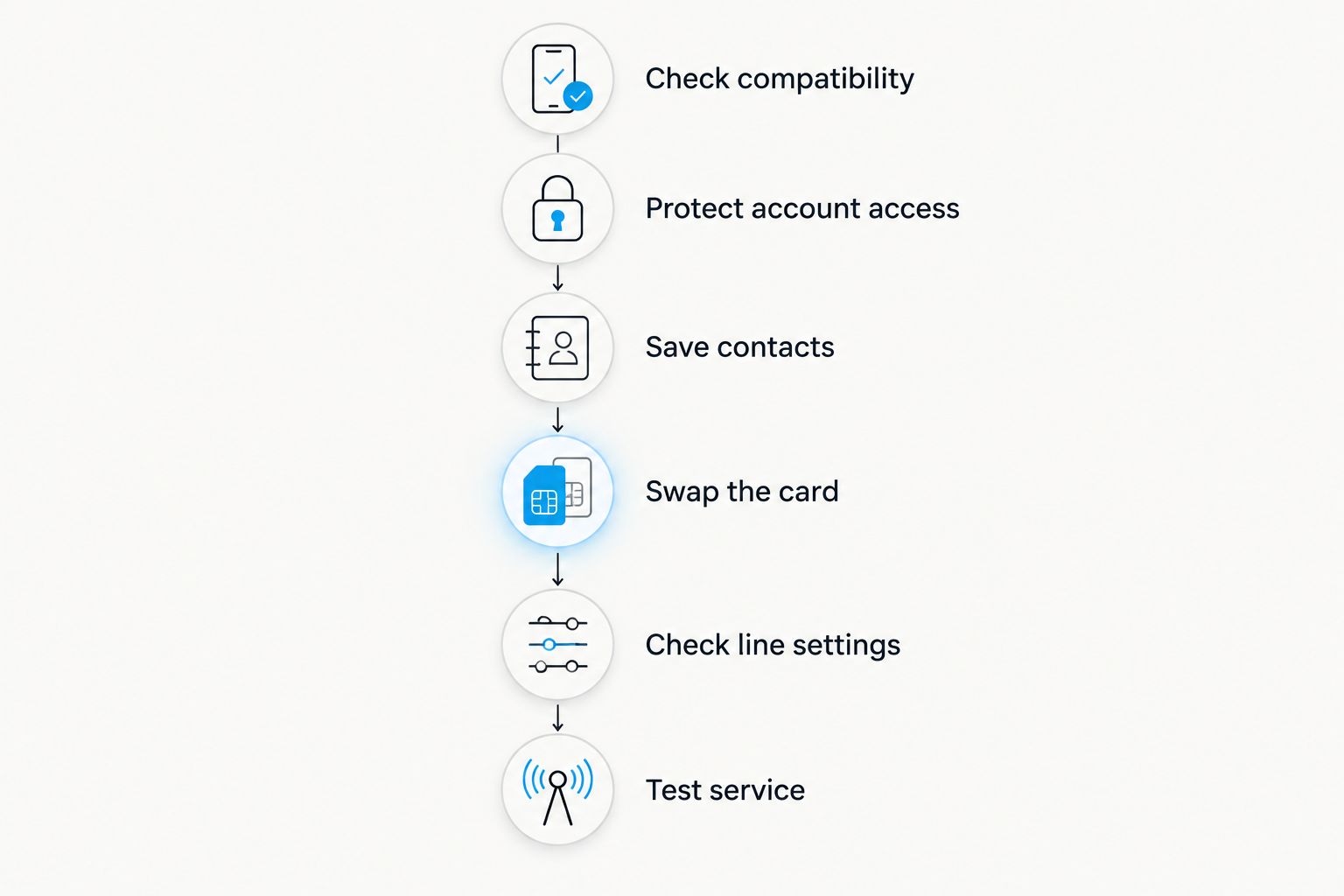
- Check compatibility. Confirm the phone's physical slot, SIM format, carrier-lock status and provider support. For an adapter, check the profile-management requirements separately.
- Protect account access. Review accounts that use your existing number for verification. Set up another supported sign-in method before disconnecting that line.
- Save contacts. Back up the phone and synchronize or export contacts stored on the old SIM. Do not assume every contact is in your cloud account.
- Swap the card. Follow the handset manufacturer's instructions for powering down, opening the tray and inserting the card. Never force a mismatched card or tray.
- Check line settings. Confirm the enabled subscription, mobile-data selection and roaming settings. Follow the provider's instructions if access-point settings need adjustment.
- Test service. Check incoming and outgoing calls, an incoming text and cellular data with Wi-Fi disabled. For a data-only plan, test data and separately confirm access to your original line.
The order matters. Account-access preparation comes before the physical swap; service testing comes after it.
If the phone reports no service, begin with activation, carrier-lock status and the inserted card. Then check provider settings and model compatibility. Avoid a factory reset as the first response: it erases local content without resolving a carrier lock or an incompatible subscription.
Can an eSIM adapter replace repeated card swaps?
An eSIM adapter is relevant when you want multiple profiles on supported hardware without relying on native eSIM support. It still requires a compatible physical SIM slot. It does not bypass carrier locks, add missing network bands or make an unsupported phone compatible.
Switchesim eSIM adapters are best for buyers who need multiple profiles on compatible physical-SIM devices. Choose the management path first. The supplied product descriptions distinguish Android-based management, compatible iPhone use and reader-based provisioning; those are not interchangeable capabilities.
For a 2026 purchase, use this comparison to narrow the setup path, then confirm the exact device and operating-system requirements.
| Option | Best for | Stated capability | Limitation to check |
|---|---|---|---|
| Switch Pro | Buyers using Android-based profile management | Uses Android-based profile management | Confirm support for the exact Android device and software version |
| Switch Max | Buyers using a configured card in a compatible iPhone | Extends use to compatible iPhones | iPhone use does not establish the profile-loading method; a compatible physical slot is required |
| Bluetooth reader | Buyers loading profiles without an Android phone | Loads profiles without an Android phone; described as open-source | Confirm reader software, host-device and adapter compatibility separately |
These are Switchesim's stated capabilities, not a claim of universal phone support. Managing profiles through the Switch Android app is a distinct task from using a configured Switch Max card in a compatible iPhone. The Bluetooth reader provides a separate provisioning route; it is not the phone's cellular connection.
Switchesim also offers pre-loaded destination-data cards and bulk or white-label supply. Those address different purchasing needs. Pre-loaded data does not, by itself, establish voice or SMS service, while bulk supply does not replace device-level compatibility checks.
Check profile capacity and privacy before choosing
Verify the supported profile capacity for the exact adapter. Stored profiles and simultaneously active lines are different limits. A profile-storage figure does not establish how many subscriptions your phone can use at once.
Review the management software's permissions, account requirements and handling of activation credentials. Open-source reader software is not, on its own, proof of a particular privacy model. Keep activation codes private and confirm the provider's rules before deleting or transferring a profile.
What should you check before buying another SIM or adapter?
Use this pre-purchase checklist in 2026. Start with your exact handset, not the broad Android or iPhone category.
- Confirm the model identifier and regional variant.
- Confirm that a compatible physical SIM slot exists if you intend to insert a card.
- Check carrier-lock status with the carrier.
- Confirm supported operating systems for profile management, not just card use.
- Identify how you will load, select and remove profiles.
- Verify profile capacity separately from active-line support.
- Confirm that the provider supplies an activation method accepted by your chosen setup.
- Decide how your original number will receive calls and verification texts.
- Review software permissions and treatment of activation credentials.
Buy for the complete setup path, not one compatibility label. The phone, adapter, management device and provider all have a role. A mismatch at any point can prevent activation or service.
Will switching SIM cards delete my photos or messages?
Switching SIM cards does not delete phone-stored photos or messages. Contacts stored only on the removed SIM need separate attention, and moving the SIM to another handset does not transfer the original handset's message history.
Can I keep my number when I switch SIM cards?
You keep your number when the carrier assigns the replacement SIM to your existing line or completes a number transfer. Inserting a different subscription's SIM does not automatically bring your old number with it.
Why does mobile data work but calls do not?
Mobile data can work while calls fail because the subscription is data-only or the phone and carrier do not have the required voice-service compatibility. Check the plan and provider requirements rather than treating working data as proof that calling is supported.
FAQ
What does switching SIM cards do to my phone?
Switching SIM cards changes the mobile subscription used by the selected line. It does not erase phone-stored photos, apps or files, and it does not transfer those files to another handset.
Does a new SIM card give me a new phone number?
A SIM for a different subscription usually uses that subscription's number. A carrier-issued replacement for your existing line can retain your number after activation.
Will my old number still receive verification texts?
Your old number needs an active, reachable line to receive ordinary verification texts. A new data-only SIM does not receive SMS addressed to your old subscription.
Can I use another carrier's SIM in a locked phone?
A carrier-locked phone can reject another carrier's SIM. Resolve the lock with the carrier; an eSIM adapter does not remove it.
Does removing my SIM cancel my mobile plan?
Removing your SIM does not cancel your mobile plan. Cancellation and number transfers are account actions handled through the provider.
Can I use a physical eSIM adapter in an eSIM-only iPhone?
A physical eSIM adapter requires a compatible physical SIM slot. An eSIM-only iPhone cannot accept a removable adapter card.
Does switching SIM cards change my app accounts?
Switching SIM cards does not automatically replace your app accounts. Apps that verify or identify you by phone number can require additional confirmation, so retain access to the original number when needed.
One last thing
Do not discard the old SIM just because the new connection works. First test access to accounts that depend on your old number, and confirm the status of the original subscription. The easiest failure to overlook is a successful data connection paired with an unreachable verification number.



